📖 What is Disaster Recovery & Business Continuity?
DR & BC in ClickHouse
Disaster Recovery (DR) is the process of preparing for and recovering from data loss or system failures to minimize downtime and data loss. Business Continuity (BC) ensures your operations continue or quickly resume after a disaster. In ClickHouse, this involves multi-datacenter setups, replication strategies, failover procedures, and data consistency verification.
🌐
Multi-Datacenter Setup
Distribute ClickHouse clusters across geographic regions for high availability and disaster resilience.
🔄
Replication
Real-time data copying between primary and backup systems to minimize data loss (RPO).
⚡
Failover
Automatic or manual switching to backup systems to minimize downtime (RTO).
✔
Consistency Verification
Ensure data remains consistent and complete across all replicas and datacenters.
Key DR/BC Metrics
Metric
Abbreviation
Description
Recovery Time Objective
RTO
Max acceptable downtime (minutes/hours)
Recovery Point Objective
RPO
Max acceptable data loss (minutes/hours)
Availability Target
SLA
99.9%, 99.99%, or 99.999%
Replication Lag
Sync
Real-time vs asynchronous
Active-Passive vs Active-Active
Aspect
Active-Passive
Active-Active
Primary System
Always active, handles all traffic
Both systems active simultaneously
Backup System
Idle, receives replicated data
Active, handles reads/writes in parallel
Failover Time
Minutes to hours
Immediate (no failover needed)
Resource Efficiency
Wastes backup resources
Full utilization, load balanced
Complexity
Simple, low operational overhead
Complex, requires coordination
Cost
Lower initial cost
Higher infrastructure cost
Data Consistency
Easier to maintain
Requires write coordination
Use Case
Most ClickHouse deployments
Mission-critical with high SLA
DR Strategy Levels
Level 1: Backup & Restore
Regular backups, manual recovery on disaster
RTO: Hours to days
RPO: Hours to days
Cost: Low
Complexity: Low
Level 2: Active-Passive Replication
Real-time replication to standby
RTO: Minutes
RPO: Seconds to minutes
Cost: Medium
Complexity: Medium
Level 3: Multi-Datacenter Replication
Replication across geographic regions
RTO: Seconds
RPO: Seconds
Cost: High
Complexity: High
Level 4: Active-Active Geo-Replication
Multi-region active clusters, full redundancy
RTO: Milliseconds
RPO: Milliseconds
Cost: Very High
Complexity: Very High
🚀 Quick Start: DR Setup
1. Basic Active-Passive Setup (2-Cluster)
Setup primary and secondary clusters in different locations with real-time replication.
Primary Datacenter (DC1) - Main Processing
-- DC1: Create replicated table
CREATE TABLE events (
    event_time DateTime,
    user_id UInt64,
    event_type String
) ENGINE = ReplicatedMergeTree(
    '/clickhouse/tables/events',
    'dc1-replica1'
)
PARTITION BY toYYYYMM(event_time)
ORDER BY event_time;

-- Insert data
INSERT INTO events VALUES
    (now(), 1001, 'click'),
    (now(), 1002, 'purchase');
Secondary Datacenter (DC2) - Standby (Read-Only)
-- DC2: Create replicated table with same ZooKeeper path
CREATE TABLE events (
    event_time DateTime,
    user_id UInt64,
    event_type String
) ENGINE = ReplicatedMergeTree(
    '/clickhouse/tables/events',
    'dc2-replica1'
)
PARTITION BY toYYYYMM(event_time)
ORDER BY event_time;

-- DC2 replica automatically receives data from DC1
-- Queries work on replicated data
-- Check replication lag
SELECT
    database,
    table,
    replica_name,
    absolute_delay,
    relative_delay,
    queue_size
FROM system.replication_queue
WHERE database != 'system';

-- Check replica status
SELECT
    table,
    replica_name,
    is_leader,
    is_readonly,
    log_pointer,
    inserts_in_queue,
    merges_in_queue
FROM system.replicas;
4. Manual Failover Procedure
-- STEP 1: Verify DC2 has all data from DC1
SELECT COUNT(*) FROM events;  -- Run on both DC1 and DC2

-- STEP 2: Stop writes to DC1 (application level)
-- Update application config to point to DC2

-- STEP 3: Wait for replication queue to clear
SELECT database, table, queue_size
FROM system.replication_queue
WHERE queue_size > 0;

-- STEP 4: Promote DC2 to PRIMARY
-- Update connection strings and DNS to point to DC2

-- STEP 5: Verify no data loss
SELECT COUNT(*) FROM events;  -- Should match DC1

-- STEP 6: Resume writes on DC2
-- Application now writes to DC2
💻 DR Commands Reference
Replication Monitoring
-- Check replication lag for all tables
SELECT
    database,
    table,
    replica_name,
    absolute_delay,
    relative_delay,
    queue_size,
    inserts_in_queue,
    merges_in_queue
FROM system.replication_queue
WHERE database != 'system'
ORDER BY absolute_delay DESC;

-- Check replica status details
SELECT
    database,
    table,
    replica_name,
    is_leader,
    is_readonly,
    zookeeper_path,
    log_pointer
FROM system.replicas
WHERE database != 'system';

-- Monitor large queue (potential issues)
SELECT
    database,
    table,
    replica_name,
    queue_size,
    inserts_in_queue,
    merges_in_queue
FROM system.replication_queue
WHERE queue_size > 100;

-- Verify replicas are synced (same log_pointer)
SELECT
    table,
    replica_name,
    log_pointer
FROM system.replicas
WHERE database = 'your_database'
ORDER BY table, replica_name;
Backup & Recovery Commands
-- Create full backup for recovery
BACKUP TABLE events TO '/backup/events_backup';

-- List all backups
SELECT * FROM system.backup_list;

-- Restore from backup
RESTORE TABLE events FROM '/backup/events_backup';

-- Backup to S3 for off-site storage
BACKUP TABLE events TO 's3://my-bucket/clickhouse/backup';

-- Backup all databases
BACKUP DATABASE mydb TO '/backups/mydb';
✨ DR & BC Best Practices
1. RTO/RPO Planning
❌ No DR Planning
-- No replication
CREATE TABLE events (...)
ENGINE = MergeTree();

-- No backup strategy
-- Hope your data is safe!
Risk: Data loss, weeks to recover, millions in losses
Benefit: Quick recovery, minimal data loss, business continuity
2. Multi-Datacenter Setup
Optimal Architecture
Use cross-datacenter ZooKeeper quorum (5 total: 3 in DC1, 2 in DC2)
Replicate all tables automatically to standby cluster
Use DNS alias for connection strings (easy failover)
Monitor replication lag continuously
Test failover regularly (monthly)
3. Active-Active Setup (Advanced)
When to Use Active-Active
Mission-critical systems requiring 99.999% uptime
Geographic load balancing across regions
Need to serve queries during disaster scenario
High cost tolerance for infrastructure
Challenges
Write coordination required (prevents conflicts)
Network latency between datacenters (usually 50-200ms)
Complexity in failover/failback procedures
Eventual consistency considerations
4. Failover Procedures
Automated Failover Checklist
Monitor primary cluster health continuously
Detect failure (leader down, replication lag > threshold)
Verify secondary is healthy and has all data
Update DNS to point to secondary (30 second TTL)
Notify operations team and stakeholders
Update application config (circuit breaker)
Monitor secondary for anomalies
Begin investigation of primary failure
5. Data Consistency Verification
-- Compare row counts across all replicas
SELECT
    database,
    table,
    replica_name,
    COUNT(*) as row_count
FROM system.replicas r
JOIN (SELECT database, table, COUNT(*) as cnt FROM your_table GROUP BY 1, 2) t
    ON r.database = t.database AND r.table = t.table
GROUP BY database, table, replica_name
ORDER BY database, table;

-- Run checksums to verify data integrity
SELECT
    database,
    table,
    sum(rows) as total_rows,
    sum(bytes_on_disk) as total_bytes
FROM system.parts
WHERE active AND database NOT IN ('system')
GROUP BY database, table;
6. DR Testing & Drills
Monthly DR Drill Procedure
Pre-test: Get approval from stakeholders
Baseline: Document current metrics (row counts, query latency)
Simulate primary failure: Temporarily down primary nodes
Initiate failover: Switch traffic to secondary
Validate: Run sample queries, verify no data loss
Load test: Simulate user traffic, monitor performance
Document issues: Note any problems or anomalies
Failback: Restore primary and switch back
Post-mortem: Review and improve DR procedures
7. Geo-Replication Considerations
Network Latency Impact
50-100ms: Acceptable for most setups
100-200ms: May require optimization
200ms+: Async replication recommended
Use network optimization (dedicated links, compression)
Data Size Implications
Calculate bandwidth needed: (Daily data size) / 24 hours
Plan for replication + backups
Consider storage costs across regions
Monitor and optimize data growth
🎯 When to Use Each DR Strategy
Level 1: Backups Only
For: Non-critical systems, development, testing
RTO: 4-24 hours
RPO: 4-24 hours
Cost: Minimal
Complexity: Low
Level 2: Active-Passive
For: Production systems, most enterprises
RTO: 15-60 minutes
RPO: 1-5 minutes
Cost: Medium
Complexity: Medium
Level 3: Multi-Datacenter
For: Mission-critical services, SLA > 99.9%
RTO: 1-15 minutes
RPO: 10-60 seconds
Cost: High
Complexity: High
Level 4: Active-Active
For: Ultra-critical systems, SLA = 99.999%
RTO: < 1 second
RPO: < 1 second
Cost: Very High
Complexity: Very High
🏆 Real-World DR Results
15 min
Failover Time
Active-passive setup: Time from primary failure to secondary taking over
< 1 min
RPO Achieved
Data loss limited to < 1 minute with proper replication setup
99.99%
Uptime SLA
Achievable with multi-datacenter + active-passive replication
50%
Cost Savings
Active-passive vs active-active for most deployments
Case Study 1: E-commerce Platform
Challenge
Handle Black Friday traffic spikes (10M events/min) across multiple regions with 99.99% SLA
2. Hybrid Active-Active with Regional Partitioning
-- DC1 handles US region writes
CREATE TABLE events (
    event_time DateTime,
    region LowCardinality(String),
    data String
) ENGINE = ReplicatedMergeTree(...)
PARTITION BY (region, toYYYYMM(event_time))
ORDER BY (region, event_time)
WHERE region IN ('US-East', 'US-West');

-- DC2 handles EU region writes
-- DC3 handles APAC region writes

-- Global view (for queries)
CREATE VIEW events_global AS
SELECT * FROM events
UNION ALL
SELECT * FROM remote('dc2', 'db', 'events')
UNION ALL
SELECT * FROM remote('dc3', 'db', 'events');

Benefits:
- Each region primary handles its writes
- No write conflicts (partitioned by region)
- Can failover region independently
- Near-local latency for reads/writes
3. Automatic Failover with Health Checks
-- Monitoring script that detects failures
#!/bin/bash
PRIMARY="ch-primary.example.com:8123"
SECONDARY="ch-secondary.example.com:8123"
CHECK_INTERVAL=10
FAILURE_THRESHOLD=3

consecutive_failures=0

while true; do
    # Check primary health
    if ! curl -s "http://$PRIMARY/?query=SELECT%201" | grep -q "1"; then
        ((consecutive_failures++))
        if [ $consecutive_failures -ge $FAILURE_THRESHOLD ]; then
            # Trigger failover
            echo "Primary failed $FAILURE_THRESHOLD times. Initiating failover..."

            # Verify secondary is healthy
            if curl -s "http://$SECONDARY/?query=SELECT%20COUNT(*)" > /dev/null; then
                # Update DNS
                aws route53 change-resource-record-sets \
                  --hosted-zone-id ZONE_ID \
                  --change-batch "{ \"Changes\": [{ \"Action\": \"UPSERT\", \"ResourceRecordSet\": { \"Name\": \"clickhouse.example.com\", \"Type\": \"A\", \"TTL\": 30, \"ResourceRecords\": [{\"Value\": \"$SECONDARY\"}] } }] }"

                # Notify team
                slack_notify "Failover completed: traffic now to secondary"
                consecutive_failures=0
            fi
        fi
    else
        consecutive_failures=0
    fi
    sleep $CHECK_INTERVAL
done
4. ZooKeeper Cluster Setup for DR
-- Optimal ZooKeeper setup for disaster recovery
-- Use 5 nodes total:
-- - 3 in primary datacenter (voting members)
-- - 2 in secondary datacenter (voting members or observers)

# zoo.cfg on all servers
server.1=zk1.dc1.example.com:2888:3888
server.2=zk2.dc1.example.com:2888:3888
server.3=zk3.dc1.example.com:2888:3888
server.4=zk1.dc2.example.com:2888:3888
server.5=zk2.dc2.example.com:2888:3888

# For DC2 observers (non-voting):
server.4=zk1.dc2.example.com:2888:3888:observer
server.5=zk2.dc2.example.com:2888:3888:observer

-- Ensures quorum survives primary datacenter failure
-- Voting members: 3 (majority of 5)
-- Can lose primary DC and still have quorum
📚 DR & BC Resources
📘 View in Notion
Access this module in your Notion workspace for note-taking and tracking your progress.
Monitoring and alerting are critical for early detection
Automate failover to minimize downtime and human error
Data consistency verification must be part of DR procedures
Plan for bandwidth: geo-replication requires network optimization
Compliance & SLAs drive your DR investment
Next Steps
After completing Module 8, you should be comfortable with:
✅ Understanding DR vs BC concepts and terminology
✅ Planning RTO/RPO based on business requirements
✅ Setting up active-passive replication across datacenters
✅ Configuring ZooKeeper for coordination
✅ Monitoring replication lag and health
✅ Performing manual and automated failover
✅ Verifying data consistency across replicas
✅ Running DR drills and testing procedures
✅ Understanding geo-replication considerations
✅ Choosing appropriate DR strategy for your use case
Ready for Module 9? Next, we'll explore Kafka integration for real-time data ingestion!
🐳 Hands-on Docker Demo for this Module
A self-contained ClickHouse stack you can run locally. Every step is reproducible; the README below walks through each concept with diagrams and measured outcomes.
cd code-examples/demos/module-8-dr
./up.sh        # bring stack up, wait for health
./run.sh       # run the demo (idempotent — re-runnable)
./down.sh      # tear down + drop volumes
📺 Live demo capture
Recorded with vhs: the actual terminal output from ./run.sh running on this very stack.
Animated GIF, ~928 KB. Right-click → open in new tab to view full-size.
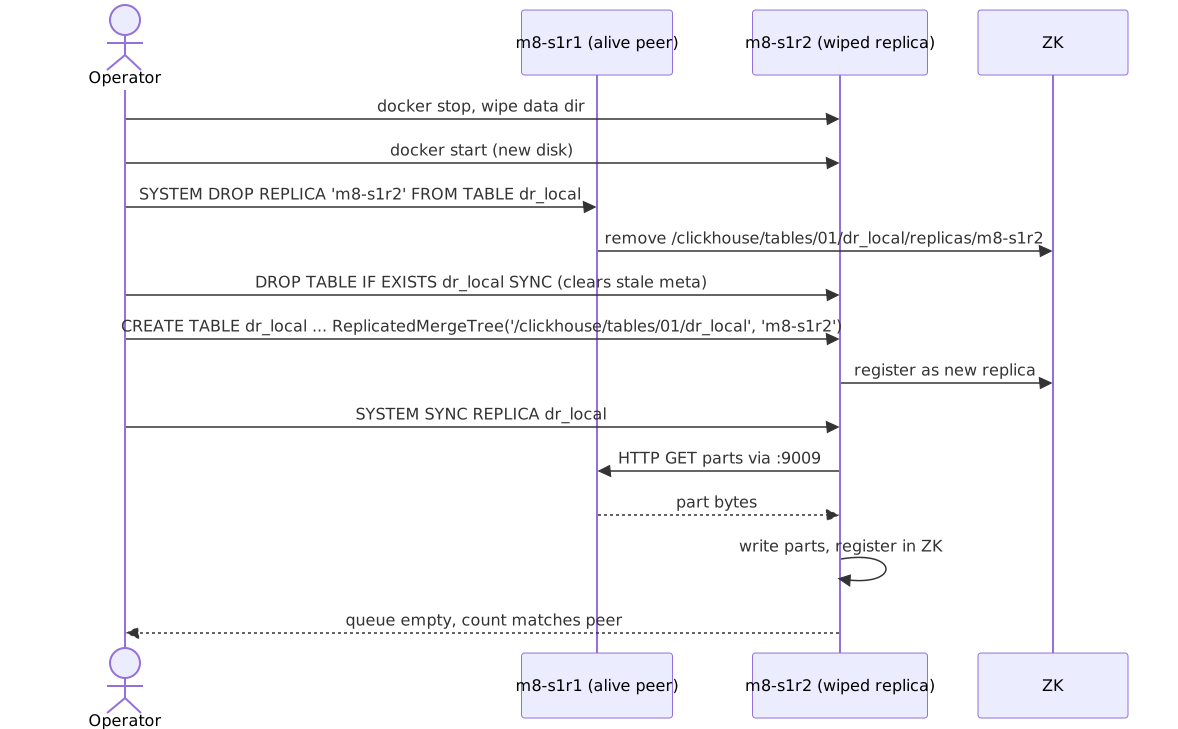
🗂️ Architecture diagrams
Rendered from the README's Mermaid sources. Click any to open the source SVG full-size.
Cluster clickhouse clusterActor op as operatorSubgraph dc1 dc 1 primary
📚 ClickHouse reference visuals
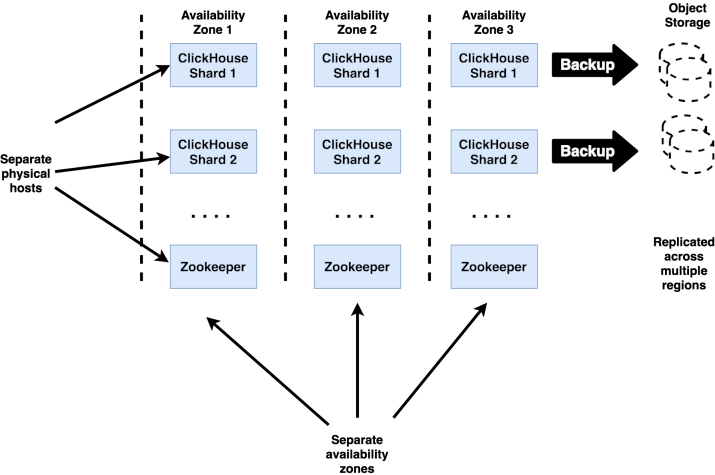
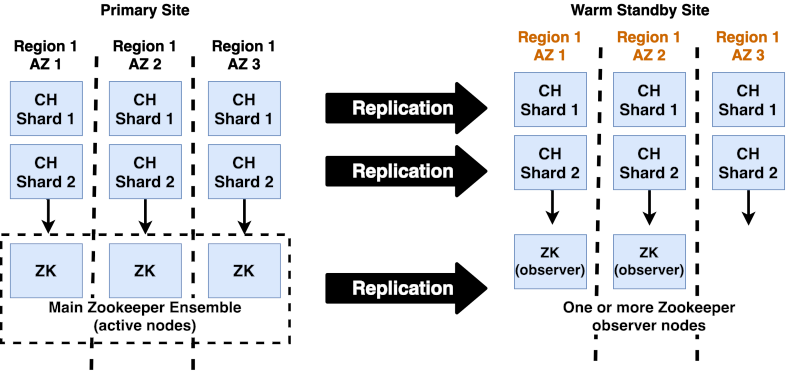
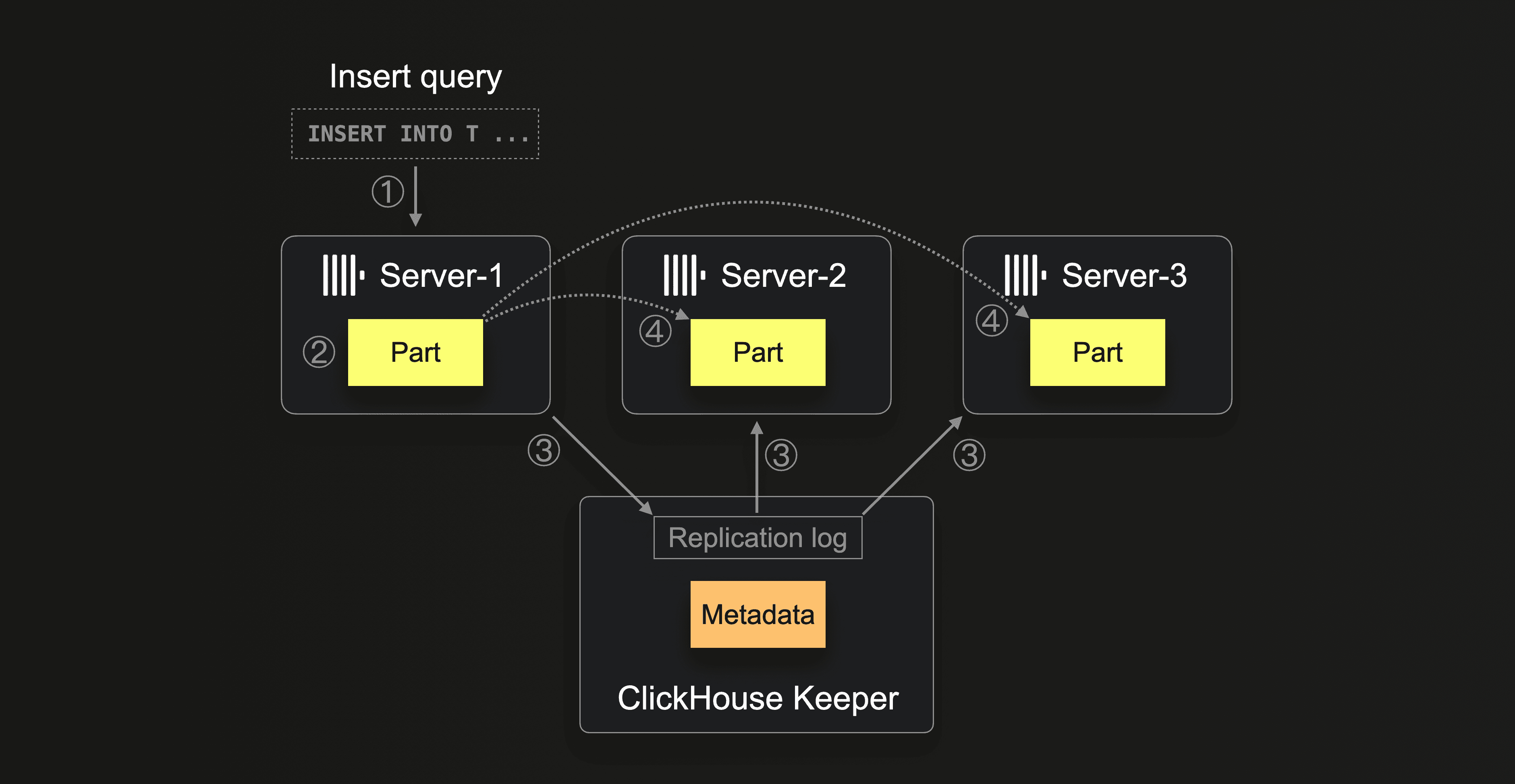
Curated from the official ClickHouse documentation and engineering blog (and Altinity's docs/blog) — the same diagrams the broader CH community uses to explain these concepts. Click any image to read the source.
Altinity Docs
High-availability architecture: replicas + Keeper quorum
Altinity Docs
Cross-site DR with warm standby cluster and shared backups
ClickHouse Blog
Replication keeps replicas in sync as the failover substrate for DR
📚 Full module reference
Module 8 — Disaster Recovery & Business Continuity
Audience: people with pagers. Prerequisites: Modules 1, 3, 4, 7.
Time: ~75 min reading + 30 min hands-on chaos drills.
By the end you will be able to:
Define and measure RTO / RPO for each failure class.
Run six destructive drills against a real cluster without flinching.
Recover a wiped replica from a peer.
Use insert_quorum to harden writes against partial-replica failure.
Sketch a multi-DC topology and cut-over procedure.
1. Failure modes you should be ready for
💬 Discuss with AI — click to view prompt
Paste into ChatGPT, Claude, Gemini, or any LLM chat.
I'm studying ClickHouse and working through the module "ClickHouse Disaster Recovery". I want to deeply understand the section: "Failure modes you should be ready for".

Here is a brief excerpt from the material I'm reading:

"""
DR isn't a ClickHouse feature. It's a set of answers to three questions — **what can break**, **how fast must we be back**, **how much may we lose**. ClickHouse gives you three independent tools — replication, quorum, backups — and each one covers a failure class the others can't touch. The single sentence to carry through the module: > **Replication protects you from hardware loss. Backups protect you from > human and software loss.** `DROP TABLE` replicates. Faithfully. In milliseconds. To every replica in every DC. That's why Modules 7 and 8 are separate modules. ### 1.1 The defense ladder
"""

Please explain this concept in depth. Cover:

1. **Core mechanics** — how does it actually work under the hood? What data structures, algorithms, or engine internals are involved? Where is the implementation in the ClickHouse source tree (file/folder names) if you know?

2. **When to use vs avoid** — what concrete workloads does this help, and when would it hurt or be wrong? Give specific scale/latency trade-offs.

3. **Comparable features in other systems** — how does this compare with similar features in PostgreSQL, MySQL, BigQuery, Snowflake, Redshift, or DuckDB? Build my intuition by analogy.

4. **Common pitfalls and gotchas** — what trips engineers up in production? Subtle bugs, performance traps, surprising semantics?

5. **Worked example** — show me a small but realistic SQL or config example that demonstrates the concept end-to-end. Include the expected output where useful.

6. **Where to read more** — a short list of authoritative pointers (CH docs, blog posts, talks, source-code files).

Assume I have solid SQL fundamentals but I'm new to ClickHouse internals. Be technical but pragmatic; avoid marketing language.
DR isn't a ClickHouse feature. It's a set of answers to three questions —
what can break, how fast must we be back, how much may we lose.
ClickHouse gives you three independent tools — replication, quorum, backups
— and each one covers a failure class the others can't touch. The single
sentence to carry through the module:
Replication protects you from hardware loss. Backups protect you from
human and software loss.
DROP TABLE replicates. Faithfully. In milliseconds. To every replica in
every DC. That's why Modules 7 and 8 are separate modules.
1.1 The defense ladder
Read this top-down and ask after each rung: "what still kills us?" The
answer is the reason the next rung exists. Every rung is a purchase, not
a best practice — where you stop is a business decision (§2), not an
engineering one.
Layer
What you add
Failure it kills
What it costs
Drilled in
0
single node
—
—
—
1
2nd replica per shard
host / disk loss
2× storage
§3, §6
2
insert_quorum = 2
silent redundancy loss on write
write availability
§7
3
Keeper quorum across AZs
coordination loss
3–5 more nodes
§5
4
backups → S3
human error, corruption, ransomware
cadence = your RPO
§8
5
replicas in a 2nd DC
site loss
WAN latency on every write
§10
Two corrections the ladder makes for you:
Layer 1 alone is not RPO=0. Replication is async; a host that dies
with parts that never left it takes them with it. Layer 2 is the fix.
Losing Keeper quorum loses nothing. Writes and DDL stall, replicated
tables go read-only, reads keep serving. Read-only is a safety property,
not damage.
1.2 The failure taxonomy
The reference view of the same material — the one to come back to at 3 a.m.
#
Class
Likelihood
Blast radius
Recovery primitive
1
Single replica down
high
none (peer covers)
restart + SYSTEM SYNC REPLICA
2
Whole shard down
medium
partial reads
skip_unavailable_shards = 1
3
ZK / Keeper quorum lost
medium
writes blocked
restore ZK quorum
4
Replica disk loss
medium
one replica empty
SYSTEM DROP REPLICA + recreate
5
Bad DROP / TRUNCATE
high
catastrophic if no backup
RESTORE from backup
6
Whole DC outage
low
total in that DC
failover to peer DC
7
Cluster-wide corruption
very low
catastrophic
RESTORE from backup
2. RTO and RPO
💬 Discuss with AI — click to view prompt
Paste into ChatGPT, Claude, Gemini, or any LLM chat.
I'm studying ClickHouse and working through the module "ClickHouse Disaster Recovery". I want to deeply understand the section: "RTO and RPO".

Here is a brief excerpt from the material I'm reading:

"""
| Term | Definition                                                          | How CH lets you tune it                                              | | RTO  | **Recovery Time Objective** — how long until service resumes.       | Replicas (instant), backup restore time (minutes-hours), DR cluster (seconds with prior sync). | | RPO  | **Recovery Point Objective** — how much data you can afford to lose. | `insert_quorum` (zero loss in shard), backup cadence (minutes-hours), cross-DC replication (zero with quorum). | A two-replica shard with `insert_quorum = 2` has **RPO=0 within the shard** and *...
"""

Please explain this concept in depth. Cover:

1. **Core mechanics** — how does it actually work under the hood? What data structures, algorithms, or engine internals are involved? Where is the implementation in the ClickHouse source tree (file/folder names) if you know?

2. **When to use vs avoid** — what concrete workloads does this help, and when would it hurt or be wrong? Give specific scale/latency trade-offs.

3. **Comparable features in other systems** — how does this compare with similar features in PostgreSQL, MySQL, BigQuery, Snowflake, Redshift, or DuckDB? Build my intuition by analogy.

4. **Common pitfalls and gotchas** — what trips engineers up in production? Subtle bugs, performance traps, surprising semantics?

5. **Worked example** — show me a small but realistic SQL or config example that demonstrates the concept end-to-end. Include the expected output where useful.

6. **Where to read more** — a short list of authoritative pointers (CH docs, blog posts, talks, source-code files).

Assume I have solid SQL fundamentals but I'm new to ClickHouse internals. Be technical but pragmatic; avoid marketing language.
Term
Definition
How CH lets you tune it
RTO
Recovery Time Objective — how long until service resumes.
Replicas (instant), backup restore time (minutes-hours), DR cluster (seconds with prior sync).
RPO
Recovery Point Objective — how much data you can afford to lose.
insert_quorum (zero loss in shard), backup cadence (minutes-hours), cross-DC replication (zero with quorum).
A two-replica shard with insert_quorum = 2 has RPO=0 within the
shard and RTO≈0 for single-replica failure. Add nightly S3 backups
and you have RPO≤24h for the bad-DROP case with RTO≤restore time.
3. Drill 1 — single replica down
💬 Discuss with AI — click to view prompt
Paste into ChatGPT, Claude, Gemini, or any LLM chat.
I'm studying ClickHouse and working through the module "ClickHouse Disaster Recovery". I want to deeply understand the section: "Drill 1 — single replica down".

Here is a brief excerpt from the material I'm reading:

"""
The most common, least scary failure. Then on `m8-s1r1`: Recovery: `absolute_delay` should drop to 0. The replication queue drains.
"""

Please explain this concept in depth. Cover:

1. **Core mechanics** — how does it actually work under the hood? What data structures, algorithms, or engine internals are involved? Where is the implementation in the ClickHouse source tree (file/folder names) if you know?

2. **When to use vs avoid** — what concrete workloads does this help, and when would it hurt or be wrong? Give specific scale/latency trade-offs.

3. **Comparable features in other systems** — how does this compare with similar features in PostgreSQL, MySQL, BigQuery, Snowflake, Redshift, or DuckDB? Build my intuition by analogy.

4. **Common pitfalls and gotchas** — what trips engineers up in production? Subtle bugs, performance traps, surprising semantics?

5. **Worked example** — show me a small but realistic SQL or config example that demonstrates the concept end-to-end. Include the expected output where useful.

6. **Where to read more** — a short list of authoritative pointers (CH docs, blog posts, talks, source-code files).

Assume I have solid SQL fundamentals but I'm new to ClickHouse internals. Be technical but pragmatic; avoid marketing language.
The most common, least scary failure.
docker stop m8-s1r2
Then on m8-s1r1:
-- Cluster sees one bad replica
SELECT host_name, errors_count FROM system.clusters
WHERE cluster='clickhouse_cluster' ORDER BY shard_num, replica_num;

-- Reads still work via the surviving replica
SELECT count() FROM dr_distributed;

-- Inserts also work (routed to s1r1, replicated later)
INSERT INTO dr_local VALUES (now(), 999999999, 'during_outage_1');
Recovery:
docker start m8-s1r2
SYSTEM SYNC REPLICA dr_local;        -- on m8-s1r2
SELECT count() FROM dr_local WHERE key >= 999999998;
absolute_delay should drop to 0. The replication queue drains.
4. Drill 2 — whole shard outage
💬 Discuss with AI — click to view prompt
Paste into ChatGPT, Claude, Gemini, or any LLM chat.
I'm studying ClickHouse and working through the module "ClickHouse Disaster Recovery". I want to deeply understand the section: "Drill 2 — whole shard outage".

Here is a brief excerpt from the material I'm reading:

"""
Reads: `skip_unavailable_shards` is a *per-query* policy decision. Use it for dashboards that prefer "stale + visible" over "blank". Don't use it for financial reports. Recovery: bring the shard back, run `SYSTEM SYNC REPLICA` on each replica.
"""

Please explain this concept in depth. Cover:

1. **Core mechanics** — how does it actually work under the hood? What data structures, algorithms, or engine internals are involved? Where is the implementation in the ClickHouse source tree (file/folder names) if you know?

2. **When to use vs avoid** — what concrete workloads does this help, and when would it hurt or be wrong? Give specific scale/latency trade-offs.

3. **Comparable features in other systems** — how does this compare with similar features in PostgreSQL, MySQL, BigQuery, Snowflake, Redshift, or DuckDB? Build my intuition by analogy.

4. **Common pitfalls and gotchas** — what trips engineers up in production? Subtle bugs, performance traps, surprising semantics?

5. **Worked example** — show me a small but realistic SQL or config example that demonstrates the concept end-to-end. Include the expected output where useful.

6. **Where to read more** — a short list of authoritative pointers (CH docs, blog posts, talks, source-code files).

Assume I have solid SQL fundamentals but I'm new to ClickHouse internals. Be technical but pragmatic; avoid marketing language.
docker stop m8-s2r1 m8-s2r2
Reads:
-- Partial — returns rows from shards 1 and 3 only
SELECT count() FROM dr_distributed SETTINGS skip_unavailable_shards = 1;

-- Without it: errors out
SELECT count() FROM dr_distributed;
-- Code: 279. NETWORK_ERROR ... All connection tries failed
skip_unavailable_shards is a per-query policy decision. Use it for
dashboards that prefer "stale + visible" over "blank". Don't use it for
financial reports.
Recovery: bring the shard back, run SYSTEM SYNC REPLICA on each replica.
5. Drill 3 — ZK quorum partial loss
💬 Discuss with AI — click to view prompt
Paste into ChatGPT, Claude, Gemini, or any LLM chat.
I'm studying ClickHouse and working through the module "ClickHouse Disaster Recovery". I want to deeply understand the section: "Drill 3 — ZK quorum partial loss".

Here is a brief excerpt from the material I'm reading:

"""
A 3-node ZK ensemble survives 1 failure. Lose 1, the cluster keeps working. Lose 2 of 3 and replicated tables go read-only. Drill the safe case: > **Production:** run 3 ZK / Keeper nodes for small clusters, 5 for big > ones. Spread them across availability zones.
"""

Please explain this concept in depth. Cover:

1. **Core mechanics** — how does it actually work under the hood? What data structures, algorithms, or engine internals are involved? Where is the implementation in the ClickHouse source tree (file/folder names) if you know?

2. **When to use vs avoid** — what concrete workloads does this help, and when would it hurt or be wrong? Give specific scale/latency trade-offs.

3. **Comparable features in other systems** — how does this compare with similar features in PostgreSQL, MySQL, BigQuery, Snowflake, Redshift, or DuckDB? Build my intuition by analogy.

4. **Common pitfalls and gotchas** — what trips engineers up in production? Subtle bugs, performance traps, surprising semantics?

5. **Worked example** — show me a small but realistic SQL or config example that demonstrates the concept end-to-end. Include the expected output where useful.

6. **Where to read more** — a short list of authoritative pointers (CH docs, blog posts, talks, source-code files).

Assume I have solid SQL fundamentals but I'm new to ClickHouse internals. Be technical but pragmatic; avoid marketing language.
A 3-node ZK ensemble survives 1 failure. Lose 1, the cluster keeps
working. Lose 2 of 3 and replicated tables go read-only.
Drill the safe case:
docker stop m8-zk1
-- Inserts still work — ZK quorum is 2 of 3
INSERT INTO dr_local VALUES (now(), 1, 'zk1_down');
SELECT count() FROM dr_local WHERE payload = 'zk1_down';
docker start m8-zk1
Production: run 3 ZK / Keeper nodes for small clusters, 5 for big
ones. Spread them across availability zones.
6. Drill 4 — replica disk loss (the hard one)
💬 Discuss with AI — click to view prompt
Paste into ChatGPT, Claude, Gemini, or any LLM chat.
I'm studying ClickHouse and working through the module "ClickHouse Disaster Recovery". I want to deeply understand the section: "Drill 4 — replica disk loss (the hard one)".

Here is a brief excerpt from the material I'm reading:

"""
What happens: one replica's `/var/lib/clickhouse/data` is gone. ZK still remembers it as a registered replica. Trying to start it fresh would conflict with that ZK record. The recovery procedure: The demo's `run.sh` does exactly this. Look for **DRILL 4** output. > **The mistake to avoid:** simply restarting the wiped node and hoping > ZK reconciles. The ZK record carries baggage (queue entries, log > pointer) that no longer applies — you have to drop it first.
"""

Please explain this concept in depth. Cover:

1. **Core mechanics** — how does it actually work under the hood? What data structures, algorithms, or engine internals are involved? Where is the implementation in the ClickHouse source tree (file/folder names) if you know?

2. **When to use vs avoid** — what concrete workloads does this help, and when would it hurt or be wrong? Give specific scale/latency trade-offs.

3. **Comparable features in other systems** — how does this compare with similar features in PostgreSQL, MySQL, BigQuery, Snowflake, Redshift, or DuckDB? Build my intuition by analogy.

4. **Common pitfalls and gotchas** — what trips engineers up in production? Subtle bugs, performance traps, surprising semantics?

5. **Worked example** — show me a small but realistic SQL or config example that demonstrates the concept end-to-end. Include the expected output where useful.

6. **Where to read more** — a short list of authoritative pointers (CH docs, blog posts, talks, source-code files).

Assume I have solid SQL fundamentals but I'm new to ClickHouse internals. Be technical but pragmatic; avoid marketing language.
What happens: one replica's /var/lib/clickhouse/data is gone. ZK still
remembers it as a registered replica. Trying to start it fresh would
conflict with that ZK record.
The recovery procedure:
The demo's run.sh does exactly this. Look for DRILL 4 output.
The mistake to avoid: simply restarting the wiped node and hoping
ZK reconciles. The ZK record carries baggage (queue entries, log
pointer) that no longer applies — you have to drop it first.
7. Drill 5 — insert_quorum durability gate
💬 Discuss with AI — click to view prompt
Paste into ChatGPT, Claude, Gemini, or any LLM chat.
I'm studying ClickHouse and working through the module "ClickHouse Disaster Recovery". I want to deeply understand the section: "Drill 5 — insert_quorum durability gate".

Here is a brief excerpt from the material I'm reading:

"""
(no excerpt — section heading was "Drill 5 — insert_quorum durability gate")
"""

Please explain this concept in depth. Cover:

1. **Core mechanics** — how does it actually work under the hood? What data structures, algorithms, or engine internals are involved? Where is the implementation in the ClickHouse source tree (file/folder names) if you know?

2. **When to use vs avoid** — what concrete workloads does this help, and when would it hurt or be wrong? Give specific scale/latency trade-offs.

3. **Comparable features in other systems** — how does this compare with similar features in PostgreSQL, MySQL, BigQuery, Snowflake, Redshift, or DuckDB? Build my intuition by analogy.

4. **Common pitfalls and gotchas** — what trips engineers up in production? Subtle bugs, performance traps, surprising semantics?

5. **Worked example** — show me a small but realistic SQL or config example that demonstrates the concept end-to-end. Include the expected output where useful.

6. **Where to read more** — a short list of authoritative pointers (CH docs, blog posts, talks, source-code files).

Assume I have solid SQL fundamentals but I'm new to ClickHouse internals. Be technical but pragmatic; avoid marketing language.
Drill 4 protects against losing data already on disk. insert_quorum
protects against writing data that only one replica ever sees.
SET insert_quorum = 2;
SET insert_quorum_timeout_ms = 3000;

-- With both replicas alive: succeeds in <100 ms
INSERT INTO dr_local VALUES (now(), 88888, 'ok_quorum');
Now stop one replica:
docker stop m8-s1r2
-- Same INSERT now FAILS at 3 s
INSERT INTO dr_local VALUES (now(), 88888, 'must_fail');
-- Code: 319. Quorum for previous write has not been satisfied yet.
This is the trade you make: writes block when redundancy isn't available.
For RPO=0 systems that's the right choice; for high-throughput analytics
it's the wrong one. Choose per table.
8. Drill 6 — restore-from-backup recovery
💬 Discuss with AI — click to view prompt
Paste into ChatGPT, Claude, Gemini, or any LLM chat.
I'm studying ClickHouse and working through the module "ClickHouse Disaster Recovery". I want to deeply understand the section: "Drill 6 — restore-from-backup recovery".

Here is a brief excerpt from the material I'm reading:

"""
The "I dropped the wrong table" or "the prod cluster was corrupted" scenario. Recovery requires a backup. > **Important:** `BACKUP ON CLUSTER` to a *node-local* disk only works > if the destination path exists on every node. For real cluster-wide > backups, point at S3 / GCS instead — see Module 7. The demo runs the > SQL anyway and prints the expected limitation note.
"""

Please explain this concept in depth. Cover:

1. **Core mechanics** — how does it actually work under the hood? What data structures, algorithms, or engine internals are involved? Where is the implementation in the ClickHouse source tree (file/folder names) if you know?

2. **When to use vs avoid** — what concrete workloads does this help, and when would it hurt or be wrong? Give specific scale/latency trade-offs.

3. **Comparable features in other systems** — how does this compare with similar features in PostgreSQL, MySQL, BigQuery, Snowflake, Redshift, or DuckDB? Build my intuition by analogy.

4. **Common pitfalls and gotchas** — what trips engineers up in production? Subtle bugs, performance traps, surprising semantics?

5. **Worked example** — show me a small but realistic SQL or config example that demonstrates the concept end-to-end. Include the expected output where useful.

6. **Where to read more** — a short list of authoritative pointers (CH docs, blog posts, talks, source-code files).

Assume I have solid SQL fundamentals but I'm new to ClickHouse internals. Be technical but pragmatic; avoid marketing language.
The "I dropped the wrong table" or "the prod cluster was corrupted"
scenario. Recovery requires a backup.
-- Snapshot now (in real life: this is from your scheduled backups)
BACKUP TABLE dr_local
ON CLUSTER clickhouse_cluster
TO Disk('backups', 'pre_disaster.zip');

-- The disaster
DROP TABLE dr_local ON CLUSTER clickhouse_cluster SYNC;

-- Recovery
RESTORE TABLE dr_local
ON CLUSTER clickhouse_cluster
FROM Disk('backups', 'pre_disaster.zip');

SELECT count() FROM dr_distributed;
Important:BACKUP ON CLUSTER to a node-local disk only works
if the destination path exists on every node. For real cluster-wide
backups, point at S3 / GCS instead — see Module 7. The demo runs the
SQL anyway and prints the expected limitation note.
9. Broken parts — when CH refuses to load a part
💬 Discuss with AI — click to view prompt
Paste into ChatGPT, Claude, Gemini, or any LLM chat.
I'm studying ClickHouse and working through the module "ClickHouse Disaster Recovery". I want to deeply understand the section: "Broken parts — when CH refuses to load a part".

Here is a brief excerpt from the material I'm reading:

"""
If a part on disk is corrupt (bad checksum, missing file), CH refuses to load it on startup and moves it to `detached/<part_name>` under the table directory. You'll see an error like: Recovery:
"""

Please explain this concept in depth. Cover:

1. **Core mechanics** — how does it actually work under the hood? What data structures, algorithms, or engine internals are involved? Where is the implementation in the ClickHouse source tree (file/folder names) if you know?

2. **When to use vs avoid** — what concrete workloads does this help, and when would it hurt or be wrong? Give specific scale/latency trade-offs.

3. **Comparable features in other systems** — how does this compare with similar features in PostgreSQL, MySQL, BigQuery, Snowflake, Redshift, or DuckDB? Build my intuition by analogy.

4. **Common pitfalls and gotchas** — what trips engineers up in production? Subtle bugs, performance traps, surprising semantics?

5. **Worked example** — show me a small but realistic SQL or config example that demonstrates the concept end-to-end. Include the expected output where useful.

6. **Where to read more** — a short list of authoritative pointers (CH docs, blog posts, talks, source-code files).

Assume I have solid SQL fundamentals but I'm new to ClickHouse internals. Be technical but pragmatic; avoid marketing language.
If a part on disk is corrupt (bad checksum, missing file), CH refuses
to load it on startup and moves it to detached/<part_name> under the
table directory. You'll see an error like:
Part all_5_5_0 is broken. Moved to detached/.
Recovery:
-- See what's in detached/
SELECT name, reason, disk_name
FROM system.detached_parts
WHERE database = 'default' AND table = 'dr_local';

-- If you trust the part: re-attach
ALTER TABLE dr_local ATTACH PART 'all_5_5_0';

-- If you don't: ditch it; the replica will fetch a clean copy from a peer
ALTER TABLE dr_local DROP DETACHED PART 'all_5_5_0' SETTINGS allow_drop_detached = 1;
SYSTEM SYNC REPLICA dr_local;
10. Multi-DC topology (sketch)
💬 Discuss with AI — click to view prompt
Paste into ChatGPT, Claude, Gemini, or any LLM chat.
I'm studying ClickHouse and working through the module "ClickHouse Disaster Recovery". I want to deeply understand the section: "Multi-DC topology (sketch)".

Here is a brief excerpt from the material I'm reading:

"""
The demo runs everything on one Docker host, so it can't truly drill multi-DC failover. Here's what production looks like: Key choices: 1. **One replica per DC per shard.** Each shard's replicas are split across DCs; replication is the cross-DC link. 2. **ZK / Keeper quorum spans 3 sites.** Two DCs + an observer (or a light-weight third site) so a single-DC outage doesn't kill quorum. 3. **`insert_quorum = 2`** for RPO=0. Cross-DC writes synchronously. Plan for 1–10 ms WAN latency on every INSERT. 4. **GEO DNS / Global Load Balancer** routes app traffic. Failover is a CNAME flip + connection-d...
"""

Please explain this concept in depth. Cover:

1. **Core mechanics** — how does it actually work under the hood? What data structures, algorithms, or engine internals are involved? Where is the implementation in the ClickHouse source tree (file/folder names) if you know?

2. **When to use vs avoid** — what concrete workloads does this help, and when would it hurt or be wrong? Give specific scale/latency trade-offs.

3. **Comparable features in other systems** — how does this compare with similar features in PostgreSQL, MySQL, BigQuery, Snowflake, Redshift, or DuckDB? Build my intuition by analogy.

4. **Common pitfalls and gotchas** — what trips engineers up in production? Subtle bugs, performance traps, surprising semantics?

5. **Worked example** — show me a small but realistic SQL or config example that demonstrates the concept end-to-end. Include the expected output where useful.

6. **Where to read more** — a short list of authoritative pointers (CH docs, blog posts, talks, source-code files).

Assume I have solid SQL fundamentals but I'm new to ClickHouse internals. Be technical but pragmatic; avoid marketing language.
The demo runs everything on one Docker host, so it can't truly drill
multi-DC failover. Here's what production looks like:
Key choices:
One replica per DC per shard. Each shard's replicas are split
across DCs; replication is the cross-DC link.
ZK / Keeper quorum spans 3 sites. Two DCs + an observer (or a
light-weight third site) so a single-DC outage doesn't kill quorum.
insert_quorum = 2 for RPO=0. Cross-DC writes synchronously.
Plan for 1–10 ms WAN latency on every INSERT.
GEO DNS / Global Load Balancer routes app traffic. Failover is
a CNAME flip + connection-drain.
select_sequential_consistency = 1 if you also need stale-read
protection.
Cut-over runbook (single DC outage):
Detect — alert from health-checking the primary DC LB. Time = 0 s.
Decide — operator/automation flips DNS to DC2. Time = 30–120 s
(TTL).
Drain — once DC1 is healthy, app traffic gradually shifted back.
11. The hands-on demo
💬 Discuss with AI — click to view prompt
Paste into ChatGPT, Claude, Gemini, or any LLM chat.
I'm studying ClickHouse and working through the module "ClickHouse Disaster Recovery". I want to deeply understand the section: "The hands-on demo".

Here is a brief excerpt from the material I'm reading:

"""
### Container map | Role        | Container | Host HTTP | Host TCP | | Shard 1 R1  | `m8-s1r1` | 8123      | 9000     | | Shard 1 R2  | `m8-s1r2` | 8124      | 9001     | | Shard 2 R1  | `m8-s2r1` | 8125      | 9002     | | Shard 2 R2  | `m8-s2r2` | 8126      | 9003     | | Shard 3 R1  | `m8-s3r1` | 8127      | 9004     | | Shard 3 R2  | `m8-s3r2` | 8128      | 9005     | | ZK 1/2/3    | `m8-zk1/2/3` | (internal) | | ### Execution flow — what runs, in order This module is mostly chaos drills inside `run.sh` itself. Every drill is independent; if one fails, the next still runs. | #  | Step...
"""

Please explain this concept in depth. Cover:

1. **Core mechanics** — how does it actually work under the hood? What data structures, algorithms, or engine internals are involved? Where is the implementation in the ClickHouse source tree (file/folder names) if you know?

2. **When to use vs avoid** — what concrete workloads does this help, and when would it hurt or be wrong? Give specific scale/latency trade-offs.

3. **Comparable features in other systems** — how does this compare with similar features in PostgreSQL, MySQL, BigQuery, Snowflake, Redshift, or DuckDB? Build my intuition by analogy.

4. **Common pitfalls and gotchas** — what trips engineers up in production? Subtle bugs, performance traps, surprising semantics?

5. **Worked example** — show me a small but realistic SQL or config example that demonstrates the concept end-to-end. Include the expected output where useful.

6. **Where to read more** — a short list of authoritative pointers (CH docs, blog posts, talks, source-code files).

Assume I have solid SQL fundamentals but I'm new to ClickHouse internals. Be technical but pragmatic; avoid marketing language.
Container map
Role
Container
Host HTTP
Host TCP
Shard 1 R1
m8-s1r1
8123
9000
Shard 1 R2
m8-s1r2
8124
9001
Shard 2 R1
m8-s2r1
8125
9002
Shard 2 R2
m8-s2r2
8126
9003
Shard 3 R1
m8-s3r1
8127
9004
Shard 3 R2
m8-s3r2
8128
9005
ZK 1/2/3
m8-zk1/2/3
(internal)
Execution flow — what runs, in order
This module is mostly chaos drills inside run.sh itself. Every drill
is independent; if one fails, the next still runs.
#
Step
What happens
0
self-bootstrap
up.sh brings up the 3-shard × 2-replica cluster with 3-node ZK ensemble (9 containers).
1
setup.sql (via m8-s1r1)
ON CLUSTER creates dr_local (ReplicatedMergeTree) and dr_distributed on every node.
2
data.sql (via m8-s1r1)
Inserts 1M rows via the Distributed table.
3
SYSTEM FLUSH DISTRIBUTED × 6
Flush spool on every node. Print baseline rows count.
4
Drill 1 — Replica failure
docker stop m8-s1r2. Print system.clusters.errors_count. Read via Distributed (works via m8-s1r1). Insert two rows via m8-s1r1 while m8-s1r2 is down. docker start m8-s1r2, SYSTEM SYNC REPLICA, verify m8-s1r2 has the new rows.
5
Drill 2 — Whole shard outage
docker stop m8-s2r1 m8-s2r2. Read with SETTINGS skip_unavailable_shards = 1 (returns partial). Read without it (errors). Restart shard 2 nodes, SYSTEM SYNC REPLICA, verify count restored.
6
Drill 3 — Lose one ZK node
docker stop m8-zk1. Insert a row (works — ZK quorum 2/3 still holds). Restart ZK 1.
7
Drill 4 — Replica disk loss
docker stop m8-s1r2, wipe its data volume using a throwaway alpine container. Restart it. From m8-s1r1: SYSTEM DROP REPLICA 'm8-s1r2' FROM TABLE dr_local. From m8-s1r2: drop the local table, recreate it pointing at the same ZK path, SYSTEM SYNC REPLICA — table rebuilds from peer.
8
Drill 5 — insert_quorum
docker stop m8-s1r2. Try INSERT … SETTINGS insert_quorum = 2, insert_quorum_timeout_ms = 3000 — must time out (1/2 replicas alive). Restart, sync, retry — succeeds.
9
Drill 6 — Restore-from-backup
BACKUP TABLE dr_local ON CLUSTER … TO File('/tmp/dr_local_backup_$$'). DROP TABLE … ON CLUSTER. RESTORE TABLE … ON CLUSTER FROM File(…). Note: cluster nodes don't share /tmp in this compose, so the restore step shows the expected "use S3" pointer.
The script is destructive only to its own table (default.dr_local)
and m8- containers. Nothing else is at risk.
12. Operational SQL cheatsheet
💬 Discuss with AI — click to view prompt
Paste into ChatGPT, Claude, Gemini, or any LLM chat.
I'm studying ClickHouse and working through the module "ClickHouse Disaster Recovery". I want to deeply understand the section: "Operational SQL cheatsheet".

Here is a brief excerpt from the material I'm reading:

"""
(no excerpt — section heading was "Operational SQL cheatsheet")
"""

Please explain this concept in depth. Cover:

1. **Core mechanics** — how does it actually work under the hood? What data structures, algorithms, or engine internals are involved? Where is the implementation in the ClickHouse source tree (file/folder names) if you know?

2. **When to use vs avoid** — what concrete workloads does this help, and when would it hurt or be wrong? Give specific scale/latency trade-offs.

3. **Comparable features in other systems** — how does this compare with similar features in PostgreSQL, MySQL, BigQuery, Snowflake, Redshift, or DuckDB? Build my intuition by analogy.

4. **Common pitfalls and gotchas** — what trips engineers up in production? Subtle bugs, performance traps, surprising semantics?

5. **Worked example** — show me a small but realistic SQL or config example that demonstrates the concept end-to-end. Include the expected output where useful.

6. **Where to read more** — a short list of authoritative pointers (CH docs, blog posts, talks, source-code files).

Assume I have solid SQL fundamentals but I'm new to ClickHouse internals. Be technical but pragmatic; avoid marketing language.
-- "Is the cluster healthy?"
SELECT cluster, shard_num, replica_num, host_name, errors_count, slowdowns_count
FROM system.clusters WHERE cluster = 'clickhouse_cluster'
ORDER BY shard_num, replica_num;

-- "Replica health"
SELECT database, table, replica_name, queue_size, absolute_delay,
       is_readonly, last_queue_update_exception
FROM system.replicas
WHERE absolute_delay > 0 OR queue_size > 0 OR is_readonly = 1;

-- "Broken parts in detached/"
SELECT database, table, name, reason
FROM system.detached_parts;

-- "Active backups"
SELECT id, name, status, formatReadableSize(total_size), num_files
FROM system.backups
WHERE status NOT IN ('BACKUP_CREATED', 'RESTORED', 'BACKUP_FAILED', 'RESTORE_FAILED');

-- "Force a stuck replica"
SYSTEM RESTART REPLICA dr_local;
SYSTEM SYNC REPLICA dr_local;
13. The DR runbook template
💬 Discuss with AI — click to view prompt
Paste into ChatGPT, Claude, Gemini, or any LLM chat.
I'm studying ClickHouse and working through the module "ClickHouse Disaster Recovery". I want to deeply understand the section: "The DR runbook template".

Here is a brief excerpt from the material I'm reading:

"""
Customise per environment. Copy this into your wiki: | Step | What                                                                  | Command / system                                  | Owner       | Time bound | | 1    | Detect: monitoring fires for replication lag / errors                 | Prometheus alert → PagerDuty                      | on-call     | < 1 min    | | 2    | Triage: identify failure class from §1                                | `system.clusters` / `system.replicas`             | on-call     | < 5 min    | | 3    | Decide: in-place recovery vs failover...
"""

Please explain this concept in depth. Cover:

1. **Core mechanics** — how does it actually work under the hood? What data structures, algorithms, or engine internals are involved? Where is the implementation in the ClickHouse source tree (file/folder names) if you know?

2. **When to use vs avoid** — what concrete workloads does this help, and when would it hurt or be wrong? Give specific scale/latency trade-offs.

3. **Comparable features in other systems** — how does this compare with similar features in PostgreSQL, MySQL, BigQuery, Snowflake, Redshift, or DuckDB? Build my intuition by analogy.

4. **Common pitfalls and gotchas** — what trips engineers up in production? Subtle bugs, performance traps, surprising semantics?

5. **Worked example** — show me a small but realistic SQL or config example that demonstrates the concept end-to-end. Include the expected output where useful.

6. **Where to read more** — a short list of authoritative pointers (CH docs, blog posts, talks, source-code files).

Assume I have solid SQL fundamentals but I'm new to ClickHouse internals. Be technical but pragmatic; avoid marketing language.
Customise per environment. Copy this into your wiki:
Step
What
Command / system
Owner
Time bound
1
Detect: monitoring fires for replication lag / errors
Prometheus alert → PagerDuty
on-call
< 1 min
2
Triage: identify failure class from §1
system.clusters / system.replicas
on-call
< 5 min
3
Decide: in-place recovery vs failover
runbook table
on-call lead
< 10 min
4
If in-place: run drill from §3-§7
this README's drills
on-call
< 30 min
5
If failover: GEO DNS flip + drain
DNS console / load balancer
networking
< 15 min
6
Verify: synthetic write+read at end-to-end check
smoke test query
on-call
< 5 min
7
Postmortem: incident timeline + remediations
doc template
on-call lead
< 24 h
Practise this monthly. The runbook you've never run is fiction.
14. Common pitfalls
💬 Discuss with AI — click to view prompt
Paste into ChatGPT, Claude, Gemini, or any LLM chat.
I'm studying ClickHouse and working through the module "ClickHouse Disaster Recovery". I want to deeply understand the section: "Common pitfalls".

Here is a brief excerpt from the material I'm reading:

"""
| Symptom                                                                       | Cause                                                                                     | Fix                                                                                              | | Wiped replica restarts and immediately errors                                 | ZK still has the old replica record.                                                       | `SYSTEM DROP REPLICA '<host>' FROM TABLE <t>` from a peer first.                                 | | `insert_quorum = 2` rejects writes after one failur...
"""

Please explain this concept in depth. Cover:

1. **Core mechanics** — how does it actually work under the hood? What data structures, algorithms, or engine internals are involved? Where is the implementation in the ClickHouse source tree (file/folder names) if you know?

2. **When to use vs avoid** — what concrete workloads does this help, and when would it hurt or be wrong? Give specific scale/latency trade-offs.

3. **Comparable features in other systems** — how does this compare with similar features in PostgreSQL, MySQL, BigQuery, Snowflake, Redshift, or DuckDB? Build my intuition by analogy.

4. **Common pitfalls and gotchas** — what trips engineers up in production? Subtle bugs, performance traps, surprising semantics?

5. **Worked example** — show me a small but realistic SQL or config example that demonstrates the concept end-to-end. Include the expected output where useful.

6. **Where to read more** — a short list of authoritative pointers (CH docs, blog posts, talks, source-code files).

Assume I have solid SQL fundamentals but I'm new to ClickHouse internals. Be technical but pragmatic; avoid marketing language.
Symptom
Cause
Fix
Wiped replica restarts and immediately errors
ZK still has the old replica record.
SYSTEM DROP REPLICA '<host>' FROM TABLE <t> from a peer first.
insert_quorum = 2 rejects writes after one failure
Only 1 of 2 replicas reachable.
Set insert_quorum = 1 temporarily, OR fix the failed replica before continuing.
skip_unavailable_shards returns empty for one shard
All replicas of that shard are down.
Restart the shard's replicas.
Restore from backup is slow
Many small parts; or remote storage with high latency.
Use S3 transfer acceleration; do schema-only restore first, then data per-partition.
Replicas drift after INSERT INTO local on both
Inserted to local table on both replicas (bypassing replication).
Always insert via Distributed (or one replica). OPTIMIZE TABLE … FINAL DEDUPLICATE may help.
Cross-DC replication adds 10× latency to writes
WAN RTT. ZK is across DCs.
Move ZK so its quorum doesn't span the WAN, OR accept the latency for RPO=0.
BACKUP ON CLUSTER to local disk fails on some nodes
The path doesn't exist on every node, or each node writes to its own disk.
Use S3 / a shared object store.
15. Talking points for the live session
💬 Discuss with AI — click to view prompt
Paste into ChatGPT, Claude, Gemini, or any LLM chat.
I'm studying ClickHouse and working through the module "ClickHouse Disaster Recovery". I want to deeply understand the section: "Talking points for the live session".

Here is a brief excerpt from the material I'm reading:

"""
1. **You have not tested DR until you've run it.** Run drill 4 live; watch the queue drain. 2. **`SYSTEM DROP REPLICA` is the magic word.** Most "stuck replica" incidents resolve with this + recreate. 3. **`skip_unavailable_shards`** is a per-query *policy*. Make the choice deliberately, per dashboard. 4. **`insert_quorum`** is the RPO=0 knob. Demo drill 5 — the INSERT genuinely refuses. 5. **Backups + replication ≠ same thing.** Replication protects hardware loss; backups protect human + software loss. 6. **Multi-DC** is a planning project, not a configuration. Show the topology diagram; disc...
"""

Please explain this concept in depth. Cover:

1. **Core mechanics** — how does it actually work under the hood? What data structures, algorithms, or engine internals are involved? Where is the implementation in the ClickHouse source tree (file/folder names) if you know?

2. **When to use vs avoid** — what concrete workloads does this help, and when would it hurt or be wrong? Give specific scale/latency trade-offs.

3. **Comparable features in other systems** — how does this compare with similar features in PostgreSQL, MySQL, BigQuery, Snowflake, Redshift, or DuckDB? Build my intuition by analogy.

4. **Common pitfalls and gotchas** — what trips engineers up in production? Subtle bugs, performance traps, surprising semantics?

5. **Worked example** — show me a small but realistic SQL or config example that demonstrates the concept end-to-end. Include the expected output where useful.

6. **Where to read more** — a short list of authoritative pointers (CH docs, blog posts, talks, source-code files).

Assume I have solid SQL fundamentals but I'm new to ClickHouse internals. Be technical but pragmatic; avoid marketing language.
You have not tested DR until you've run it. Run drill 4 live;
watch the queue drain.
SYSTEM DROP REPLICA is the magic word. Most "stuck replica"
incidents resolve with this + recreate.
skip_unavailable_shards is a per-query policy. Make the
choice deliberately, per dashboard.
insert_quorum is the RPO=0 knob. Demo drill 5 — the INSERT
genuinely refuses.
Backups + replication ≠ same thing. Replication protects
hardware loss; backups protect human + software loss.
Multi-DC is a planning project, not a configuration. Show the
topology diagram; discuss the GEO DNS / WAN latency tradeoffs.
Document the runbook. It's the deliverable, not the technology.
16. Going deeper
💬 Discuss with AI — click to view prompt
Paste into ChatGPT, Claude, Gemini, or any LLM chat.
I'm studying ClickHouse and working through the module "ClickHouse Disaster Recovery". I want to deeply understand the section: "Going deeper".

Here is a brief excerpt from the material I'm reading:

"""
- **Module 4** — replication internals; the system tables this module relies on. - **Module 7** — backup mechanics this module restores from. - ClickHouse docs on operational topics: - <https://clickhouse.com/docs/en/operations/backup> - <https://clickhouse.com/docs/en/operations/system-tables/replicas> - A great read: Anil Tatir's "Disaster Recovery Patterns for ClickHouse" (Altinity blog).
"""

Please explain this concept in depth. Cover:

1. **Core mechanics** — how does it actually work under the hood? What data structures, algorithms, or engine internals are involved? Where is the implementation in the ClickHouse source tree (file/folder names) if you know?

2. **When to use vs avoid** — what concrete workloads does this help, and when would it hurt or be wrong? Give specific scale/latency trade-offs.

3. **Comparable features in other systems** — how does this compare with similar features in PostgreSQL, MySQL, BigQuery, Snowflake, Redshift, or DuckDB? Build my intuition by analogy.

4. **Common pitfalls and gotchas** — what trips engineers up in production? Subtle bugs, performance traps, surprising semantics?

5. **Worked example** — show me a small but realistic SQL or config example that demonstrates the concept end-to-end. Include the expected output where useful.

6. **Where to read more** — a short list of authoritative pointers (CH docs, blog posts, talks, source-code files).

Assume I have solid SQL fundamentals but I'm new to ClickHouse internals. Be technical but pragmatic; avoid marketing language.
Module 4 — replication internals; the system tables this module relies on.
Module 7 — backup mechanics this module restores from.