Backup & Recovery is the process of creating copies of your ClickHouse data and being able to restore it when needed. Point-in-Time Recovery (PITR) allows you to restore your database to any specific point in time, not just to the most recent backup. Together, these form your disaster recovery strategy.
💾
Full Backups
Complete copy of all data at a specific moment. Slower but simple recovery.
📊
Incremental Backups
Only new/changed data since last backup. Fast and storage-efficient.
⏱️
Point-in-Time Recovery
Restore to any moment, combining backups + transaction logs.
🔄
Backup Tools
clickhouse-backup for easy management, replication for HA.
Total Storage: 307GB Backup Time: ~3 hours each Recovery: Fast (single backup)
Incremental Backup
Day 1: Full Backup (100GB)
↓
Day 2: +2GB changes
↓
Day 3: +3GB changes
Total Storage: 105GB Backup Time: ~10 min each Recovery: Slower (chain restore)
Point-in-Time Recovery Timeline
PITR Workflow
Sunday 00:00
Full Backup
→
Mon-Sat
Incremental + Logs
→
Wed 14:30
Disaster!
↓ RECOVERY ↓
Recovery Steps:
1. Restore Sunday Full Backup → Base State
2. Apply Mon Incremental → +changes
3. Apply Tue Incremental → +changes
4. Apply Wed Logs up to 14:29:59 → Exact Recovery Point ✅ Result: Data recovered to Wed 14:29:59 (1 second before disaster)
Restore Procedure Flowchart
1. Detect Failure / Data Loss
↓
2. Identify Last Good Backup
↓
3. Download from S3 (if needed)
↓
4. Restore Schema (Metadata)
↓
5. Restore Data (Parts)
↓
6. Apply Incremental Changes
↓
7. Verify Data Integrity
↓
8. Resume Operations ✅
Backup Architecture Options
Local Backup
Pros: Fast, simple, no external dependencies. Cons: Vulnerable to single-node failure.
Backup Server → Local Disk (Fast)
Network Storage (NFS/SMB)
Pros: Shared storage, centralized. Cons: Network bottleneck, single point of failure.
sudo apt-get install -y clickhouse-backup

# Verify installation
clickhouse-backup version
macOS
brew install clickhouse-backup

# Verify installation
clickhouse-backup version
2. Create Your First Full Backup
# Make sure clickhouse-server is running
sudo service clickhouse-server status

# Create a full backup
sudo clickhouse-backup create --tables default.events

# List all backups
sudo clickhouse-backup list

# Example output:
# Backup: 20260122_100000
# Backup: 20260122_110000
3. Verify Backup
# Get backup details
sudo clickhouse-backup details 20260122_100000

# Check backup size
sudo du -sh /var/lib/clickhouse/backups/
4. Restore from Backup
# First, restore metadata (table structure)
sudo clickhouse-backup restore --backup 20260122_100000

# Restart server
sudo service clickhouse-server restart

# Verify data is restored
clickhouse-client -q "SELECT COUNT(*) FROM default.events;"
5. Basic Scheduling with Cron
# Edit crontab
sudo crontab -e

# Add daily backup at 2 AM
0 2 * * * /usr/bin/clickhouse-backup create --all 2>&1 | logger

# Add weekly full backup (Sunday at 3 AM)
0 3 * * 0 /usr/bin/clickhouse-backup create --all --full 2>&1 | logger

# Keep only last 7 backups (cleanup old ones)
0 4 * * * /usr/bin/clickhouse-backup delete --older-than 7d 2>&1 | logger
💻 Commands Reference
Backup Commands
# Create full backup of all tables
clickhouse-backup create --all

# Create backup of specific database
clickhouse-backup create --database mydb

# Create backup of specific table
clickhouse-backup create --tables mydb.mytable

# Create incremental backup (only changes since last backup)
clickhouse-backup create --incremental

# List all backups
clickhouse-backup list

# Get backup details
clickhouse-backup details backup_name

# Get backup size
clickhouse-backup size backup_name

# Delete old backups
clickhouse-backup delete backup_name
clickhouse-backup delete --older-than 30d
Upload Backups to S3
# Upload backup to S3
clickhouse-backup upload backup_name

# Upload to S3 with specific destination
clickhouse-backup upload backup_name \
  --s3-endpoint https://s3.amazonaws.com \
  --s3-bucket my-backup-bucket \
  --s3-path /clickhouse-backups

# Download backup from S3
clickhouse-backup download backup_name

# Download specific backup
clickhouse-backup download backup_name \
  --s3-bucket my-backup-bucket \
  --s3-path /clickhouse-backups
Restore Commands
# Restore specific backup (metadata + data)
clickhouse-backup restore --backup backup_name

# Restore only metadata (table structure)
clickhouse-backup restore --backup backup_name --schema-only

# Restore to different database
clickhouse-backup restore --backup backup_name \
  --restore-database-mapping "mydb->mydb_restored"

# Restore and verify
clickhouse-backup restore --backup backup_name --verify

# Dry run (see what would be restored)
clickhouse-backup restore --backup backup_name --dry-run
Native ClickHouse Backup Commands
# Create backup using native ClickHouse command
BACKUP TABLE mydb.mytable TO 'file:///backups/mybackup'

# Create backup to S3
BACKUP TABLE mydb.mytable TO
  's3://my-bucket/clickhouse-backups/mybackup'
SETTINGS
  s3_access_key_id='AKIAIOSFODNN7EXAMPLE',
  s3_secret_access_key='wJalrXUtnFEMI/K7MDENG/bPxRfiCYEXAMPLEKEY'

# Restore backup
RESTORE TABLE mydb.mytable FROM 'file:///backups/mybackup'

# Monitor restore progress
SELECT * FROM system.backup_log ORDER BY finish_time DESC
System Monitoring
# Check backup operations (ClickHouse 22.3+)
SELECT
    id,
    name,
    create_time,
    finish_time,
    status,
    error
FROM system.backup_log
ORDER BY create_time DESC
LIMIT 10;

# Check disk usage
SELECT
    name,
    path,
    formatReadableSize(total_space) as total,
    formatReadableSize(free_space) as free,
    round(100.0 * free_space / total_space, 2) as free_pct
FROM system.disks;

# Check data part sizes (for planning backups)
SELECT
    table,
    partition,
    formatReadableSize(sum(bytes)) as size,
    count() as part_count
FROM system.parts
WHERE database = 'mydb' AND active
GROUP BY table, partition
ORDER BY sum(bytes) DESC;
✨ Best Practices
1. Backup Strategy Design
❌ Risky
-- Only local backups
-- No off-site copies
-- Monthly backups
-- No testing

RTO: Unknown
RPO: 30 days
Problem: Data center fire = total data loss
✅ Recommended
-- Daily full backup to local
-- Daily incremental to S3
-- Weekly full backup to S3
-- Monthly archive to Glacier
-- Test restore monthly

RTO: 2 hours
RPO: 24 hours
Benefit: Protected against multiple failure modes
2. 3-2-1 Backup Rule
Industry Best Practice: 3-2-1
3 copies: Original data + 2 backup copies
2 media types: Local disk + Cloud storage (S3)
1 offsite: One copy in different geographic region
Production DB (Local)
  ↓
Daily Backup (Local SSD) → 48 hours retention
Daily Backup (S3) → 90 days retention
Monthly Archive (Glacier) → 7 years retention
3. Backup Window Planning
❌ Bad
-- Backup during peak hours
-- No throttling
-- Impacts production queries

Backup Time: 5 hours
Query Impact: 40% slower
# Enable query logging for PITR capability
# Edit /etc/clickhouse-server/config.d/backup.xml


system
query_log
toYYYYMM(event_time)
7500


true
/var/lib/clickhouse/backups


# Restart ClickHouse
sudo service clickhouse-server restart

# Now you can restore to any point in time!
6. Testing Backups Regularly
⚠️ Critical: A backup is useless if it can't be restored!
Monthly test: Restore full backup to staging environment
Verify data integrity: Compare checksums
Document recovery time: Measure RTO
Test selective restore: Restore single table/database
7. Replication for HA
# Replication provides instant failover (not traditional backup)
# Setup 2-replica cluster for high availability

# Check replication status
SELECT
    database,
    table,
    is_leader,
    absolute_delay,
    queue_size
FROM system.replication_queue
ORDER BY absolute_delay DESC;

# Monitor replication
SELECT
    server_name,
    query,
    type,
    event_time
FROM system.part_log
WHERE database = 'mydb'
ORDER BY event_time DESC
LIMIT 10;
8. Backup Monitoring and Alerting
# Script to check backup freshness (bash)
#!/bin/bash

BACKUP_DIR="/var/lib/clickhouse/backups"
LATEST_BACKUP=$(ls -t $BACKUP_DIR | head -1)
LATEST_TIME=$(date -d "$(ls -l $BACKUP_DIR/$LATEST_BACKUP | awk '{print $6,$7,$8}')" +%s)
NOW=$(date +%s)
AGE_HOURS=$(( ($NOW - $LATEST_TIME) / 3600 ))

if [ $AGE_HOURS -gt 48 ]; then
    echo "ALERT: Last backup is $AGE_HOURS hours old" | mail -s "Backup Alert" admin@company.com
fi

# Add to cron to check every 6 hours
0 */6 * * * /usr/local/bin/check_backup_age.sh
🎯 When to Use Each Backup Strategy
Full Backups
Use when:
You need complete data copies
Recovery speed is critical
Database is small (< 500GB)
Storage is not constrained
Weekly or monthly frequency
Incremental Backups
Use when:
Data changes frequently
Storage space is limited
Daily or hourly frequency
You need cost efficiency
Database is large (> 1TB)
Replication (Not Backup)
Use when:
You need instant failover
High availability is critical
No single node can fail
Read replicas needed
Disaster recovery required
Note: Replication protects against node failure, not data corruption or deletes!
Point-in-Time Recovery
Use when:
You need to recover to specific moment
Accidental deletes must be recoverable
Compliance requires audit trails
Ransomware protection needed
Testing against production data
🏆 Real-World Results & Case Studies
99.99%
Data Recovery Success
With proper 3-2-1 strategy and regular testing
< 4 hours
RTO (Recovery Time)
Restore 10TB from S3 backup with full verification
70%
Cost Reduction
vs traditional databases with lifecycle policies
15 min
Avg Recovery Time
For single table restore from local backup
Case Study 1: SaaS Analytics Platform
Challenge: Customer deleted entire dataset by mistake, needs instant recovery
Solution:
Point-in-time recovery from 6-hour-old backup
Merged with last 6 hours of WAL logs
Restored to staging, verified, then swapped
Results:
Recovery time: 45 minutes
Data loss: 0 (complete recovery)
Customer satisfaction: Restored before they realized the delete!
Case Study 2: Financial Services Company
Challenge: Ransomware attack affects production cluster
Solution:
Detected attack via S3 backup versioning
Activated offline backup on Glacier
Restored to new cluster in different AWS region
Results:
RTO: 2 hours (incident to recovery)
Zero ransomware payload impact
Compliance audit passed
Business continuity: Full
Case Study 3: Real-Time Analytics Company
Challenge: Balance daily backups with ingesting 10 billion events/day
Solution:
Use replication for HA (instant failover)
Backup from secondary replica (no impact)
Incremental backups to S3 (efficient)
Full backup every Sunday to Glacier
Results:
Zero impact on ingest performance
RTO: < 5 minutes (failover)
RPO: < 5 seconds (replication)
Monthly restore tests: 100% success
📋 Production-Ready Templates
Template 1: Basic Daily Backup Script
#!/bin/bash
# backup-daily.sh - Daily ClickHouse backup to local + S3

set -e

BACKUP_NAME="clickhouse-$(date +%Y%m%d-%H%M%S)"
LOCAL_BACKUP_DIR="/var/lib/clickhouse/backups"
S3_BUCKET="my-company-backups"
S3_PATH="/clickhouse"
LOG_FILE="/var/log/clickhouse-backup.log"

echo "[$(date)] Starting backup: $BACKUP_NAME" | tee -a $LOG_FILE

# Create full backup
clickhouse-backup create --all --backup-name $BACKUP_NAME 2>&1 | tee -a $LOG_FILE

# Get backup size
BACKUP_SIZE=$(clickhouse-backup size $BACKUP_NAME)
echo "[$(date)] Backup size: $BACKUP_SIZE" | tee -a $LOG_FILE

# Upload to S3
echo "[$(date)] Uploading to S3..." | tee -a $LOG_FILE
clickhouse-backup upload $BACKUP_NAME 2>&1 | tee -a $LOG_FILE

# Clean up backups older than 7 days
echo "[$(date)] Cleaning up old backups..." | tee -a $LOG_FILE
clickhouse-backup delete --older-than 7d 2>&1 | tee -a $LOG_FILE

echo "[$(date)] Backup complete!" | tee -a $LOG_FILE
Template 2: S3 Configuration for clickhouse-backup
#!/bin/bash
# restore-with-verify.sh

BACKUP_NAME=$1
TARGET_DB=$2

if [ -z "$BACKUP_NAME" ] || [ -z "$TARGET_DB" ]; then
    echo "Usage: $0 backup_name target_database"
    exit 1
fi

echo "Starting restore of $BACKUP_NAME to $TARGET_DB..."

# Download from S3 if not local
if [ ! -d "/var/lib/clickhouse/backups/$BACKUP_NAME" ]; then
    echo "Downloading backup from S3..."
    clickhouse-backup download $BACKUP_NAME
fi

# Restore with verification
echo "Restoring backup..."
clickhouse-backup restore \
    --backup $BACKUP_NAME \
    --restore-database-mapping "$TARGET_DB->$TARGET_DB" \
    --verify

# Verify table count
echo "Verifying restore..."
TABLE_COUNT=$(clickhouse-client -q "SELECT COUNT(*) FROM system.tables WHERE database = '$TARGET_DB'")
echo "Tables restored: $TABLE_COUNT"

# Verify data integrity (check row counts)
echo "Checking row counts..."
clickhouse-client -q "SELECT table, formatReadableSize(sum(bytes)) as size FROM system.parts WHERE database = '$TARGET_DB' GROUP BY table"

echo "Restore verification complete!"

            Template 4: Complete Backup Strategy (Cron Jobs)
#!/bin/bash
# Complete backup strategy with multiple tiers

# /etc/clickhouse-backup/cron-backups.sh

# Daily full backup to local (2 AM)
0 2 * * * /usr/bin/clickhouse-backup create --all --backup-name daily-$(date +\%Y\%m\%d) 2>&1 | logger

# Weekly full backup to S3 (Sunday 3 AM)
0 3 * * 0 /usr/bin/clickhouse-backup create --all --backup-name weekly-$(date +\%Y\%m\%d) && /usr/bin/clickhouse-backup upload weekly-$(date +\%Y\%m\%d) 2>&1 | logger

# Clean local backups older than 7 days (4 AM)
0 4 * * * /usr/bin/clickhouse-backup delete --older-than 7d 2>&1 | logger

# Upload daily backups to S3 (5 AM)
0 5 * * * for backup in $(/usr/bin/clickhouse-backup list | grep daily); do /usr/bin/clickhouse-backup upload $backup 2>&1 | logger; done

# Verify backup freshness (every 6 hours)
0 */6 * * * /usr/local/bin/check_backup_age.sh 2>&1 | logger

# Monthly full S3 archive to Glacier (First of month, 6 AM)
0 6 1 * * /usr/local/bin/archive_to_glacier.sh 2>&1 | logger

# Test restore on staging (Monthly, Saturday 10 PM)
0 22 * * 6 /usr/local/bin/test_restore_staging.sh 2>&1 | logger
🔥 Advanced Patterns
1. Cross-Cluster Backup Strategy
# Backup from one cluster and restore to another
# Useful for: geo-replication, disaster recovery, upgrades

# On source cluster:
clickhouse-backup create --all --backup-name cross-cluster-backup

# Transfer backup to target cluster (via S3)
clickhouse-backup upload cross-cluster-backup

# On target cluster:
clickhouse-backup download cross-cluster-backup
clickhouse-backup restore --backup cross-cluster-backup

# Verify data matches
clickhouse-client -q "SELECT COUNT(*) FROM mydb.mytable;" # Compare both clusters
2. Incremental Backup with Chain
# Full backup + incremental chain = efficient storage

Sunday: Full backup (100GB)
Monday: Incremental (5GB) - only changes
Tuesday: Incremental (5GB) - only new changes
...

# To restore Tuesday data, need: Full + Monday Inc + Tuesday Inc
# Benefits:
# - Storage: 130GB instead of 700GB (7 daily fulls)
# - Speed: Faster backups during the week
# - Flexibility: Can restore to any day

# In clickhouse-backup:
clickhouse-backup create --incremental --backup-name monday-inc
3. Backup Deduplication at Scale
# S3 with deduplication for large clusters

# Configure S3 Object Lock for immutability
aws s3api put-object-lock-configuration \
    --bucket my-company-backups \
    --object-lock-configuration "ObjectLockEnabled=Enabled"

# Set lifecycle to transition old backups to Glacier
aws s3api put-bucket-lifecycle-configuration \
    --bucket my-company-backups \
    --lifecycle-configuration file://lifecycle.json

# lifecycle.json content:
{
  "Rules": [
    {
      "Id": "ArchiveOldBackups",
      "Filter": {"Prefix": "clickhouse-backups/"},
      "Transitions": [
        {
          "Days": 90,
          "StorageClass": "GLACIER"
        },
        {
          "Days": 365,
          "StorageClass": "DEEP_ARCHIVE"
        }
      ],
      "Expiration": {"Days": 2555}  # 7 years
    }
  ]
}
4. Backup Verification Pipeline
#!/bin/bash
# Automated backup verification with alerts

verify_backup() {
    BACKUP=$1

    # 1. Check backup integrity
    clickhouse-backup verify-backup $BACKUP || exit 1

    # 2. Test restore to staging
    clickhouse-backup restore --backup $BACKUP --schema-only --dry-run || exit 1

    # 3. Check for corruption
    clickhouse-client -q "SELECT * FROM system.backup_log WHERE name = '$BACKUP' AND error != ''" | grep -q . && exit 1

    # 4. Verify against expected tables
    EXPECTED=$(clickhouse-client -q "SELECT COUNT(*) FROM system.tables WHERE database != 'system'")
    RESTORED=$(clickhouse-client -q "SELECT COUNT(*) FROM system.tables WHERE database != 'system'" 2>/dev/null || echo 0)
    [ "$EXPECTED" -eq "$RESTORED" ] || exit 1

    echo "Backup $BACKUP: VERIFIED OK"
}

# Run verification on latest backup
LATEST=$(clickhouse-backup list | head -1)
verify_backup $LATEST || mail -s "BACKUP FAILURE: $LATEST" admin@company.com
5. Parallel Backup for Large Clusters
# For clusters with many shards, backup in parallel

# clickhouse-backup config for parallel operations
general:
  max_file_size: 1gb
  disable_progress_bar: false
  remote_storage: s3

# Enable parallel downloads/uploads
s3:
  concurrent_files: 16
  concurrent_parts: 16
  multipart_chunk_size: 100m
  max_retries: 3

# Backup each shard independently
for shard in {1..4}; do
    clickhouse-backup create \
        --database mydb \
        --backup-name shard-$shard-$(date +%Y%m%d) \
        --remote-server clickhouse-server-$shard &
done
wait  # Wait for all backups to complete

# Monitor progress
clickhouse-backup list
6. Disaster Recovery Runbook
# Follow these steps if complete cluster failure

1. Detect failure (monitoring alerts)
   - Monitor: cluster availability, data reachability
   - If all nodes down > 30 minutes, initiate recovery

2. Prepare new cluster
   - Spin up new EC2 instances (same specs as original)
   - Install ClickHouse (same version as backup)
   - Configure config.xml

3. Restore from backup
   - Download latest full backup from S3 to new cluster
   - clickhouse-backup restore --backup latest_full_backup
   - Verify: SELECT COUNT(*) FROM each_table

4. Apply incremental changes
   - Download all incremental backups after full
   - Restore each incrementally:
     clickhouse-backup restore --backup incremental_backup --incremental

5. Verify completeness
   - Compare row counts: SELECT COUNT(*) FROM each_table (new vs backup log)
   - Run validation queries: SELECT COUNT(*) FROM table WHERE critical_field IS NULL
   - Check disk usage matches expected

6. Failover DNS/Application
   - Update application connection string to new cluster
   - Repoint DNS to new cluster IPs
   - Monitor error logs for any connection issues

7. Post-recovery
   - Document what failed and why
   - Update runbook if needed
   - Schedule post-mortem review
   - Test backups again to ensure recovery works
📚 Resources & Further Learning
📘 View in Notion
Access this module in your Notion workspace for note-taking and tracking your progress.
✅ Use clickhouse-backup for easy backup management
✅ Test backups monthly - a backup that can't be restored is useless
✅ Combine backups with replication for HA + disaster recovery
✅ Use S3 lifecycle policies to manage long-term retention efficiently
✅ Automate backup process with cron and monitoring
✅ Document RTO/RPO requirements and measure actual recovery time
✅ Plan backup windows during off-peak hours to minimize impact
Next Steps After This Module
You now understand how to protect your ClickHouse data. The remaining modules cover:
Module 8: Monitoring & Observability - Keep systems running smoothly
Module 9: Performance Tuning - Extract maximum speed from ClickHouse
Congratulations! You've completed most of the ClickHouse knowledge transfer. You're now equipped to run production systems with confidence!
🐳 Hands-on Docker Demo for this Module
A self-contained ClickHouse stack you can run locally. Every step is reproducible; the README below walks through each concept with diagrams and measured outcomes.
cd code-examples/demos/module-7-backup
./up.sh        # bring stack up, wait for health
./run.sh       # run the demo (idempotent — re-runnable)
./down.sh      # tear down + drop volumes
📺 Live demo capture
Recorded with vhs: the actual terminal output from ./run.sh running on this very stack.
Animated GIF, ~566 KB. Right-click → open in new tab to view full-size.
🗂️ Architecture diagrams
Rendered from the README's Mermaid sources. Click any to open the source SVG full-size.
Need need a backup
📚 ClickHouse reference visuals
Curated from the official ClickHouse documentation and engineering blog (and Altinity's docs/blog) — the same diagrams the broader CH community uses to explain these concepts. Click any image to read the source.
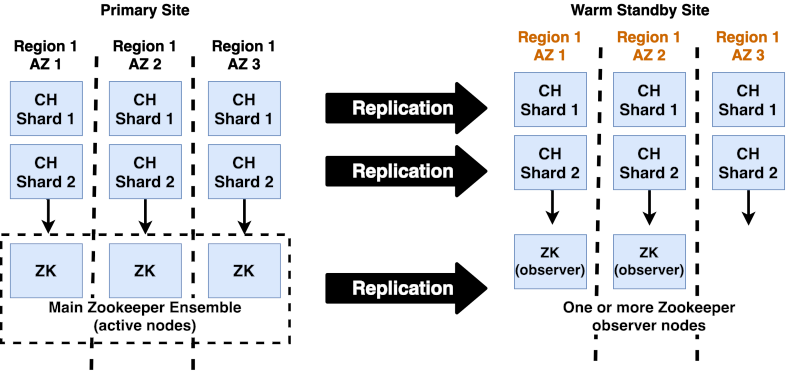
Altinity Docs
ClickHouse disaster-recovery architecture (primary + warm standby + backups)
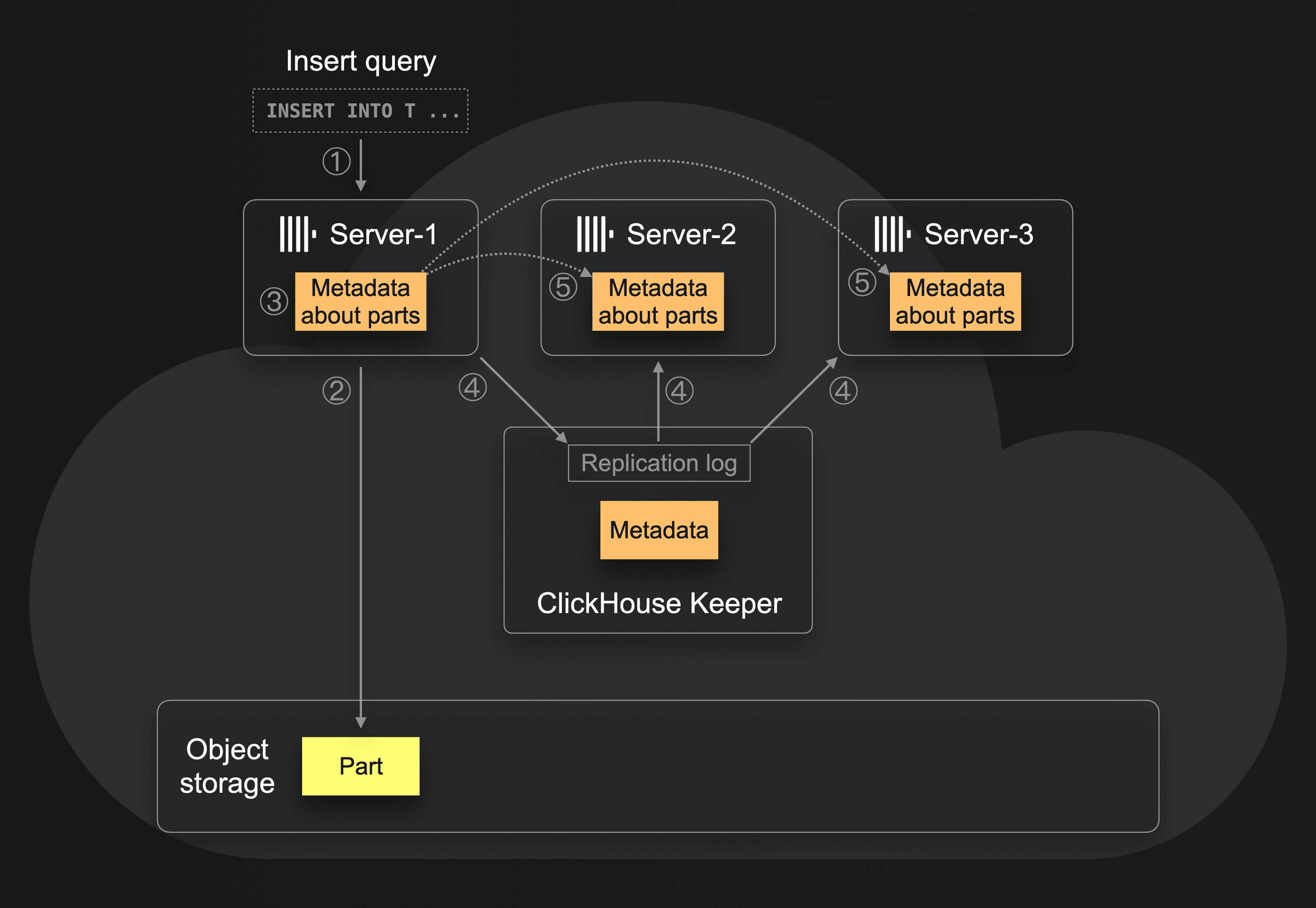
ClickHouse Blog
Object-storage-backed parts: backup is essentially a metadata snapshot
📚 Full module reference
Module 7 — Backup & Recovery
Audience: anyone whose job depends on the data not vanishing.
Prerequisites: Modules 1–4. Time: ~60 min reading + 30 min hands-on.
By the end you will be able to:
Choose between FREEZE, BACKUP, and clickhouse-backup for a workload.
Set up a backups disk (local) and an S3-backed backup (MinIO here).
Build incremental backup chains.
Run async backups and poll their status.
Restore from a chain into a clean database.
Plan a backup schedule and restore drill cadence.
1. The backup options at a glance
💬 Discuss with AI — click to view prompt
Paste into ChatGPT, Claude, Gemini, or any LLM chat.
I'm studying ClickHouse and working through the module "ClickHouse Backup & Recovery". I want to deeply understand the section: "The backup options at a glance".

Here is a brief excerpt from the material I'm reading:

"""
| Mechanism                           | Time       | Portable | Cluster-aware | Best for                                        | | `ALTER TABLE … FREEZE`              | instant    | no       | no            | "I'm about to do something risky, snap it now."  | | `BACKUP … TO Disk('backups', ...)`  | seconds    | yes      | with `ON CLUSTER` | scheduled local backups; nightly cron.       | | `BACKUP … TO S3(...)`               | seconds-minutes | yes | with `ON CLUSTER` | production durable backups.                  | | `clickhouse-backup` (Altinity CLI)  | depends    | yes      | yes...
"""

Please explain this concept in depth. Cover:

1. **Core mechanics** — how does it actually work under the hood? What data structures, algorithms, or engine internals are involved? Where is the implementation in the ClickHouse source tree (file/folder names) if you know?

2. **When to use vs avoid** — what concrete workloads does this help, and when would it hurt or be wrong? Give specific scale/latency trade-offs.

3. **Comparable features in other systems** — how does this compare with similar features in PostgreSQL, MySQL, BigQuery, Snowflake, Redshift, or DuckDB? Build my intuition by analogy.

4. **Common pitfalls and gotchas** — what trips engineers up in production? Subtle bugs, performance traps, surprising semantics?

5. **Worked example** — show me a small but realistic SQL or config example that demonstrates the concept end-to-end. Include the expected output where useful.

6. **Where to read more** — a short list of authoritative pointers (CH docs, blog posts, talks, source-code files).

Assume I have solid SQL fundamentals but I'm new to ClickHouse internals. Be technical but pragmatic; avoid marketing language.
Mechanism
Time
Portable
Cluster-aware
Best for
ALTER TABLE … FREEZE
instant
no
no
"I'm about to do something risky, snap it now."
BACKUP … TO Disk('backups', ...)
seconds
yes
with ON CLUSTER
scheduled local backups; nightly cron.
BACKUP … TO S3(...)
seconds-minutes
yes
with ON CLUSTER
production durable backups.
clickhouse-backup (Altinity CLI)
depends
yes
yes
full ops layer: retention, S3 lifecycle, scheduling.
2. FREEZE — hardlinked instant snapshots
💬 Discuss with AI — click to view prompt
Paste into ChatGPT, Claude, Gemini, or any LLM chat.
I'm studying ClickHouse and working through the module "ClickHouse Backup & Recovery". I want to deeply understand the section: "FREEZE — hardlinked instant snapshots".

Here is a brief excerpt from the material I'm reading:

"""
What it actually does: - **Hardlinks**, not copies. Constant time, zero extra disk while the source parts still exist. - Once a part is merged away, the hardlink in `shadow/` is the *only* remaining reference — at which point the inode survives until you delete the shadow dir. - Recovery: copy the hardlinks somewhere safe, then re-import via `ALTER TABLE … ATTACH PART`. > **FREEZE is local-only.** It doesn't help against host loss. Use it > for "I'm about to do something I might regret" — not as your DR plan.
"""

Please explain this concept in depth. Cover:

1. **Core mechanics** — how does it actually work under the hood? What data structures, algorithms, or engine internals are involved? Where is the implementation in the ClickHouse source tree (file/folder names) if you know?

2. **When to use vs avoid** — what concrete workloads does this help, and when would it hurt or be wrong? Give specific scale/latency trade-offs.

3. **Comparable features in other systems** — how does this compare with similar features in PostgreSQL, MySQL, BigQuery, Snowflake, Redshift, or DuckDB? Build my intuition by analogy.

4. **Common pitfalls and gotchas** — what trips engineers up in production? Subtle bugs, performance traps, surprising semantics?

5. **Worked example** — show me a small but realistic SQL or config example that demonstrates the concept end-to-end. Include the expected output where useful.

6. **Where to read more** — a short list of authoritative pointers (CH docs, blog posts, talks, source-code files).

Assume I have solid SQL fundamentals but I'm new to ClickHouse internals. Be technical but pragmatic; avoid marketing language.
ALTER TABLE m7.transactions FREEZE WITH NAME 'demo_snap';
What it actually does:
/var/lib/clickhouse/data/m7/transactions/
├── 202601_1_1_0/
│   ├── columns.txt
│   ├── ... (data)
└── ...

/var/lib/clickhouse/shadow/demo_snap/
└── data/m7/transactions/
    ├── 202601_1_1_0/   ← hardlinks to the same inodes
    └── ...
Hardlinks, not copies. Constant time, zero extra disk while the
source parts still exist.
Once a part is merged away, the hardlink in shadow/ is the only
remaining reference — at which point the inode survives until you
delete the shadow dir.
Recovery: copy the hardlinks somewhere safe, then re-import via
ALTER TABLE … ATTACH PART.
FREEZE is local-only. It doesn't help against host loss. Use it
for "I'm about to do something I might regret" — not as your DR plan.
3. The BACKUP / RESTORE SQL
💬 Discuss with AI — click to view prompt
Paste into ChatGPT, Claude, Gemini, or any LLM chat.
I'm studying ClickHouse and working through the module "ClickHouse Backup & Recovery". I want to deeply understand the section: "The BACKUP / RESTORE SQL".

Here is a brief excerpt from the material I'm reading:

"""
(no excerpt — section heading was "The BACKUP / RESTORE SQL")
"""

Please explain this concept in depth. Cover:

1. **Core mechanics** — how does it actually work under the hood? What data structures, algorithms, or engine internals are involved? Where is the implementation in the ClickHouse source tree (file/folder names) if you know?

2. **When to use vs avoid** — what concrete workloads does this help, and when would it hurt or be wrong? Give specific scale/latency trade-offs.

3. **Comparable features in other systems** — how does this compare with similar features in PostgreSQL, MySQL, BigQuery, Snowflake, Redshift, or DuckDB? Build my intuition by analogy.

4. **Common pitfalls and gotchas** — what trips engineers up in production? Subtle bugs, performance traps, surprising semantics?

5. **Worked example** — show me a small but realistic SQL or config example that demonstrates the concept end-to-end. Include the expected output where useful.

6. **Where to read more** — a short list of authoritative pointers (CH docs, blog posts, talks, source-code files).

Assume I have solid SQL fundamentals but I'm new to ClickHouse internals. Be technical but pragmatic; avoid marketing language.
This is the modern, portable way. Targets a registered "backup
destination": a local disk, an S3 bucket, or an HTTP endpoint.
Without <backups><allowed_disk> ClickHouse refuses any BACKUP /
RESTORE command. This is a safety net.
Full backup → restore
BACKUP TABLE m7.transactions TO Disk('backups', 'transactions_disk_v1.zip');

-- Verify what got written
SELECT id, name, status, total_size, num_files
FROM system.backups WHERE name LIKE '%transactions_disk_v1%';

-- Drop and restore
DROP TABLE m7.transactions;
RESTORE TABLE m7.transactions FROM Disk('backups', 'transactions_disk_v1.zip');
SELECT count() FROM m7.transactions;
Async backup
For tables larger than your HTTP timeout:
BACKUP TABLE m7.transactions
TO Disk('backups', 'transactions_async.zip')
SETTINGS async = 1;

-- Poll
SELECT status FROM system.backups
WHERE name LIKE '%transactions_async%' ORDER BY start_time DESC LIMIT 1;
-- Wait until it's BACKUP_CREATED.
Incremental backup
Reference the previous full as base_backup. Only changed parts are
written.
-- Full
BACKUP TABLE t TO Disk('backups', 't_full.zip');

-- New rows...
INSERT INTO t SELECT ...;

-- Incremental
BACKUP TABLE t
TO Disk('backups', 't_inc_v2.zip')
SETTINGS base_backup = Disk('backups', 't_full.zip');

-- Restore: just point at the most recent incremental;
-- CH walks the chain back to the base automatically.
RESTORE TABLE t FROM Disk('backups', 't_inc_v2.zip');
The same setting works against S3 — see
queries-incremental-s3.sql for the runnable
version. base_backup takes a full destination spec, not a name:
system.backups distinguishes what a backup contains from what it
stored. This is the pair to show people:
SELECT name, base_backup_name, num_files, num_entries,
       formatReadableSize(total_size)      AS logical_size,
       formatReadableSize(compressed_size) AS actually_written
FROM system.backups ORDER BY start_time;
backup
base
num_files
num_entries
logical
written
txn_inc_base
—
62
55
27.69 MiB
27.70 MiB
txn_inc_v2
txn_inc_base
74
9
30.52 MiB
2.84 MiB
74 files visible, 9 written. In the bucket that's 56 objects / 28 MiB for
the base against 10 objects / 2.8 MiB for the incremental, and the
incremental's data/m7/transactions/ holds exactly one part directory
(202602_4_4_0).
Dedup is at part granularity. Append-only partitioned tables
incremental beautifully. A table that rewrites parts — heavy merges, a
mutation, a re-inserted partition — can produce an "incremental" nearly the
size of a full, because a rewritten part is a new part.
The chain is a hard dependency
Restoring points at the newest incremental and ClickHouse walks backwards.
Delete the base, though, and every incremental behind it is scrap:
Code: 599. DB::Exception: Backup S3('.../txn_inc_base', ...) not found.
           (BACKUP_NOT_FOUND)
No partial recovery, and no warning when you delete it — the bucket is
happy to let you. Retention must expire a base together with its
dependants, or take a fresh full before expiring the old one. This is the
usual way teams find out their backups were worthless, and the best
argument for section 5's tooling over a hand-rolled cron job.
Backup specific partitions
BACKUP TABLE t
PARTITIONS '202601', '202602'
TO Disk('backups', 't_jan_feb.zip');
Useful for "back up just the changed month".
BACKUP ON CLUSTER
For a Replicated table on a cluster, BACKUP ON CLUSTER coordinates
across replicas so the snapshot is consistent:
BACKUP TABLE analytics.page_views_local
ON CLUSTER clickhouse_cluster
TO Disk('backups', 'page_views.zip');
Each replica writes to its local Disk('backups', ...) — so for cluster
backups you typically point at S3 instead, where every replica writes to
the same bucket.
4. S3 backups (the production path)
💬 Discuss with AI — click to view prompt
Paste into ChatGPT, Claude, Gemini, or any LLM chat.
I'm studying ClickHouse and working through the module "ClickHouse Backup & Recovery". I want to deeply understand the section: "S3 backups (the production path)".

Here is a brief excerpt from the material I'm reading:

"""
Argument layout: `S3('<endpoint>/<bucket>/<key-prefix>', '<access_key>', '<secret_key>')`. The endpoint can be AWS S3, MinIO, GCS S3-compat, R2, etc. What MinIO actually receives: The format is *part-level*. That means: - Incremental backups across S3 share parts (no double-copy). - A reasonably-equipped human can extract data by hand if needed. ### Restoring from S3
"""

Please explain this concept in depth. Cover:

1. **Core mechanics** — how does it actually work under the hood? What data structures, algorithms, or engine internals are involved? Where is the implementation in the ClickHouse source tree (file/folder names) if you know?

2. **When to use vs avoid** — what concrete workloads does this help, and when would it hurt or be wrong? Give specific scale/latency trade-offs.

3. **Comparable features in other systems** — how does this compare with similar features in PostgreSQL, MySQL, BigQuery, Snowflake, Redshift, or DuckDB? Build my intuition by analogy.

4. **Common pitfalls and gotchas** — what trips engineers up in production? Subtle bugs, performance traps, surprising semantics?

5. **Worked example** — show me a small but realistic SQL or config example that demonstrates the concept end-to-end. Include the expected output where useful.

6. **Where to read more** — a short list of authoritative pointers (CH docs, blog posts, talks, source-code files).

Assume I have solid SQL fundamentals but I'm new to ClickHouse internals. Be technical but pragmatic; avoid marketing language.
BACKUP TABLE m7.transactions
TO S3(
    'http://m7-minio:9000/clickhouse-backups/transactions_s3_v1',
    'minioadmin',
    'minioadmin'
);
Argument layout: S3('<endpoint>/<bucket>/<key-prefix>', '<access_key>',
'<secret_key>'). The endpoint can be AWS S3, MinIO, GCS S3-compat, R2, etc.
The format is part-level. That means:
- Incremental backups across S3 share parts (no double-copy).
- A reasonably-equipped human can extract data by hand if needed.
Restoring from S3
RESTORE TABLE m7.transactions
FROM S3(
    'http://m7-minio:9000/clickhouse-backups/transactions_s3_v1',
    'minioadmin',
    'minioadmin'
);
5. clickhouse-backup — the operations layer
💬 Discuss with AI — click to view prompt
Paste into ChatGPT, Claude, Gemini, or any LLM chat.
I'm studying ClickHouse and working through the module "ClickHouse Backup & Recovery". I want to deeply understand the section: "clickhouse-backup — the operations layer".

Here is a brief excerpt from the material I'm reading:

"""
(no excerpt — section heading was "clickhouse-backup — the operations layer")
"""

Please explain this concept in depth. Cover:

1. **Core mechanics** — how does it actually work under the hood? What data structures, algorithms, or engine internals are involved? Where is the implementation in the ClickHouse source tree (file/folder names) if you know?

2. **When to use vs avoid** — what concrete workloads does this help, and when would it hurt or be wrong? Give specific scale/latency trade-offs.

3. **Comparable features in other systems** — how does this compare with similar features in PostgreSQL, MySQL, BigQuery, Snowflake, Redshift, or DuckDB? Build my intuition by analogy.

4. **Common pitfalls and gotchas** — what trips engineers up in production? Subtle bugs, performance traps, surprising semantics?

5. **Worked example** — show me a small but realistic SQL or config example that demonstrates the concept end-to-end. Include the expected output where useful.

6. **Where to read more** — a short list of authoritative pointers (CH docs, blog posts, talks, source-code files).

Assume I have solid SQL fundamentals but I'm new to ClickHouse internals. Be technical but pragmatic; avoid marketing language.
It does not issue BACKUP TO S3 on the server's behalf. It runs
ALTER TABLE ... FREEZE, reads the resulting hardlinks out of
/var/lib/clickhouse/shadow/, and uploads them itself. Two consequences:
It must have the ClickHouse data directory on a local mount — hence
m7-backup-tool sharing the m7_data volume in docker-compose.yml.
It connects over the native protocol (9000), not HTTP.
Commands
# Two-phase: snapshot now (cheap, instant), ship later
clickhouse-backup create        nightly-2026-07-26
clickhouse-backup upload        nightly-2026-07-26

# Or both at once
clickhouse-backup create_remote nightly-2026-07-26

# Incremental — diff against a REMOTE backup by name
clickhouse-backup create_remote --diff-from-remote=nightly-2026-07-26 \
                                inc-2026-07-27
#   --diff-from  is the local-only equivalent

# Recovery
clickhouse-backup restore_remote inc-2026-07-27
clickhouse-backup restore_remote --schema inc-2026-07-27     # schema only
clickhouse-backup restore_remote --restore-table-mapping='transactions:transactions_verify' \
                                 inc-2026-07-27              # restore beside the live table

# Maintenance
clickhouse-backup list local
clickhouse-backup list remote
clickhouse-backup delete remote nightly-2026-04-01
clickhouse-backup print-config          # merged config incl. env overrides
clickhouse-backup default-config        # every key with its default
What incremental looks like
list remote shows the dependency in a required column:
Measured on the demo table: full upload 30.58 MiB → incremental upload
2.16 MiB. But restoring the incremental with nothing cached locally
downloads 32.67 MiB:
Backup cost scales with what changed; restore cost scales with the whole
dataset. Size your RTO against the second number.
Config keys that matter
Full annotated file in configs/clickhouse-backup.yml. The ones people get
wrong:
Key
Why it matters
general.upload_by_part: true
What makes --diff-from-remote cheap. Off = every backup is silently a full. Default true — don't "tidy" it away.
general.backups_to_keep_local / _remote
Retention. Default 0 = keep forever, which is how disks and S3 bills fill up.
s3.force_path_style: true
Required for MinIO (bucket in path, not in hostname). Leave false for real AWS S3.
s3.disable_ssl: true
Only because the demo MinIO is plain HTTP. Never in production.
s3.compression_format: tar
tar = package, don't compress. .bin files are already codec-compressed; gzip/zstd burns CPU for near-zero gain.
clickhouse.log_sql_queries
Defaults to true and logs every internal query at INF. Set false or output is unreadable.
general.upload_max_bytes_per_second
Throttle so backups don't starve query I/O. 0 = unlimited.
clickhouse.host + port: 9000
Native protocol. Pointing at 8123 fails confusingly.
Every key is overridable by env var (SECTION_KEY uppercased —
S3_ACCESS_KEY, CLICKHOUSE_PASSWORD). That is how you keep credentials
out of the YAML in production.
Gotcha: DROP TABLE ... SYNC before a tool restore
A plain DROP TABLE on an Atomic database parks the data directory for
database_atomic_delay_before_drop_table_sec (default 480s) so
UNDROP TABLE can work. clickhouse-backup recreates the table with its
original UUID, so it collides with the parked directory:
Code: 57. Directory for table data store/ae2/ae215ea4-.../ already exists
Native RESTORE never hits this — it assigns a fresh UUID. Only the tool
preserves them. Use DROP TABLE ... SYNC, or
--restore-table-mapping to a different name. Cleaning up after the
collision means deleting metadata_dropped/ entries and store/ dirs by
hand.
What it adds over raw SQL
Retention rules, applied automatically on every create/upload.
Named backups instead of hand-managed S3 key prefixes.
Dependency tracking, so it knows an incremental needs its base.
Paste into ChatGPT, Claude, Gemini, or any LLM chat.
I'm studying ClickHouse and working through the module "ClickHouse Backup & Recovery". I want to deeply understand the section: "Partition operations — the cheap surrogate".

Here is a brief excerpt from the material I'm reading:

"""
For tables you partition by date: `ATTACH PARTITION FROM` is the single most useful trick for "promote a staging table into the live table" — fully atomic, no rewrites.
"""

Please explain this concept in depth. Cover:

1. **Core mechanics** — how does it actually work under the hood? What data structures, algorithms, or engine internals are involved? Where is the implementation in the ClickHouse source tree (file/folder names) if you know?

2. **When to use vs avoid** — what concrete workloads does this help, and when would it hurt or be wrong? Give specific scale/latency trade-offs.

3. **Comparable features in other systems** — how does this compare with similar features in PostgreSQL, MySQL, BigQuery, Snowflake, Redshift, or DuckDB? Build my intuition by analogy.

4. **Common pitfalls and gotchas** — what trips engineers up in production? Subtle bugs, performance traps, surprising semantics?

5. **Worked example** — show me a small but realistic SQL or config example that demonstrates the concept end-to-end. Include the expected output where useful.

6. **Where to read more** — a short list of authoritative pointers (CH docs, blog posts, talks, source-code files).

Assume I have solid SQL fundamentals but I'm new to ClickHouse internals. Be technical but pragmatic; avoid marketing language.
For tables you partition by date:
-- Snapshot a partition (still hardlinks under shadow/)
ALTER TABLE t FREEZE PARTITION '202601';

-- Detach a partition (moves to detached/, queries don't see it)
ALTER TABLE t DETACH PARTITION '202601';

-- Re-attach when ready
ALTER TABLE t ATTACH PARTITION '202601';

-- Drop irrevocably (use with caution; ATTACH FROM detached still possible briefly)
ALTER TABLE t DROP PARTITION '202601';

-- Move a partition between two same-schema tables
ALTER TABLE t_archive ATTACH PARTITION '202601' FROM t;
ATTACH PARTITION FROM is the single most useful trick for "promote a
staging table into the live table" — fully atomic, no rewrites.
7. The hands-on demo
💬 Discuss with AI — click to view prompt
Paste into ChatGPT, Claude, Gemini, or any LLM chat.
I'm studying ClickHouse and working through the module "ClickHouse Backup & Recovery". I want to deeply understand the section: "The hands-on demo".

Here is a brief excerpt from the material I'm reading:

"""
### What you get ### Container map | Service     | Container         | Host ports         | | ClickHouse  | `m7-clickhouse`   | 8123, 9000         | | MinIO       | `m7-minio`        | 9100 (S3), 9101 (console) | | Bootstrap   | `m7-minio-init`   | (one-shot)         | | Backup tool | `m7-backup-tool`  | (idle; `docker exec` into it) | MinIO console: <http://localhost:9101>, login `minioadmin` / `minioadmin`. From your host the S3 API is `localhost:9100`; from inside `m7-net` it is `m7-minio:9000`. Same MinIO, opposite sides of the port mapping — that is why the SQL says `9000` and your browse...
"""

Please explain this concept in depth. Cover:

1. **Core mechanics** — how does it actually work under the hood? What data structures, algorithms, or engine internals are involved? Where is the implementation in the ClickHouse source tree (file/folder names) if you know?

2. **When to use vs avoid** — what concrete workloads does this help, and when would it hurt or be wrong? Give specific scale/latency trade-offs.

3. **Comparable features in other systems** — how does this compare with similar features in PostgreSQL, MySQL, BigQuery, Snowflake, Redshift, or DuckDB? Build my intuition by analogy.

4. **Common pitfalls and gotchas** — what trips engineers up in production? Subtle bugs, performance traps, surprising semantics?

5. **Worked example** — show me a small but realistic SQL or config example that demonstrates the concept end-to-end. Include the expected output where useful.

6. **Where to read more** — a short list of authoritative pointers (CH docs, blog posts, talks, source-code files).

Assume I have solid SQL fundamentals but I'm new to ClickHouse internals. Be technical but pragmatic; avoid marketing language.
What you get
docker-compose.yml                 m7-clickhouse + m7-minio + m7-minio-init + m7-backup-tool
configs/clickhouse-config.xml      includes <backups> + <storage_configuration>
configs/default-user.xml           opens the default-user ACL to the docker network
configs/clickhouse-backup.yml      annotated clickhouse-backup config
setup.sql · queries.sql · queries-s3.sql · queries-incremental-s3.sql · extras.sql
backup-tool.sh                     clickhouse-backup full + incremental + DR restore
up.sh · run.sh · down.sh
Container map
Service
Container
Host ports
ClickHouse
m7-clickhouse
8123, 9000
MinIO
m7-minio
9100 (S3), 9101 (console)
Bootstrap
m7-minio-init
(one-shot)
Backup tool
m7-backup-tool
(idle; docker exec into it)
MinIO console: http://localhost:9101, login minioadmin / minioadmin.
From your host the S3 API is localhost:9100; from inside m7-net it is
m7-minio:9000. Same MinIO, opposite sides of the port mapping — that is
why the SQL says 9000 and your browser says 9101.
m7-backup-tool shares the m7_data volume with ClickHouse because
clickhouse-backup reads the data directory directly. It idles on
sleep infinity; drive it with docker exec m7-backup-tool clickhouse-backup …
or just run ./backup-tool.sh.
The default user's ACL is widened in configs/default-user.xml — the
stock image restricts it to 127.0.0.1, which the backup tool (a separate
container) cannot satisfy. Same fix modules 3 and 4 needed for distributed
queries.
Execution flow — what runs, in order
#
Step
What happens
0
self-bootstrap
up.sh brings up CH + MinIO + the bucket bootstrap (m7-minio-init creates clickhouse-backups). Both share m7-net, so CH can reach http://m7-minio:9000.
1
setup.sql
Creates database m7, table m7.transactions (MergeTree partitioned by month, ordered by (account_id, txn_time, txn_id)), inserts 2M synthetic rows.
2
queries.sql — local-disk backup path
ALTER TABLE … FREEZE WITH NAME 'demo_snap' (instant hardlinks under /var/lib/clickhouse/shadow/), BACKUP TABLE … TO Disk('backups', 'transactions_disk_v1.zip'), DROP TABLE, RESTORE TABLE … FROM Disk(…), then per-partition DETACH PARTITION '202601' + ATTACH PARTITION '202601'.
3
queries-s3.sql — S3 backup path
BACKUP TABLE … TO S3('http://m7-minio:9000/clickhouse-backups/transactions_s3_v1', 'minioadmin', 'minioadmin'), look up the backup row in system.backups, DROP TABLE, RESTORE … FROM S3(…). Verify row count returns to 2M.
4
extras.sql — async + incremental
BACKUP TABLE … SETTINGS async = 1 (returns immediately), poll loop on system.backups.status until BACKUP_CREATED. Insert 50k more rows, then BACKUP … SETTINGS base_backup = Disk('backups', 'transactions_disk_v1.zip') — the resulting incremental zip is much smaller. DROP TABLE, RESTORE FROM Disk('backups', 'transactions_inc_v2.zip') — CH walks the chain to the base. Prints notes on BACKUP ON CLUSTER.
5
queries-incremental-s3.sql — incremental to S3
Full base to MinIO, insert a new February partition, then BACKUP … SETTINGS base_backup = S3(…). Compares num_files vs num_entries in system.backups (74 visible / 9 written), restores from the incremental alone, and documents the BACKUP_NOT_FOUND failure you get when the base is deleted.
6
backup-tool.sh — the ops layer (run separately)
clickhouse-backup create_remote, insert a March partition, create_remote --diff-from-remote, list remote (shows the +base dependency), then a genuine DR drill: delete local backups, DROP TABLE … SYNC, restore_remote from the incremental. Not part of run.sh — invoke it yourself.
What you should observe
Step
Outcome
FREEZE
/var/lib/clickhouse/shadow/demo_snap/ exists with hardlinks; same inodes as live data.
BACKUP TO Disk
Zip file under /var/lib/clickhouse/backups/; system.backups.status = 'BACKUP_CREATED'.
DROP + RESTORE
Row count returns to 2,000,000.
Partition detach/attach
Row count drops then returns; no data rewrite.
BACKUP TO S3
Visible in MinIO console at http://localhost:9101; nested under clickhouse-backups/transactions_s3_v1/.
Async backup
Returns immediately; status flips through CREATING_BACKUP → BACKUP_CREATED.
Incremental
total_size of transactions_inc_v2.zip ≪ transactions_disk_v1.zip.
8. A reasonable production schedule
💬 Discuss with AI — click to view prompt
Paste into ChatGPT, Claude, Gemini, or any LLM chat.
I'm studying ClickHouse and working through the module "ClickHouse Backup & Recovery". I want to deeply understand the section: "A reasonable production schedule".

Here is a brief excerpt from the material I'm reading:

"""
| Cadence  | What                                          | Where                              | | Daily    | Full `BACKUP ON CLUSTER` to S3                | `s3://backups/clickhouse/<env>/<date>/full` | | Hourly   | Incremental against the day's full            | `s3://.../<date>/inc-NN`            | | Weekly   | Restore drill into a sandbox cluster          | scratch S3 path; verify counts      | | 30 days  | Lifecycle to Glacier / Coldline               | bucket lifecycle rule               | > **A backup you have never restored is not a backup.** Run a restore > drill at least monthly. Mo...
"""

Please explain this concept in depth. Cover:

1. **Core mechanics** — how does it actually work under the hood? What data structures, algorithms, or engine internals are involved? Where is the implementation in the ClickHouse source tree (file/folder names) if you know?

2. **When to use vs avoid** — what concrete workloads does this help, and when would it hurt or be wrong? Give specific scale/latency trade-offs.

3. **Comparable features in other systems** — how does this compare with similar features in PostgreSQL, MySQL, BigQuery, Snowflake, Redshift, or DuckDB? Build my intuition by analogy.

4. **Common pitfalls and gotchas** — what trips engineers up in production? Subtle bugs, performance traps, surprising semantics?

5. **Worked example** — show me a small but realistic SQL or config example that demonstrates the concept end-to-end. Include the expected output where useful.

6. **Where to read more** — a short list of authoritative pointers (CH docs, blog posts, talks, source-code files).

Assume I have solid SQL fundamentals but I'm new to ClickHouse internals. Be technical but pragmatic; avoid marketing language.
Cadence
What
Where
Daily
Full BACKUP ON CLUSTER to S3
s3://backups/clickhouse/<env>/<date>/full
Hourly
Incremental against the day's full
s3://.../<date>/inc-NN
Weekly
Restore drill into a sandbox cluster
scratch S3 path; verify counts
30 days
Lifecycle to Glacier / Coldline
bucket lifecycle rule
A backup you have never restored is not a backup. Run a restore
drill at least monthly. Module 8's drill 6 exercises this end-to-end.
9. Operational SQL cheatsheet
💬 Discuss with AI — click to view prompt
Paste into ChatGPT, Claude, Gemini, or any LLM chat.
I'm studying ClickHouse and working through the module "ClickHouse Backup & Recovery". I want to deeply understand the section: "Operational SQL cheatsheet".

Here is a brief excerpt from the material I'm reading:

"""
(no excerpt — section heading was "Operational SQL cheatsheet")
"""

Please explain this concept in depth. Cover:

1. **Core mechanics** — how does it actually work under the hood? What data structures, algorithms, or engine internals are involved? Where is the implementation in the ClickHouse source tree (file/folder names) if you know?

2. **When to use vs avoid** — what concrete workloads does this help, and when would it hurt or be wrong? Give specific scale/latency trade-offs.

3. **Comparable features in other systems** — how does this compare with similar features in PostgreSQL, MySQL, BigQuery, Snowflake, Redshift, or DuckDB? Build my intuition by analogy.

4. **Common pitfalls and gotchas** — what trips engineers up in production? Subtle bugs, performance traps, surprising semantics?

5. **Worked example** — show me a small but realistic SQL or config example that demonstrates the concept end-to-end. Include the expected output where useful.

6. **Where to read more** — a short list of authoritative pointers (CH docs, blog posts, talks, source-code files).

Assume I have solid SQL fundamentals but I'm new to ClickHouse internals. Be technical but pragmatic; avoid marketing language.
-- "What backups exist?"
SELECT id, name, status, formatReadableSize(total_size) AS size,
       num_files, start_time, end_time
FROM system.backups ORDER BY start_time DESC LIMIT 20;

-- "What's running right now?"
SELECT id, name, status, num_files, processed_files
FROM system.backups WHERE status IN ('CREATING_BACKUP','RESTORING') ;

-- "Which freezes are still on disk?"
-- (no system table; check the shadow/ dir)
-- docker exec m7-clickhouse ls /var/lib/clickhouse/shadow/

-- "Drop a stuck async backup"
SYSTEM SHUTDOWN BACKUP <backup_id>;       -- newer CH; varies by version
10. Settings worth knowing
💬 Discuss with AI — click to view prompt
Paste into ChatGPT, Claude, Gemini, or any LLM chat.
I'm studying ClickHouse and working through the module "ClickHouse Backup & Recovery". I want to deeply understand the section: "Settings worth knowing".

Here is a brief excerpt from the material I'm reading:

"""
| Setting                              | Effect                                                                | | `async = 1` on BACKUP                | Returns immediately; poll `system.backups`.                           | | `base_backup = Disk('...', 'name')`  | Make this an incremental against the named base.                      | | `compression_method = 'zstd'`        | Compress the backup file (default depends on destination).            | | `password = '...'`                   | Encrypt the backup (file destination only).                           | | `s3_max_connections`...
"""

Please explain this concept in depth. Cover:

1. **Core mechanics** — how does it actually work under the hood? What data structures, algorithms, or engine internals are involved? Where is the implementation in the ClickHouse source tree (file/folder names) if you know?

2. **When to use vs avoid** — what concrete workloads does this help, and when would it hurt or be wrong? Give specific scale/latency trade-offs.

3. **Comparable features in other systems** — how does this compare with similar features in PostgreSQL, MySQL, BigQuery, Snowflake, Redshift, or DuckDB? Build my intuition by analogy.

4. **Common pitfalls and gotchas** — what trips engineers up in production? Subtle bugs, performance traps, surprising semantics?

5. **Worked example** — show me a small but realistic SQL or config example that demonstrates the concept end-to-end. Include the expected output where useful.

6. **Where to read more** — a short list of authoritative pointers (CH docs, blog posts, talks, source-code files).

Assume I have solid SQL fundamentals but I'm new to ClickHouse internals. Be technical but pragmatic; avoid marketing language.
Setting
Effect
async = 1 on BACKUP
Returns immediately; poll system.backups.
base_backup = Disk('...', 'name')
Make this an incremental against the named base.
compression_method = 'zstd'
Compress the backup file (default depends on destination).
password = '...'
Encrypt the backup (file destination only).
s3_max_connections
Concurrency for S3 backup/restore I/O.
allow_drop_detached
Allow DROP DETACHED PART (safety knob; off by default).
11. Common pitfalls
💬 Discuss with AI — click to view prompt
Paste into ChatGPT, Claude, Gemini, or any LLM chat.
I'm studying ClickHouse and working through the module "ClickHouse Backup & Recovery". I want to deeply understand the section: "Common pitfalls".

Here is a brief excerpt from the material I'm reading:

"""
| Symptom                                                                      | Cause                                                                       | Fix                                                                                              | | `Code: 605. The maximum size of file system disk is allowed for backups...`  | Backup destination not in `<allowed_disk>` / `<allowed_path>`.              | Add it to `<backups>` in config.                                                                 | | `BACKUP TO Disk(...)` works but takes forever                                | Ton...
"""

Please explain this concept in depth. Cover:

1. **Core mechanics** — how does it actually work under the hood? What data structures, algorithms, or engine internals are involved? Where is the implementation in the ClickHouse source tree (file/folder names) if you know?

2. **When to use vs avoid** — what concrete workloads does this help, and when would it hurt or be wrong? Give specific scale/latency trade-offs.

3. **Comparable features in other systems** — how does this compare with similar features in PostgreSQL, MySQL, BigQuery, Snowflake, Redshift, or DuckDB? Build my intuition by analogy.

4. **Common pitfalls and gotchas** — what trips engineers up in production? Subtle bugs, performance traps, surprising semantics?

5. **Worked example** — show me a small but realistic SQL or config example that demonstrates the concept end-to-end. Include the expected output where useful.

6. **Where to read more** — a short list of authoritative pointers (CH docs, blog posts, talks, source-code files).

Assume I have solid SQL fundamentals but I'm new to ClickHouse internals. Be technical but pragmatic; avoid marketing language.
Symptom
Cause
Fix
Code: 605. The maximum size of file system disk is allowed for backups...
Backup destination not in <allowed_disk> / <allowed_path>.
Add it to <backups> in config.
BACKUP TO Disk(...) works but takes forever
Tons of small parts (single-row INSERTs from upstream).
Optimise / batch upstream. Backup time scales with part count.
RESTORE fails with "Backup data not found"
Pointed at the wrong base or chain broken.
Verify system.backups knows the chain; restore from the highest layer.
FREEZE makes disk usage spike when old parts merge
Hardlinks still reference old part files; merges can't reclaim.
Clear shadow/ directories you no longer need.
S3 backup with self-signed MinIO fails on TLS
The S3 endpoint URL uses https:// and the cert isn't trusted.
Use http:// for MinIO, or mount the CA into CH and trust it.
BACKUP ON CLUSTER fails on one node
That node can't reach the destination.
Verify per-node connectivity (e.g. all hosts can resolve the S3 endpoint).
12. Talking points for the live session
💬 Discuss with AI — click to view prompt
Paste into ChatGPT, Claude, Gemini, or any LLM chat.
I'm studying ClickHouse and working through the module "ClickHouse Backup & Recovery". I want to deeply understand the section: "Talking points for the live session".

Here is a brief excerpt from the material I'm reading:

"""
1. **Three layers, three uses.** FREEZE for "oh wait, hold on"; BACKUP/RESTORE for routine; `clickhouse-backup` for ops scale. 2. **Backups are part-level.** Show MinIO contents; the directory tree matches the live data layout. 3. **Incrementals are nearly free** if your data is mostly append. 4. **Restore drills are the test.** Without monthly drills you don't have backups, you have hopes. 5. **Partition operations** (DETACH / ATTACH) are the secret weapon for archive workflows. 6. **`ON CLUSTER`** for replicated tables — coordinated snapshot.
"""

Please explain this concept in depth. Cover:

1. **Core mechanics** — how does it actually work under the hood? What data structures, algorithms, or engine internals are involved? Where is the implementation in the ClickHouse source tree (file/folder names) if you know?

2. **When to use vs avoid** — what concrete workloads does this help, and when would it hurt or be wrong? Give specific scale/latency trade-offs.

3. **Comparable features in other systems** — how does this compare with similar features in PostgreSQL, MySQL, BigQuery, Snowflake, Redshift, or DuckDB? Build my intuition by analogy.

4. **Common pitfalls and gotchas** — what trips engineers up in production? Subtle bugs, performance traps, surprising semantics?

5. **Worked example** — show me a small but realistic SQL or config example that demonstrates the concept end-to-end. Include the expected output where useful.

6. **Where to read more** — a short list of authoritative pointers (CH docs, blog posts, talks, source-code files).

Assume I have solid SQL fundamentals but I'm new to ClickHouse internals. Be technical but pragmatic; avoid marketing language.
Three layers, three uses. FREEZE for "oh wait, hold on";
BACKUP/RESTORE for routine; clickhouse-backup for ops scale.
Backups are part-level. Show MinIO contents; the directory tree
matches the live data layout.
Incrementals are nearly free if your data is mostly append.
Restore drills are the test. Without monthly drills you don't
have backups, you have hopes.
Partition operations (DETACH / ATTACH) are the secret weapon for
archive workflows.
ON CLUSTER for replicated tables — coordinated snapshot.
13. Going deeper
💬 Discuss with AI — click to view prompt
Paste into ChatGPT, Claude, Gemini, or any LLM chat.
I'm studying ClickHouse and working through the module "ClickHouse Backup & Recovery". I want to deeply understand the section: "Going deeper".

Here is a brief excerpt from the material I'm reading:

"""
- **Module 8** — DR drills, including end-to-end backup-restore over a cluster. - ClickHouse docs: <https://clickhouse.com/docs/en/operations/backup> - `clickhouse-backup`: <https://github.com/Altinity/clickhouse-backup>
"""

Please explain this concept in depth. Cover:

1. **Core mechanics** — how does it actually work under the hood? What data structures, algorithms, or engine internals are involved? Where is the implementation in the ClickHouse source tree (file/folder names) if you know?

2. **When to use vs avoid** — what concrete workloads does this help, and when would it hurt or be wrong? Give specific scale/latency trade-offs.

3. **Comparable features in other systems** — how does this compare with similar features in PostgreSQL, MySQL, BigQuery, Snowflake, Redshift, or DuckDB? Build my intuition by analogy.

4. **Common pitfalls and gotchas** — what trips engineers up in production? Subtle bugs, performance traps, surprising semantics?

5. **Worked example** — show me a small but realistic SQL or config example that demonstrates the concept end-to-end. Include the expected output where useful.

6. **Where to read more** — a short list of authoritative pointers (CH docs, blog posts, talks, source-code files).

Assume I have solid SQL fundamentals but I'm new to ClickHouse internals. Be technical but pragmatic; avoid marketing language.
Module 8 — DR drills, including end-to-end backup-restore over
a cluster.