The Kafka table engine allows ClickHouse to consume messages directly from Apache Kafka topics in real-time. It provides a bridge between Kafka streams and ClickHouse's analytical processing capabilities, enabling sub-second latency data ingestion at scale.
Key Components
📨
Kafka Engine
Native ClickHouse engine that consumes from Kafka without external tools
🔄
Materialized Views
Automatically transform and persist messages to MergeTree tables
👥
Consumer Groups
Distribute load across multiple ClickHouse instances
📝
Message Formats
Support JSON, Avro, Protobuf, CSV and more formats
Key Advantage: Everything happens within ClickHouse - no external dependencies for the core ingestion pipeline.
How Kafka Engine Works
Message Consumption
Reads from Kafka topics as a virtual table
Supports multiple partitions
Manages consumer group offsets
Can handle backpressure
Supports exactly-once semantics
Offset Management
Kafka stores offset state
ClickHouse can resume from last offset
Supports offset reset strategies
Manual offset management possible
No duplicate handling by default
🚀 Quick Start: Kafka Engine Setup
1. Prerequisites
Apache Kafka 0.9+ (installed and running)
ClickHouse 20.7+
Network connectivity between ClickHouse and Kafka brokers
# Verify Kafka is running
kafka-topics.sh --list --bootstrap-server localhost:9092

# Create a test Kafka topic
kafka-topics.sh --create --topic events \
  --bootstrap-server localhost:9092 \
  --partitions 3 \
  --replication-factor 1
2. Create Kafka Table
-- Create a simple Kafka table for consuming JSON messages
CREATE TABLE kafka_events (
    event_id String,
    user_id UInt64,
    event_type String,
    timestamp UInt64,
    properties String  -- Store JSON as string
) ENGINE = Kafka()
SETTINGS
    kafka_broker_list = 'localhost:9092',
    kafka_topic_list = 'events',
    kafka_group_id = 'clickhouse-consumer-1',
    kafka_format = 'JSONEachRow',
    kafka_num_consumers = 3;

-- Verify table was created
SHOW CREATE TABLE kafka_events;

-- Check table exists
SELECT * FROM kafka_events LIMIT 0;
3. Create Materialized View for Persistence
-- First, create the target MergeTree table
CREATE TABLE events_persistent (
    event_id String,
    user_id UInt64,
    event_type String,
    timestamp DateTime,
    properties String,
    ingestion_time DateTime DEFAULT now()
) ENGINE = MergeTree()
PARTITION BY toYYYYMM(timestamp)
ORDER BY (timestamp, user_id)
TTL timestamp + INTERVAL 90 DAY;

-- Create materialized view to feed data from Kafka to MergeTree
CREATE MATERIALIZED VIEW kafka_events_consumer TO events_persistent AS
SELECT
    event_id,
    user_id,
    event_type,
    fromUnixTimestamp(timestamp) as timestamp,
    properties,
    now() as ingestion_time
FROM kafka_events;

-- Verify the materialized view
SHOW MATERIALIZED VIEWS;
4. Test with Sample Data
# Send test messages to Kafka
echo '{"event_id":"evt-001","user_id":1001,"event_type":"click","timestamp":1642772400,"properties":"{}"}' | \
  kafka-console-producer.sh --broker-list localhost:9092 --topic events

echo '{"event_id":"evt-002","user_id":1002,"event_type":"purchase","timestamp":1642772500,"properties":"{}"}' | \
  kafka-console-producer.sh --broker-list localhost:9092 --topic events

-- Query the persistent table to see ingested data
SELECT * FROM events_persistent LIMIT 10;

-- Check ingestion rate
SELECT COUNT(*) as total_events FROM events_persistent;
5. Verify Setup
-- Check Kafka table status
SELECT * FROM system.tables WHERE table = 'kafka_events';

-- Monitor materialized view processing
SELECT table, status, query
FROM system.tables
WHERE table = 'kafka_events_consumer';

-- Check system logs for Kafka engine
SELECT * FROM system.query_log
WHERE query_kind = 'Select'
ORDER BY event_time DESC
LIMIT 5;
-- Check Kafka engine status
SELECT
    table,
    engine,
    database,
    total_bytes,
    total_rows
FROM system.tables
WHERE engine = 'Kafka';

-- Monitor query_log for Kafka reads
SELECT
    event_time,
    query_id,
    query,
    read_rows,
    read_bytes,
    query_duration_ms
FROM system.query_log
WHERE query_kind = 'Select'
  AND table = 'kafka_events'
ORDER BY event_time DESC
LIMIT 20;

-- Check system.text_log for Kafka errors
SELECT
    event_time,
    level,
    message
FROM system.text_log
WHERE level >= 'Warning'
  AND message LIKE '%Kafka%'
ORDER BY event_time DESC
LIMIT 50;
✨ Kafka Ingestion Best Practices
1. Materialized Views Design
❌ Bad: Direct Kafka Queries
-- DON'T query Kafka table directly
SELECT * FROM kafka_events LIMIT 1000;

-- Problem: Messages are consumed &
-- won't be replayed. Lost data!
✅ Good: Use Materialized Views
-- DO use materialized view
CREATE MATERIALIZED VIEW kafka_mv
TO target_table AS
SELECT * FROM kafka_events;

-- Messages consumed once, persisted,
-- and replayed for all queries
2. Consumer Group Strategy
Single Consumer Group per Table
Recommended: One consumer group per table/topic pair
Avoids offset conflicts between different pipelines
Simplifies monitoring and debugging
Each consumer group tracks its own offset
-- Good: Separate consumer groups
CREATE TABLE kafka_events
SETTINGS kafka_group_id = 'clickhouse-events-consumer';

CREATE TABLE kafka_logs
SETTINGS kafka_group_id = 'clickhouse-logs-consumer';
3. Backpressure & Throughput Tuning
Handle High Message Rates
Increase kafka_num_consumers for parallelism
Adjust kafka_max_block_size for batching
Tune kafka_poll_timeout_ms to balance latency vs throughput
Monitor ClickHouse resource usage (CPU, memory, disk I/O)
Cost: 70% reduction vs previous Elasticsearch stack
Case Study 2: Real-Time Monitoring System
Challenge
Monitor 10,000 servers generating 2M metrics/second. Alert on anomalies in real-time.
Solution
Custom metrics producer → Kafka topic
5-node ClickHouse cluster
Separate consumer groups per metric type
ReplacingMergeTree for latest metric state
Results
Ingestion: 2M events/sec (within SLA)
Alert latency: 5-10 seconds
Data retention: 30 days (automatic TTL)
Operational cost: $50K/month (vs $300K+ for commercial TSDB)
Case Study 3: User Behavior Analytics
Challenge
Analyze 100M user interactions/day. Support ad-hoc exploration with complex queries.
Solution
Multiple Kafka topics for different event types
Data enrichment via materialized view joins
Distributed ClickHouse cluster (6 nodes)
ReplicatedMergeTree for fault tolerance
Results
Query performance: 0.5-2s for any analysis
Data freshness: ~1 minute from event to query
Enabled new self-service analytics platform
Reduced dependency on data scientists for ad-hoc queries
📋 Production-Ready Templates
Template 1: JSON Event Streaming
-- Kafka table for JSON events
CREATE TABLE kafka_raw_events (
    event_id String,
    user_id UInt64,
    session_id String,
    event_type String,
    event_time UInt64,
    properties String,  -- JSON object as string
    platform String
) ENGINE = Kafka()
SETTINGS
    kafka_broker_list = 'kafka1:9092,kafka2:9092,kafka3:9092',
    kafka_topic_list = 'events',
    kafka_group_id = 'clickhouse-events',
    kafka_format = 'JSONEachRow',
    kafka_num_consumers = 4,
    kafka_auto_offset_reset = 'smallest',
    kafka_skip_broken_messages = 1;

-- Persistent storage
CREATE TABLE events (
    event_date Date,
    event_time DateTime,
    event_id String,
    user_id UInt64,
    session_id String,
    event_type LowCardinality(String),
    properties String,
    platform LowCardinality(String),
    ingestion_time DateTime
) ENGINE = ReplicatedMergeTree('/clickhouse/tables/01/events', 'replica-1')
PARTITION BY toYYYYMM(event_date)
ORDER BY (event_date, user_id, event_time)
TTL event_date + INTERVAL 90 DAY;

-- Materialized view to pump data
CREATE MATERIALIZED VIEW events_consumer TO events AS
SELECT
    toDate(fromUnixTimestamp(event_time)) as event_date,
    fromUnixTimestamp(event_time) as event_time,
    event_id,
    user_id,
    session_id,
    event_type,
    properties,
    platform,
    now() as ingestion_time
FROM kafka_raw_events;
Template 2: Metrics/Time-Series from Kafka
-- Kafka table for metrics
CREATE TABLE kafka_metrics (
    metric_name String,
    metric_value Float64,
    timestamp UInt64,
    tags String  -- JSON tags
) ENGINE = Kafka()
SETTINGS
    kafka_broker_list = 'localhost:9092',
    kafka_topic_list = 'metrics',
    kafka_group_id = 'clickhouse-metrics',
    kafka_format = 'JSONEachRow',
    kafka_num_consumers = 8,
    kafka_skip_broken_messages = 1;

-- Persistent metrics table
CREATE TABLE metrics (
    timestamp DateTime,
    metric_name LowCardinality(String),
    metric_value Float64,
    host LowCardinality(String) DEFAULT '',
    service LowCardinality(String) DEFAULT '',
    region LowCardinality(String) DEFAULT '',
    tags String DEFAULT ''
) ENGINE = MergeTree()
PARTITION BY toYYYYMMDD(timestamp)
ORDER BY (metric_name, timestamp, host)
TTL timestamp + INTERVAL 365 DAY;

-- Parse tags and store metrics
CREATE MATERIALIZED VIEW metrics_consumer TO metrics AS
SELECT
    fromUnixTimestamp(timestamp) as timestamp,
    metric_name,
    metric_value,
    JSONExtractString(tags, 'host') as host,
    JSONExtractString(tags, 'service') as service,
    JSONExtractString(tags, 'region') as region,
    tags
FROM kafka_metrics;
Template 3: Logs Aggregation from Kafka
-- Kafka table for log events
CREATE TABLE kafka_logs (
    timestamp UInt64,
    level String,
    logger String,
    message String,
    service String,
    host String,
    trace_id String,
    extra_fields String  -- Store additional fields as JSON
) ENGINE = Kafka()
SETTINGS
    kafka_broker_list = 'localhost:9092',
    kafka_topic_list = 'logs',
    kafka_group_id = 'clickhouse-logs',
    kafka_format = 'JSONEachRow',
    kafka_num_consumers = 4,
    kafka_skip_broken_messages = 1;

-- Central logs table
CREATE TABLE logs (
    timestamp DateTime,
    level LowCardinality(String),
    logger LowCardinality(String),
    message String,
    service LowCardinality(String),
    host LowCardinality(String),
    trace_id String,
    extra_fields String DEFAULT ''
) ENGINE = MergeTree()
PARTITION BY toYYYYMMDD(timestamp)
ORDER BY (level, service, timestamp)
TTL timestamp + INTERVAL 30 DAY;

-- Materialized view
CREATE MATERIALIZED VIEW logs_consumer TO logs AS
SELECT
    fromUnixTimestamp(timestamp) as timestamp,
    level,
    logger,
    message,
    service,
    host,
    trace_id,
    extra_fields
FROM kafka_logs;
🔥 Advanced Patterns
1. Data Enrichment with Materialized Views
-- Raw Kafka table with minimal data
CREATE TABLE kafka_raw (
    user_id UInt64,
    product_id UInt32,
    amount Float64,
    timestamp UInt64
) ENGINE = Kafka()
SETTINGS
    kafka_broker_list = 'localhost:9092',
    kafka_topic_list = 'purchases',
    kafka_group_id = 'enrichment-pipeline',
    kafka_format = 'JSONEachRow';

-- Reference tables for enrichment
CREATE TABLE users (
    user_id UInt64,
    country LowCardinality(String),
    vip_status UInt8
) ENGINE = ReplicatedMergeTree()
ORDER BY user_id;

CREATE TABLE products (
    product_id UInt32,
    category LowCardinality(String),
    price Float64
) ENGINE = ReplicatedMergeTree()
ORDER BY product_id;

-- Enriched events table
CREATE TABLE purchases_enriched (
    timestamp DateTime,
    user_id UInt64,
    country LowCardinality(String),
    product_id UInt32,
    category LowCardinality(String),
    amount Float64,
    vip_status UInt8
) ENGINE = MergeTree()
PARTITION BY toYYYYMM(timestamp)
ORDER BY (timestamp, user_id);

-- Materialized view with JOINs for enrichment
CREATE MATERIALIZED VIEW purchases_enrich_mv TO purchases_enriched AS
SELECT
    fromUnixTimestamp(kr.timestamp) as timestamp,
    kr.user_id,
    u.country,
    kr.product_id,
    p.category,
    kr.amount,
    u.vip_status
FROM kafka_raw kr
LEFT JOIN users u ON kr.user_id = u.user_id
LEFT JOIN products p ON kr.product_id = p.product_id;
2. Real-Time Aggregation with SummingMergeTree
-- Kafka raw events
CREATE TABLE kafka_events_raw (
    timestamp UInt64,
    event_type String,
    user_id UInt64,
    revenue Float64
) ENGINE = Kafka()
SETTINGS
    kafka_broker_list = 'localhost:9092',
    kafka_topic_list = 'raw_events',
    kafka_group_id = 'aggregation',
    kafka_format = 'JSONEachRow';

-- Pre-aggregated by hour with SummingMergeTree
CREATE TABLE events_hourly_agg (
    hour DateTime,
    event_type LowCardinality(String),
    user_count AggregateFunction(uniq, UInt64),
    event_count UInt64,
    revenue Float64
) ENGINE = SummingMergeTree()
PARTITION BY toYYYYMM(hour)
ORDER BY (hour, event_type);

-- Materialize hourly aggregations
CREATE MATERIALIZED VIEW events_hourly_mv TO events_hourly_agg AS
SELECT
    toStartOfHour(fromUnixTimestamp(timestamp)) as hour,
    event_type,
    uniqState(user_id) as user_count,
    COUNT(*) as event_count,
    SUM(revenue) as revenue
FROM kafka_events_raw
GROUP BY hour, event_type;
3. Deduplication with ReplacingMergeTree
-- Kafka events (may contain duplicates)
CREATE TABLE kafka_orders (
    order_id String,
    user_id UInt64,
    amount Float64,
    status String,
    timestamp UInt64,
    version UInt32  -- Helps with duplicates
) ENGINE = Kafka()
SETTINGS
    kafka_broker_list = 'localhost:9092',
    kafka_topic_list = 'orders',
    kafka_group_id = 'orders-processing',
    kafka_format = 'JSONEachRow';

-- Use ReplacingMergeTree for deduplication
CREATE TABLE orders_deduplicated (
    order_id String,
    user_id UInt64,
    amount Float64,
    status String,
    timestamp DateTime,
    version UInt32
) ENGINE = ReplacingMergeTree(version)
PARTITION BY toYYYYMM(timestamp)
ORDER BY (order_id, timestamp);

-- Consume with versioning
CREATE MATERIALIZED VIEW orders_dedup_mv TO orders_deduplicated AS
SELECT
    order_id,
    user_id,
    amount,
    status,
    fromUnixTimestamp(timestamp) as timestamp,
    version
FROM kafka_orders;
4. Distributed Kafka Ingestion Across Cluster
-- On each ClickHouse node: local Kafka table
CREATE TABLE kafka_local (
    id UInt64,
    data String
) ENGINE = Kafka()
SETTINGS
    kafka_broker_list = 'kafka1:9092,kafka2:9092,kafka3:9092',
    kafka_topic_list = 'distributed_topic',
    kafka_group_id = 'clickhouse-cluster-group',
    kafka_num_consumers = 4;

-- Local MergeTree table
CREATE TABLE events_local (
    id UInt64,
    data String,
    processed_at DateTime DEFAULT now()
) ENGINE = MergeTree()
ORDER BY id;

-- Local materialized view
CREATE MATERIALIZED VIEW kafka_local_consumer TO events_local AS
SELECT id, data, now()
FROM kafka_local;

-- Distributed table for cluster-wide queries
CREATE TABLE events_distributed AS events_local
ENGINE = Distributed('my_cluster', 'default', 'events_local', rand());

-- Query combines data from all nodes
SELECT COUNT(*) as total_events FROM events_distributed;
📚 Resources & References
📘 View in Notion
Access this module in your Notion workspace for note-taking and tracking your progress.
After completing Module 9, you should be comfortable with:
✅ Understanding Kafka Engine architecture and setup
✅ Creating Kafka tables and materialized views
✅ Configuring consumer groups and offset management
✅ Handling different message formats (JSON, Avro, Protobuf)
✅ Implementing error handling and monitoring
✅ Optimizing for high throughput and low latency
🐳 Hands-on Docker Demo for this Module
A self-contained ClickHouse stack you can run locally. Every step is reproducible; the README below walks through each concept with diagrams and measured outcomes.
cd code-examples/demos/module-9-kafka
./up.sh        # bring stack up, wait for health
./run.sh       # run the demo (idempotent — re-runnable)
./down.sh      # tear down + drop volumes
📺 Live demo capture
Recorded with vhs: the actual terminal output from ./run.sh running on this very stack.
Animated GIF, ~1198 KB. Right-click → open in new tab to view full-size.
✨ Animated concept diagrams
Inline SVG animations — no plugins, native browser playback. Each visualises a key flow this module covers.
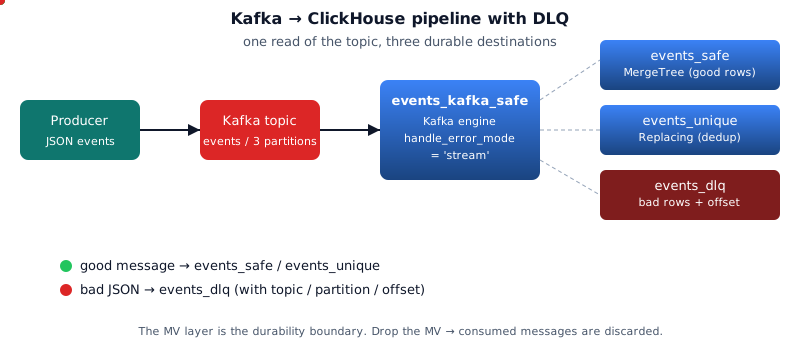
Kafka pipeline
🗂️ Architecture diagrams
Rendered from the README's Mermaid sources. Click any to open the source SVG full-size.
Subgraph kafka kafka topic events br n pActor producer as producer
📚 ClickHouse reference visuals
Curated from the official ClickHouse documentation and engineering blog (and Altinity's docs/blog) — the same diagrams the broader CH community uses to explain these concepts. Click any image to read the source.
ClickHouse Blog
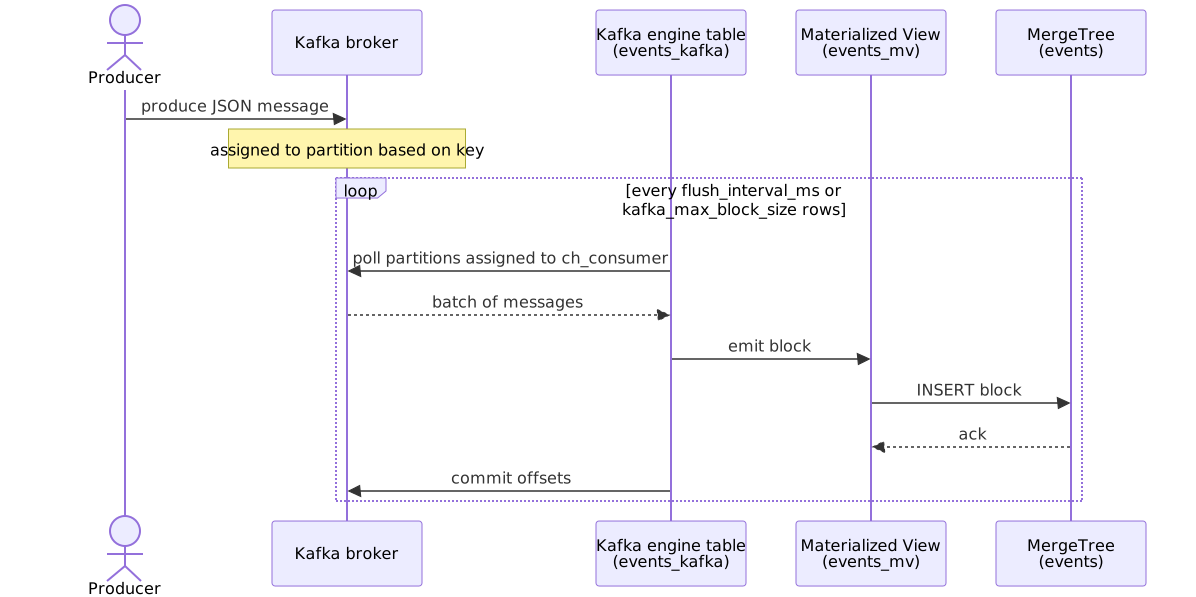
Kafka engine table -> materialized view -> MergeTree storage flow
ClickHouse Blog
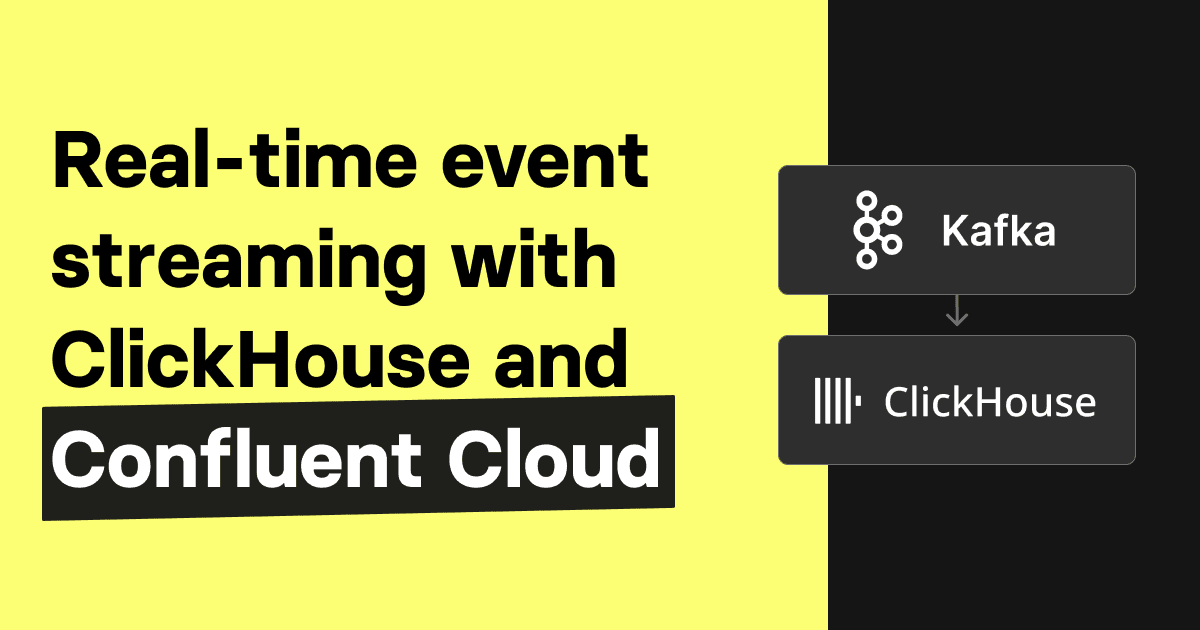
Confluent Cloud + Kafka Connect sink into ClickHouse architecture
ClickHouse Blog
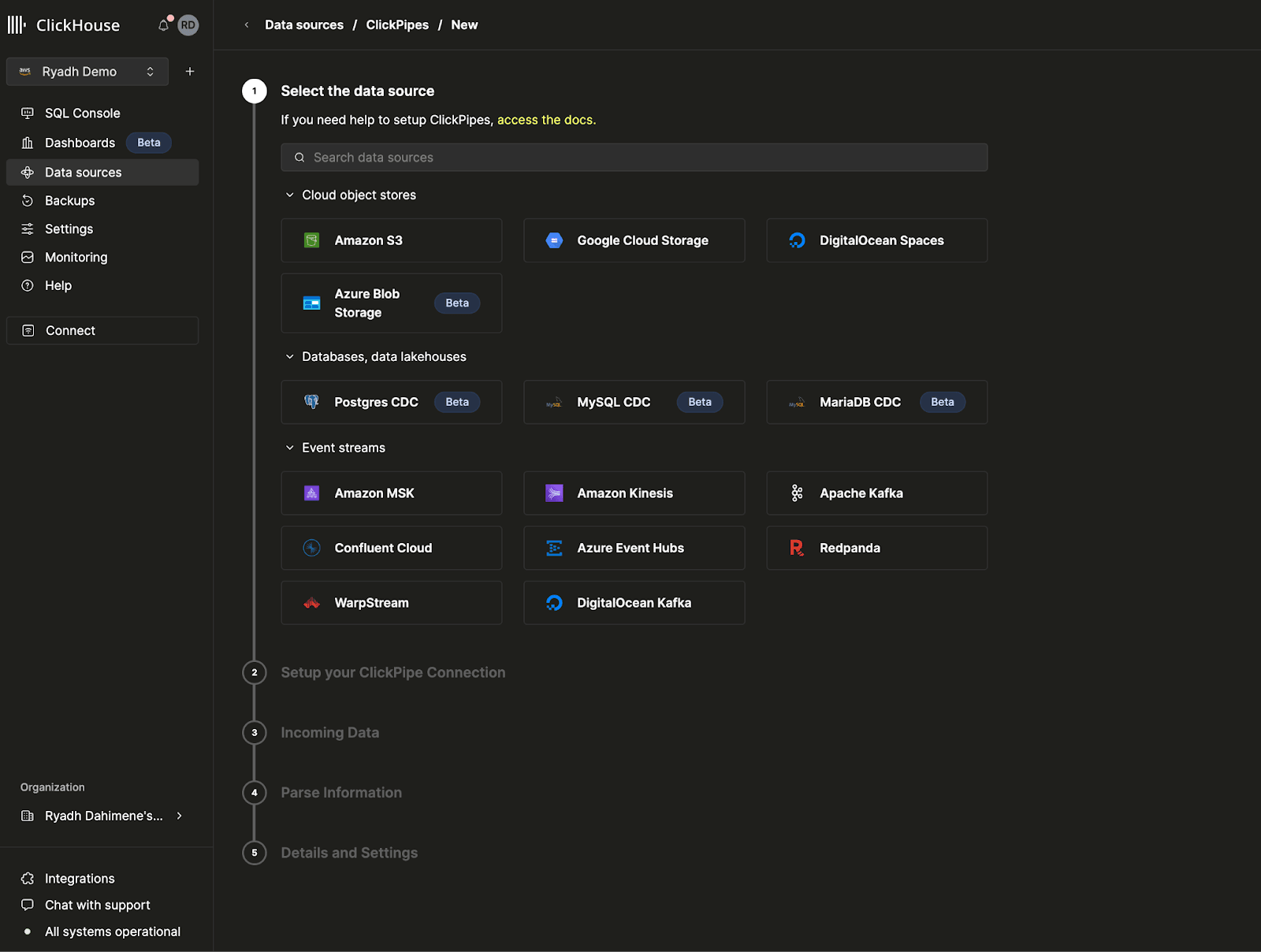
ClickPipes managed Kafka ingestion architecture
ClickHouse Blog
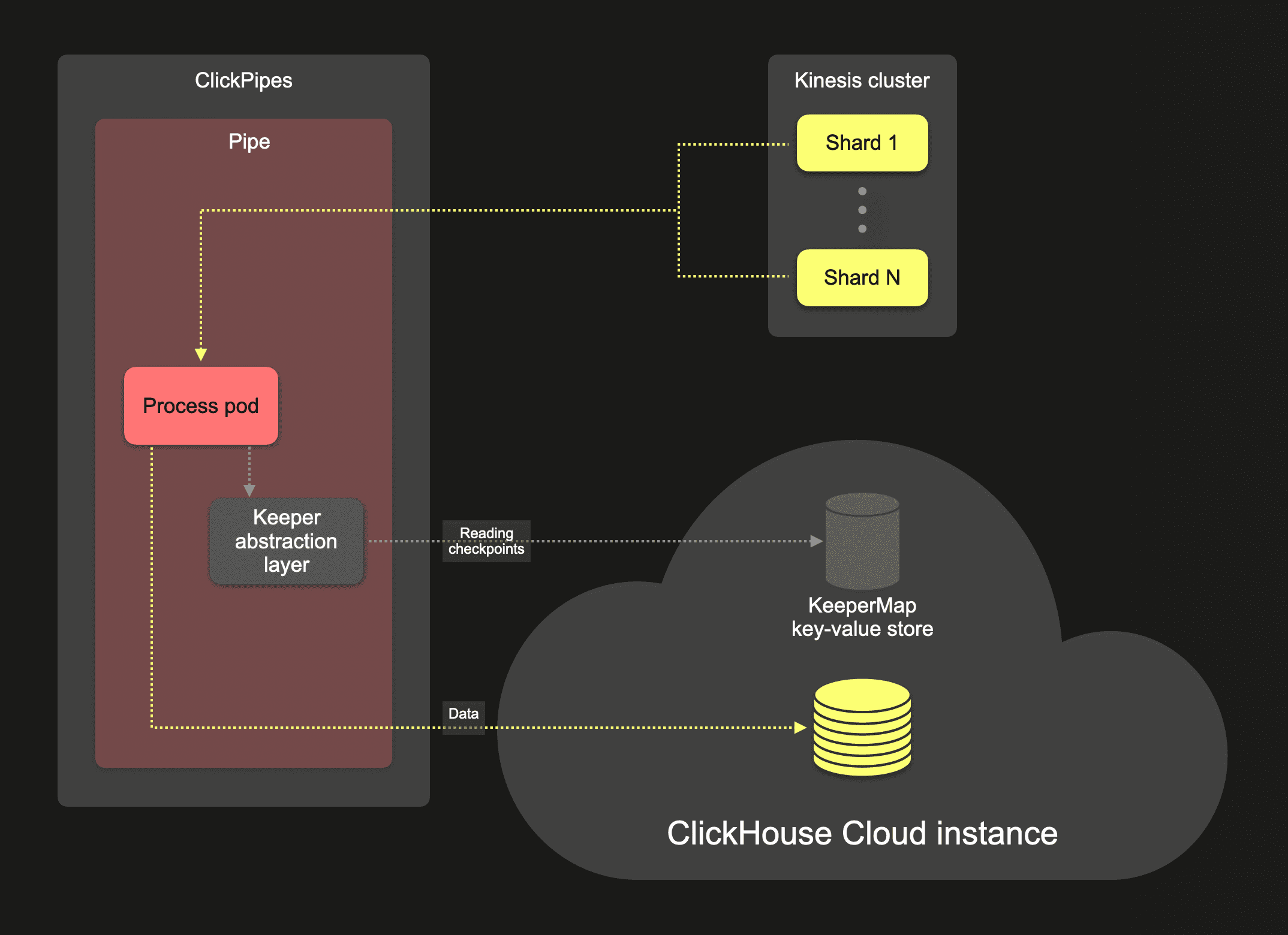
ClickPipes overall ingestion architecture (Kafka, Kinesis, object stores)
ClickHouse Blog
Streaming ingestion architecture (same shape as Kafka pipeline)
ClickHouse Blog
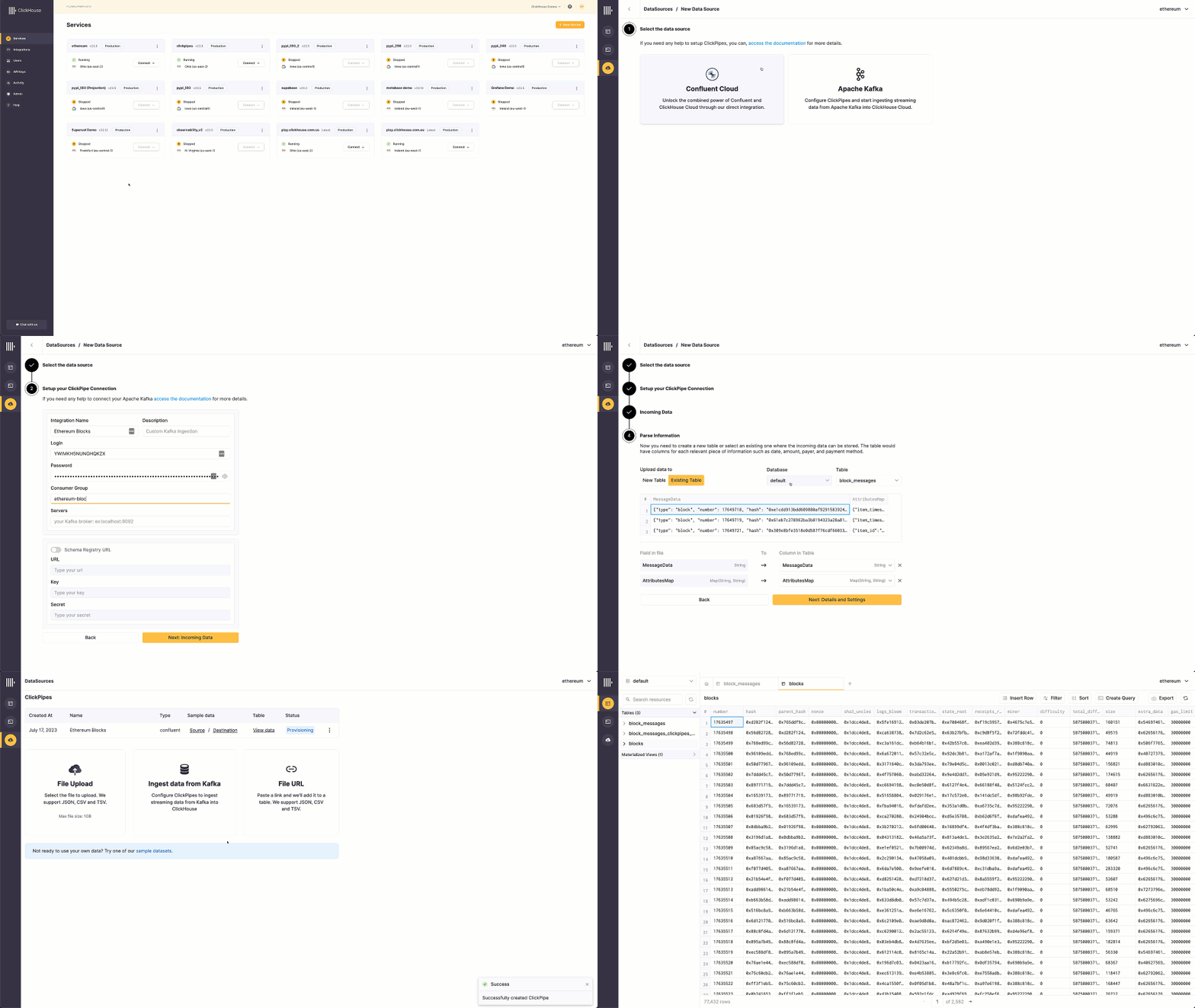
Animated: end-to-end Kafka -> ClickPipes -> ClickHouse demo
📚 Full module reference
Module 9 — Kafka Ingestion
Audience: anyone wiring Kafka into ClickHouse. Prerequisites:
Modules 1–2. Time: ~70 min reading + 30 min hands-on.
By the end you will be able to:
Build the canonical Kafka engine → MV → MergeTree pipeline.
Configure consumer groups, batching, and retries.
Route bad messages to a Dead Letter Queue (DLQ).
Achieve "exactly once" semantics over an at-least-once source.
Reset offsets for replay; pause and resume consumption.
Pick the right wire format (JSON, CSV, Avro, Protobuf).
1. The mental model
💬 Discuss with AI — click to view prompt
Paste into ChatGPT, Claude, Gemini, or any LLM chat.
I'm studying ClickHouse and working through the module "ClickHouse + Kafka Ingestion". I want to deeply understand the section: "The mental model".

Here is a brief excerpt from the material I'm reading:

"""
ClickHouse's Kafka engine is a **consumer**, not a destination. Selecting from it consumes messages. To make ingest durable you put a Materialized View on top of it that writes the consumed rows to a real MergeTree. Three rules to remember: 1. **Don't `SELECT * FROM events_kafka`.** A direct SELECT consumes messages and throws them away. Use it only for diagnosis with `LIMIT 1`. 2. **The MV is the durability boundary.** If you DROP the MV without replacement, the engine still consumes — your data is gone. 3. **One Kafka source can feed N MVs.** A single read of the topic can power both the dur...
"""

Please explain this concept in depth. Cover:

1. **Core mechanics** — how does it actually work under the hood? What data structures, algorithms, or engine internals are involved? Where is the implementation in the ClickHouse source tree (file/folder names) if you know?

2. **When to use vs avoid** — what concrete workloads does this help, and when would it hurt or be wrong? Give specific scale/latency trade-offs.

3. **Comparable features in other systems** — how does this compare with similar features in PostgreSQL, MySQL, BigQuery, Snowflake, Redshift, or DuckDB? Build my intuition by analogy.

4. **Common pitfalls and gotchas** — what trips engineers up in production? Subtle bugs, performance traps, surprising semantics?

5. **Worked example** — show me a small but realistic SQL or config example that demonstrates the concept end-to-end. Include the expected output where useful.

6. **Where to read more** — a short list of authoritative pointers (CH docs, blog posts, talks, source-code files).

Assume I have solid SQL fundamentals but I'm new to ClickHouse internals. Be technical but pragmatic; avoid marketing language.
ClickHouse's Kafka engine is a consumer, not a destination. Selecting
from it consumes messages. To make ingest durable you put a Materialized
View on top of it that writes the consumed rows to a real MergeTree.
Three rules to remember:
Don't SELECT * FROM events_kafka. A direct SELECT consumes
messages and throws them away. Use it only for diagnosis with LIMIT 1.
The MV is the durability boundary. If you DROP the MV without
replacement, the engine still consumes — your data is gone.
One Kafka source can feed N MVs. A single read of the topic can
power both the durable destination and any number of pre-aggregations.
2. The Kafka source table
💬 Discuss with AI — click to view prompt
Paste into ChatGPT, Claude, Gemini, or any LLM chat.
I'm studying ClickHouse and working through the module "ClickHouse + Kafka Ingestion". I want to deeply understand the section: "The Kafka source table".

Here is a brief excerpt from the material I'm reading:

"""
Settings worth knowing: | Setting                        | Default                | What it controls                                                            | | `kafka_broker_list`            | required                | Comma-separated `host:port`. Multiple brokers is fine.                      | | `kafka_topic_list`             | required                | Comma-separated topics. Regex with `kafka_topic_regex`.                     | | `kafka_group_name`             | required                | Consumer group ID. Multiple CH instances in the same group share partitions. | | `kafka_format`...
"""

Please explain this concept in depth. Cover:

1. **Core mechanics** — how does it actually work under the hood? What data structures, algorithms, or engine internals are involved? Where is the implementation in the ClickHouse source tree (file/folder names) if you know?

2. **When to use vs avoid** — what concrete workloads does this help, and when would it hurt or be wrong? Give specific scale/latency trade-offs.

3. **Comparable features in other systems** — how does this compare with similar features in PostgreSQL, MySQL, BigQuery, Snowflake, Redshift, or DuckDB? Build my intuition by analogy.

4. **Common pitfalls and gotchas** — what trips engineers up in production? Subtle bugs, performance traps, surprising semantics?

5. **Worked example** — show me a small but realistic SQL or config example that demonstrates the concept end-to-end. Include the expected output where useful.

6. **Where to read more** — a short list of authoritative pointers (CH docs, blog posts, talks, source-code files).

Assume I have solid SQL fundamentals but I'm new to ClickHouse internals. Be technical but pragmatic; avoid marketing language.
Paste into ChatGPT, Claude, Gemini, or any LLM chat.
I'm studying ClickHouse and working through the module "ClickHouse + Kafka Ingestion". I want to deeply understand the section: "The Materialized View glue".

Here is a brief excerpt from the material I'm reading:

"""
The MV reads the Kafka source and writes to the destination. As long as the MV exists, the engine consumes. Drop it (`DROP TABLE events_mv`) and consumption stops; CH commits no further offsets. ### Multiple MVs from one source Both MVs run from the same Kafka read. Single network/IO, two writes.
"""

Please explain this concept in depth. Cover:

1. **Core mechanics** — how does it actually work under the hood? What data structures, algorithms, or engine internals are involved? Where is the implementation in the ClickHouse source tree (file/folder names) if you know?

2. **When to use vs avoid** — what concrete workloads does this help, and when would it hurt or be wrong? Give specific scale/latency trade-offs.

3. **Comparable features in other systems** — how does this compare with similar features in PostgreSQL, MySQL, BigQuery, Snowflake, Redshift, or DuckDB? Build my intuition by analogy.

4. **Common pitfalls and gotchas** — what trips engineers up in production? Subtle bugs, performance traps, surprising semantics?

5. **Worked example** — show me a small but realistic SQL or config example that demonstrates the concept end-to-end. Include the expected output where useful.

6. **Where to read more** — a short list of authoritative pointers (CH docs, blog posts, talks, source-code files).

Assume I have solid SQL fundamentals but I'm new to ClickHouse internals. Be technical but pragmatic; avoid marketing language.
CREATE TABLE events (
    event_time  DateTime,
    user_id     UInt64,
    event_type  LowCardinality(String),
    revenue     Float64,
    payload     String,
    inserted_at DateTime DEFAULT now()
)
ENGINE = MergeTree
PARTITION BY toYYYYMMDD(event_time)
ORDER BY (event_type, event_time);

CREATE MATERIALIZED VIEW events_mv TO events AS
SELECT event_time, user_id, event_type, revenue, payload
FROM events_kafka;
The MV reads the Kafka source and writes to the destination. As long as
the MV exists, the engine consumes. Drop it (DROP TABLE events_mv) and
consumption stops; CH commits no further offsets.
Multiple MVs from one source
CREATE TABLE events_per_minute (...) ENGINE = SummingMergeTree ORDER BY (...);

CREATE MATERIALIZED VIEW events_per_minute_mv TO events_per_minute AS
SELECT toStartOfMinute(event_time) AS minute,
       event_type,
       count() AS events,
       sum(revenue) AS revenue
FROM events_kafka
GROUP BY minute, event_type;
Both MVs run from the same Kafka read. Single network/IO, two writes.
4. The end-to-end flow
💬 Discuss with AI — click to view prompt
Paste into ChatGPT, Claude, Gemini, or any LLM chat.
I'm studying ClickHouse and working through the module "ClickHouse + Kafka Ingestion". I want to deeply understand the section: "The end-to-end flow".

Here is a brief excerpt from the material I'm reading:

"""
Failure semantics: - **Server crash mid-block** — uncommitted messages are re-consumed on restart. `events` may have duplicates if the prior INSERT partially succeeded; deduplicate in the destination if it matters. - **MV crash** — same as above; the MV's INSERT errored, so the offset isn't committed. - **Bad message** — by default, the *whole block* fails. Enable `kafka_skip_broken_messages` or `kafka_handle_error_mode = 'stream'`.
"""

Please explain this concept in depth. Cover:

1. **Core mechanics** — how does it actually work under the hood? What data structures, algorithms, or engine internals are involved? Where is the implementation in the ClickHouse source tree (file/folder names) if you know?

2. **When to use vs avoid** — what concrete workloads does this help, and when would it hurt or be wrong? Give specific scale/latency trade-offs.

3. **Comparable features in other systems** — how does this compare with similar features in PostgreSQL, MySQL, BigQuery, Snowflake, Redshift, or DuckDB? Build my intuition by analogy.

4. **Common pitfalls and gotchas** — what trips engineers up in production? Subtle bugs, performance traps, surprising semantics?

5. **Worked example** — show me a small but realistic SQL or config example that demonstrates the concept end-to-end. Include the expected output where useful.

6. **Where to read more** — a short list of authoritative pointers (CH docs, blog posts, talks, source-code files).

Assume I have solid SQL fundamentals but I'm new to ClickHouse internals. Be technical but pragmatic; avoid marketing language.
Failure semantics:
Server crash mid-block — uncommitted messages are re-consumed on
restart. events may have duplicates if the prior INSERT partially
succeeded; deduplicate in the destination if it matters.
MV crash — same as above; the MV's INSERT errored, so the offset
isn't committed.
Bad message — by default, the whole block fails. Enable
kafka_skip_broken_messages or kafka_handle_error_mode = 'stream'.
5. Dead Letter Queue — kafka_handle_error_mode = 'stream'
💬 Discuss with AI — click to view prompt
Paste into ChatGPT, Claude, Gemini, or any LLM chat.
I'm studying ClickHouse and working through the module "ClickHouse + Kafka Ingestion". I want to deeply understand the section: "Dead Letter Queue — kafka_handle_error_mode = 'stream'".

Here is a brief excerpt from the material I'm reading:

"""
(no excerpt — section heading was "Dead Letter Queue — kafka_handle_error_mode = 'stream'")
"""

Please explain this concept in depth. Cover:

1. **Core mechanics** — how does it actually work under the hood? What data structures, algorithms, or engine internals are involved? Where is the implementation in the ClickHouse source tree (file/folder names) if you know?

2. **When to use vs avoid** — what concrete workloads does this help, and when would it hurt or be wrong? Give specific scale/latency trade-offs.

3. **Comparable features in other systems** — how does this compare with similar features in PostgreSQL, MySQL, BigQuery, Snowflake, Redshift, or DuckDB? Build my intuition by analogy.

4. **Common pitfalls and gotchas** — what trips engineers up in production? Subtle bugs, performance traps, surprising semantics?

5. **Worked example** — show me a small but realistic SQL or config example that demonstrates the concept end-to-end. Include the expected output where useful.

6. **Where to read more** — a short list of authoritative pointers (CH docs, blog posts, talks, source-code files).

Assume I have solid SQL fundamentals but I'm new to ClickHouse internals. Be technical but pragmatic; avoid marketing language.
The default mode poisons a block of good messages if any one of them
fails to parse. The 'stream' mode lets bad messages flow with two extra
virtual columns:
Virtual column
Type
Contains
_error
String
Empty if the message parsed cleanly; an error string if not.
_raw_message
String
The raw bytes of the message.
_topic
LowCardinality(String)
Topic name.
_partition
UInt64
Partition number.
_offset
UInt64
Offset within the partition.
_timestamp
Nullable(DateTime)
Producer timestamp.
Then split with two MVs:
CREATE TABLE events_kafka_safe (
    event_time DateTime, user_id UInt64,
    event_type String, revenue Float64, payload String
)
ENGINE = Kafka
SETTINGS
    kafka_broker_list       = 'm9-kafka:29092',
    kafka_topic_list        = 'events',
    kafka_group_name        = 'ch_consumer_safe',
    kafka_format            = 'JSONEachRow',
    kafka_handle_error_mode = 'stream';

-- Good messages → durable destination
CREATE MATERIALIZED VIEW events_safe_mv TO events_safe AS
SELECT event_time, user_id, event_type, revenue, payload
FROM events_kafka_safe WHERE _error = '';

-- Bad messages → DLQ table for replay/inspection
CREATE TABLE events_dlq (
    received_at DateTime DEFAULT now(),
    error       String,
    raw         String,
    topic       String,
    partition   UInt32,
    offset      UInt64
) ENGINE = MergeTree ORDER BY (received_at, topic, partition);

CREATE MATERIALIZED VIEW events_dlq_mv TO events_dlq AS
SELECT now() AS received_at,
       _error AS error,
       _raw_message AS raw,
       _topic AS topic,
       _partition AS partition,
       _offset AS offset
FROM events_kafka_safe
WHERE _error != '';
It lands in events_dlq, not in events_safe. Inspect, fix the
producer, optionally re-publish from the DLQ.
6. Exactly-once via ReplacingMergeTree
💬 Discuss with AI — click to view prompt
Paste into ChatGPT, Claude, Gemini, or any LLM chat.
I'm studying ClickHouse and working through the module "ClickHouse + Kafka Ingestion". I want to deeply understand the section: "Exactly-once via ReplacingMergeTree".

Here is a brief excerpt from the material I'm reading:

"""
(no excerpt — section heading was "Exactly-once via ReplacingMergeTree")
"""

Please explain this concept in depth. Cover:

1. **Core mechanics** — how does it actually work under the hood? What data structures, algorithms, or engine internals are involved? Where is the implementation in the ClickHouse source tree (file/folder names) if you know?

2. **When to use vs avoid** — what concrete workloads does this help, and when would it hurt or be wrong? Give specific scale/latency trade-offs.

3. **Comparable features in other systems** — how does this compare with similar features in PostgreSQL, MySQL, BigQuery, Snowflake, Redshift, or DuckDB? Build my intuition by analogy.

4. **Common pitfalls and gotchas** — what trips engineers up in production? Subtle bugs, performance traps, surprising semantics?

5. **Worked example** — show me a small but realistic SQL or config example that demonstrates the concept end-to-end. Include the expected output where useful.

6. **Where to read more** — a short list of authoritative pointers (CH docs, blog posts, talks, source-code files).

Assume I have solid SQL fundamentals but I'm new to ClickHouse internals. Be technical but pragmatic; avoid marketing language.
Kafka offers at-least-once delivery. After a failover or replay, you
might see the same message twice. To get at-most-once at the table
level, dedupe on a stable key with ReplacingMergeTree:
CREATE TABLE events_unique (
    event_time  DateTime,
    user_id     UInt64,
    event_type  LowCardinality(String),
    revenue     Float64,
    payload     String,
    ingested_at DateTime DEFAULT now()    -- the version
)
ENGINE = ReplacingMergeTree(ingested_at)
ORDER BY (user_id, event_time);

CREATE MATERIALIZED VIEW events_unique_mv TO events_unique AS
SELECT event_time, user_id, event_type, revenue, payload, now() AS ingested_at
FROM events_kafka;

-- Read with FINAL or argMax to see only the latest version per key.
SELECT count() FROM events_unique FINAL;
The dedup key (user_id, event_time) must be stable across retries
— typically the producer's natural primary key.
Mode
Throughput
Correctness
Plain MergeTree
highest
duplicates possible after failure
ReplacingMergeTree
high
dedup on read (FINAL) or post-merge
AggregatingMergeTree + idempotent agg
high
duplicates absorbed by the aggregator
7. Format coverage
💬 Discuss with AI — click to view prompt
Paste into ChatGPT, Claude, Gemini, or any LLM chat.
I'm studying ClickHouse and working through the module "ClickHouse + Kafka Ingestion". I want to deeply understand the section: "Format coverage".

Here is a brief excerpt from the material I'm reading:

"""
`JSONEachRow` is the demo's choice. CH supports many more: | Format          | Schema     | Notes                                                              | | `JSONEachRow`   | implicit   | One JSON object per line. Most flexible; modest overhead.          | | `JSON`          | implicit   | Single big JSON blob with `data: [...]`. Less common in Kafka.     | | `CSV` / `CSVWithNames` | implicit (or header) | Fast; no nesting.                                       | | `TabSeparated`  | implicit   | Even faster; no quoting needed.                                    | | `Protobuf`      | requi...
"""

Please explain this concept in depth. Cover:

1. **Core mechanics** — how does it actually work under the hood? What data structures, algorithms, or engine internals are involved? Where is the implementation in the ClickHouse source tree (file/folder names) if you know?

2. **When to use vs avoid** — what concrete workloads does this help, and when would it hurt or be wrong? Give specific scale/latency trade-offs.

3. **Comparable features in other systems** — how does this compare with similar features in PostgreSQL, MySQL, BigQuery, Snowflake, Redshift, or DuckDB? Build my intuition by analogy.

4. **Common pitfalls and gotchas** — what trips engineers up in production? Subtle bugs, performance traps, surprising semantics?

5. **Worked example** — show me a small but realistic SQL or config example that demonstrates the concept end-to-end. Include the expected output where useful.

6. **Where to read more** — a short list of authoritative pointers (CH docs, blog posts, talks, source-code files).

Assume I have solid SQL fundamentals but I'm new to ClickHouse internals. Be technical but pragmatic; avoid marketing language.
JSONEachRow is the demo's choice. CH supports many more:
Format
Schema
Notes
JSONEachRow
implicit
One JSON object per line. Most flexible; modest overhead.
JSON
implicit
Single big JSON blob with data: [...]. Less common in Kafka.
Paste into ChatGPT, Claude, Gemini, or any LLM chat.
I'm studying ClickHouse and working through the module "ClickHouse + Kafka Ingestion". I want to deeply understand the section: "Operational SQL cheatsheet".

Here is a brief excerpt from the material I'm reading:

"""
(no excerpt — section heading was "Operational SQL cheatsheet")
"""

Please explain this concept in depth. Cover:

1. **Core mechanics** — how does it actually work under the hood? What data structures, algorithms, or engine internals are involved? Where is the implementation in the ClickHouse source tree (file/folder names) if you know?

2. **When to use vs avoid** — what concrete workloads does this help, and when would it hurt or be wrong? Give specific scale/latency trade-offs.

3. **Comparable features in other systems** — how does this compare with similar features in PostgreSQL, MySQL, BigQuery, Snowflake, Redshift, or DuckDB? Build my intuition by analogy.

4. **Common pitfalls and gotchas** — what trips engineers up in production? Subtle bugs, performance traps, surprising semantics?

5. **Worked example** — show me a small but realistic SQL or config example that demonstrates the concept end-to-end. Include the expected output where useful.

6. **Where to read more** — a short list of authoritative pointers (CH docs, blog posts, talks, source-code files).

Assume I have solid SQL fundamentals but I'm new to ClickHouse internals. Be technical but pragmatic; avoid marketing language.
-- Lag and assignments
SELECT
    database, table, consumer_id,
    assignments.topic AS topic,
    assignments.partition_id AS partition,
    assignments.current_offset AS offset
FROM system.kafka_consumers
ARRAY JOIN assignments
WHERE database = 'm9';

-- Lifetime counters
SELECT event, value
FROM system.events
WHERE event LIKE 'Kafka%'
ORDER BY event;

-- Pause / resume consumption (without dropping the MV)
DETACH TABLE events_mv;     -- consumer keeps running but doesn't write
ATTACH TABLE events_mv;     -- resume; offsets resume from where Kafka committed

-- Hard reset offsets (replay everything)
docker exec m9-kafka kafka-consumer-groups \
    --bootstrap-server localhost:9092 \
    --group ch_consumer --reset-offsets --to-earliest \
    --topic events --execute

-- Per-consumer-group lag
docker exec m9-kafka kafka-consumer-groups \
    --bootstrap-server localhost:9092 \
    --group ch_consumer --describe
9. The hands-on demo
💬 Discuss with AI — click to view prompt
Paste into ChatGPT, Claude, Gemini, or any LLM chat.
I'm studying ClickHouse and working through the module "ClickHouse + Kafka Ingestion". I want to deeply understand the section: "The hands-on demo".

Here is a brief excerpt from the material I'm reading:

"""
### What you get ### Container map | Service     | Container       | Host ports                    | | ClickHouse  | `m9-clickhouse` | 8123, 9000                    | | Kafka       | `m9-kafka`      | 9092 (host), 29092 (internal) | | ZooKeeper   | `m9-zk`         | (internal only)               | | Kafka UI    | `m9-kafka-ui`   | 8080                          | Internally the broker is `m9-kafka:29092` (used in `setup.sql`). From the host: `localhost:9092`. ### Execution flow — what runs, in order | #  | Step                                   | What happens...
"""

Please explain this concept in depth. Cover:

1. **Core mechanics** — how does it actually work under the hood? What data structures, algorithms, or engine internals are involved? Where is the implementation in the ClickHouse source tree (file/folder names) if you know?

2. **When to use vs avoid** — what concrete workloads does this help, and when would it hurt or be wrong? Give specific scale/latency trade-offs.

3. **Comparable features in other systems** — how does this compare with similar features in PostgreSQL, MySQL, BigQuery, Snowflake, Redshift, or DuckDB? Build my intuition by analogy.

4. **Common pitfalls and gotchas** — what trips engineers up in production? Subtle bugs, performance traps, surprising semantics?

5. **Worked example** — show me a small but realistic SQL or config example that demonstrates the concept end-to-end. Include the expected output where useful.

6. **Where to read more** — a short list of authoritative pointers (CH docs, blog posts, talks, source-code files).

Assume I have solid SQL fundamentals but I'm new to ClickHouse internals. Be technical but pragmatic; avoid marketing language.
50 deliberately malformed JSON lines → kafka-console-producer --topic events. These get rejected by the strict consumer (events_kafka) but flow through the safe consumer into events_dlq.
6
Sleep 8 s
Lets the Kafka MVs catch up (default flush_interval_ms = 7500).
7
queries.sql
Inspects: total rows in events, per-event-type breakdown, the SummingMergeTree minute buckets, system.kafka_consumers (assignments, offsets), system.events Kafka counters.
8
DLQ + exactly-once verification
Prints events_dlq count (~50, the bad messages), events_safe count (~$ROWS), events_unique FINAL count, top-3 _error strings.
Run with bigger volume:
ROWS=500000 ./run.sh
10. Common pitfalls
💬 Discuss with AI — click to view prompt
Paste into ChatGPT, Claude, Gemini, or any LLM chat.
I'm studying ClickHouse and working through the module "ClickHouse + Kafka Ingestion". I want to deeply understand the section: "Common pitfalls".

Here is a brief excerpt from the material I'm reading:

"""
| Symptom                                                                  | Cause                                                                            | Fix                                                                                                | | `SELECT * FROM events_kafka` returns rows once and never again           | Direct SELECT consumes messages.                                                  | Don't. Use the MV. For diagnostics: `SELECT * FROM events_kafka LIMIT 1`.                          | | MV creates millions of tiny parts                                        |...
"""

Please explain this concept in depth. Cover:

1. **Core mechanics** — how does it actually work under the hood? What data structures, algorithms, or engine internals are involved? Where is the implementation in the ClickHouse source tree (file/folder names) if you know?

2. **When to use vs avoid** — what concrete workloads does this help, and when would it hurt or be wrong? Give specific scale/latency trade-offs.

3. **Comparable features in other systems** — how does this compare with similar features in PostgreSQL, MySQL, BigQuery, Snowflake, Redshift, or DuckDB? Build my intuition by analogy.

4. **Common pitfalls and gotchas** — what trips engineers up in production? Subtle bugs, performance traps, surprising semantics?

5. **Worked example** — show me a small but realistic SQL or config example that demonstrates the concept end-to-end. Include the expected output where useful.

6. **Where to read more** — a short list of authoritative pointers (CH docs, blog posts, talks, source-code files).

Assume I have solid SQL fundamentals but I'm new to ClickHouse internals. Be technical but pragmatic; avoid marketing language.
Symptom
Cause
Fix
SELECT * FROM events_kafka returns rows once and never again
Direct SELECT consumes messages.
Don't. Use the MV. For diagnostics: SELECT * FROM events_kafka LIMIT 1.
MV creates millions of tiny parts
Tiny kafka_max_block_size and high message rate.
Raise to 1048576 rows or 64 * 1024 * 1024 bytes. Match flush_on_rows server setting.
One bad message stops ingestion
Default kafka_handle_error_mode = 'default'.
kafka_skip_broken_messages = N for tolerance, or DLQ pattern.
Duplicates after Kafka rebalance
Kafka redelivered uncommitted messages.
Use ReplacingMergeTree on a stable key, or AggregatingMergeTree with idempotent aggregates.
"Cannot resolve hostname m9-kafka"
kafka_broker_list uses internal hostname; CH can't reach it from host network.
Use the hostname that's reachable from CH (the demo uses m9-kafka:29092 on the shared network).
Lag grows unbounded
Single consumer can't keep up with topic throughput.
Increase kafka_num_consumers, or scale CH replicas in the same group.
Consumer group resets every restart
Group ID changes (e.g. random suffix).
Use a stable kafka_group_name. Treat it like a database name.
Offsets stuck on a corrupted message
The block keeps failing; CH retries forever.
Skip the offset via the kafka CLI tools, or switch to 'stream' mode + DLQ.
11. Tuning knobs by goal
💬 Discuss with AI — click to view prompt
Paste into ChatGPT, Claude, Gemini, or any LLM chat.
I'm studying ClickHouse and working through the module "ClickHouse + Kafka Ingestion". I want to deeply understand the section: "Tuning knobs by goal".

Here is a brief excerpt from the material I'm reading:

"""
| Goal                                  | Knobs                                                                                       | | Throughput                            | `kafka_num_consumers`↑, `kafka_max_block_size`↑, multiple CH replicas in same group         | | Latency                               | `flush_interval_ms`↓, `flush_on_rows`↓, `kafka_max_block_size`↓                              | | Tolerance to bad messages             | `kafka_handle_error_mode = 'stream'` + DLQ MV                                                | | RPO=0 (no message loss)               | producer `ac...
"""

Please explain this concept in depth. Cover:

1. **Core mechanics** — how does it actually work under the hood? What data structures, algorithms, or engine internals are involved? Where is the implementation in the ClickHouse source tree (file/folder names) if you know?

2. **When to use vs avoid** — what concrete workloads does this help, and when would it hurt or be wrong? Give specific scale/latency trade-offs.

3. **Comparable features in other systems** — how does this compare with similar features in PostgreSQL, MySQL, BigQuery, Snowflake, Redshift, or DuckDB? Build my intuition by analogy.

4. **Common pitfalls and gotchas** — what trips engineers up in production? Subtle bugs, performance traps, surprising semantics?

5. **Worked example** — show me a small but realistic SQL or config example that demonstrates the concept end-to-end. Include the expected output where useful.

6. **Where to read more** — a short list of authoritative pointers (CH docs, blog posts, talks, source-code files).

Assume I have solid SQL fundamentals but I'm new to ClickHouse internals. Be technical but pragmatic; avoid marketing language.
Goal
Knobs
Throughput
kafka_num_consumers↑, kafka_max_block_size↑, multiple CH replicas in same group
producer acks=all + kafka_commit_every_batch=1 + dedup on consumer
Smaller storage footprint
events.payload with CODEC(ZSTD), partition by day, drop column-level TTL
12. Talking points for the live session
💬 Discuss with AI — click to view prompt
Paste into ChatGPT, Claude, Gemini, or any LLM chat.
I'm studying ClickHouse and working through the module "ClickHouse + Kafka Ingestion". I want to deeply understand the section: "Talking points for the live session".

Here is a brief excerpt from the material I'm reading:

"""
1. **Kafka engine is a *consumer*, not a destination.** Demonstrate by `SELECT * FROM events_kafka LIMIT 5` and watching messages disappear. 2. **MV is the durability boundary.** Drop the MV, produce more messages, show that they're consumed and discarded. 3. **DLQ in 30 seconds.** Show drill 5 (broken JSON) and the `events_dlq` table. 4. **Exactly-once is a property of the destination,** not the source. `ReplacingMergeTree` is how CH gets there. 5. **Schema-bound formats** (Protobuf/Avro) for production. Mention `format_schema_path` and the AvroConfluent magic byte. 6. **Operational ergonomic...
"""

Please explain this concept in depth. Cover:

1. **Core mechanics** — how does it actually work under the hood? What data structures, algorithms, or engine internals are involved? Where is the implementation in the ClickHouse source tree (file/folder names) if you know?

2. **When to use vs avoid** — what concrete workloads does this help, and when would it hurt or be wrong? Give specific scale/latency trade-offs.

3. **Comparable features in other systems** — how does this compare with similar features in PostgreSQL, MySQL, BigQuery, Snowflake, Redshift, or DuckDB? Build my intuition by analogy.

4. **Common pitfalls and gotchas** — what trips engineers up in production? Subtle bugs, performance traps, surprising semantics?

5. **Worked example** — show me a small but realistic SQL or config example that demonstrates the concept end-to-end. Include the expected output where useful.

6. **Where to read more** — a short list of authoritative pointers (CH docs, blog posts, talks, source-code files).

Assume I have solid SQL fundamentals but I'm new to ClickHouse internals. Be technical but pragmatic; avoid marketing language.
Kafka engine is a consumer, not a destination. Demonstrate by
SELECT * FROM events_kafka LIMIT 5 and watching messages disappear.
MV is the durability boundary. Drop the MV, produce more
messages, show that they're consumed and discarded.
DLQ in 30 seconds. Show drill 5 (broken JSON) and the
events_dlq table.
Exactly-once is a property of the destination, not the source.
ReplacingMergeTree is how CH gets there.
Schema-bound formats (Protobuf/Avro) for production. Mention
format_schema_path and the AvroConfluent magic byte.
Operational ergonomics:system.kafka_consumers, kafka-cli
group-describe, DETACH/ATTACH MV for pause/resume.
13. Going deeper
💬 Discuss with AI — click to view prompt
Paste into ChatGPT, Claude, Gemini, or any LLM chat.
I'm studying ClickHouse and working through the module "ClickHouse + Kafka Ingestion". I want to deeply understand the section: "Going deeper".

Here is a brief excerpt from the material I'm reading:

"""
- **Module 2** — the engines this module writes into. - **Module 6** — query optimisation for the high-volume `events` table. - ClickHouse docs: <https://clickhouse.com/docs/en/integrations/kafka> - Confluent's "Kafka Connect ClickHouse Sink" for the *opposite* direction (CH → Kafka).
"""

Please explain this concept in depth. Cover:

1. **Core mechanics** — how does it actually work under the hood? What data structures, algorithms, or engine internals are involved? Where is the implementation in the ClickHouse source tree (file/folder names) if you know?

2. **When to use vs avoid** — what concrete workloads does this help, and when would it hurt or be wrong? Give specific scale/latency trade-offs.

3. **Comparable features in other systems** — how does this compare with similar features in PostgreSQL, MySQL, BigQuery, Snowflake, Redshift, or DuckDB? Build my intuition by analogy.

4. **Common pitfalls and gotchas** — what trips engineers up in production? Subtle bugs, performance traps, surprising semantics?

5. **Worked example** — show me a small but realistic SQL or config example that demonstrates the concept end-to-end. Include the expected output where useful.

6. **Where to read more** — a short list of authoritative pointers (CH docs, blog posts, talks, source-code files).

Assume I have solid SQL fundamentals but I'm new to ClickHouse internals. Be technical but pragmatic; avoid marketing language.
Module 2 — the engines this module writes into.
Module 6 — query optimisation for the high-volume events table.