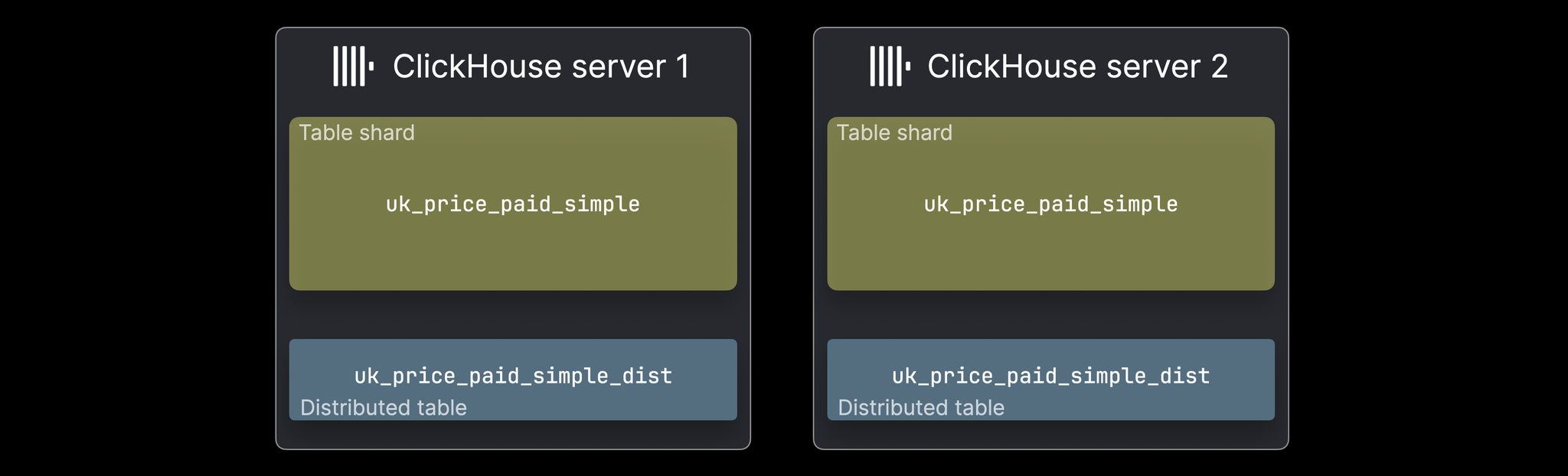
Sharding is the process of distributing data across multiple nodes in a cluster. Each node (shard) holds a portion of the data, allowing ClickHouse to scale horizontally and handle datasets too large for a single server. The Distributed engine lets you query data across all shards transparently, as if it were a single table.
📊
Horizontal Scaling
Scale to petabytes by adding more nodes. Each shard processes its portion of data independently.
⚡
Parallel Processing
Queries execute in parallel across all shards, dramatically reducing response time for large datasets.
🔄
Data Distribution
Sharding keys determine how data is split. Smart key selection ensures balanced distribution.
🛡️
Fault Tolerance
Combined with replication, sharding provides resilience. Loss of one shard doesn't stop the cluster.
Single Node vs Distributed Architecture
Single Node
All data on one server
Limited by disk space and memory
Queries process on one machine
No fault tolerance
Simple to setup and manage
Good for: < 10TB data
Distributed Cluster
Data spread across multiple nodes
Scales to petabytes
Queries parallelized across nodes
Can survive node failures
More complex setup
Good for: 100TB+ data
Key Concepts
Local Table
The actual table on each shard node storing a partition of the data. Each shard has a local table with the same structure.
Distributed Table
A virtual table that references all local tables across the cluster. Queries to it are automatically distributed.
Sharding Key
The column used to determine which shard gets which data. Must distribute evenly across shards.
Replica
A copy of each shard for fault tolerance. Can be combined with sharding for maximum resilience.
Distributed Table Architecture
Client Application
Sends query to Distributed Table
↓
Distributed Table (Virtual)
Routes query to appropriate shards based on sharding key
↓ Query Distribution ↓
Shard 1
Local Table
events_local
Data: user_id 1-1M
Shard 2
Local Table
events_local
Data: user_id 1M-2M
Shard 3
Local Table
events_local
Data: user_id 2M-3M
↓ Parallel Execution ↓
Query Coordinator
Collects and merges results from all shards
↓
Final Result to Client
Sharding Key Distribution
Sharding Function
cityHash64(user_id) % 3
Shard 1 (33.3%)
Users:
user_1user_4user_7user_10...
Shard 2 (33.3%)
Users:
user_2user_5user_8user_11...
Shard 3 (33.3%)
Users:
user_3user_6user_9user_12...
Key Properties:
Even distribution across all shards
Consistent hashing: same user_id always goes to same shard
Single-shard queries when filtering by user_id
Query Execution Flow
Single-Shard Query (Fast)
SELECT * FROM events
WHERE user_id = 12345
AND date >= '2026-01-01'
Step 1: Hash user_id
cityHash64(12345) % 3 = 1
↓
Step 2: Route to Shard 2
Query only 1 shard
↓
✅ Fast: ~100ms
Multi-Shard Query (Scatter-Gather)
SELECT event_type, COUNT(*)
FROM events
WHERE date >= '2026-01-01'
GROUP BY event_type
docker-compose up -d

# After running docker-compose.yml with:
# - clickhouse-node1 on port 9000
# - clickhouse-node2 on port 9001

# Connect to node 1
docker exec -it clickhouse-node1 clickhouse-client

# Connect to node 2 in another terminal
docker exec -it clickhouse-node2 clickhouse-client
2. Create Local Tables on Each Node
-- Run on BOTH nodes (connect to each separately)

CREATE DATABASE sharding_demo;

CREATE TABLE sharding_demo.events_local (
    event_date Date,
    event_time DateTime,
    user_id UInt32,
    event_type String,
    value Float64
) ENGINE = MergeTree()
PARTITION BY toYYYYMM(event_date)
ORDER BY (event_date, user_id);
3. Create Distributed Table (Query All Shards)
-- Run on ANY node (or all for convenience)

CREATE TABLE sharding_demo.events_distributed (
    event_date Date,
    event_time DateTime,
    user_id UInt32,
    event_type String,
    value Float64
) ENGINE = Distributed(
    'my_cluster',                    -- Cluster name
    'sharding_demo',                 -- Database name
    'events_local',                  -- Local table name
    rand()                           -- Sharding key (random)
);
4. Insert Data
-- Insert to distributed table (auto-distributed to shards)
INSERT INTO sharding_demo.events_distributed VALUES
    ('2026-01-22', '2026-01-22 10:00:00', 1001, 'click', 1.5),
    ('2026-01-22', '2026-01-22 10:01:00', 1002, 'purchase', 99.99),
    ('2026-01-22', '2026-01-22 10:02:00', 1003, 'view', 0.0);

-- Verify data distributed
SELECT COUNT(*) FROM sharding_demo.events_local;   -- Each node shows its partition
SELECT COUNT(*) FROM sharding_demo.events_distributed;  -- Total across all nodes
5. Query Across Shards
-- Queries automatically parallelize across shards
SELECT
    event_type,
    COUNT(*) as count,
    SUM(value) as total_value
FROM sharding_demo.events_distributed
GROUP BY event_type
ORDER BY count DESC;
💻 Commands Reference
Cluster Configuration
-- Check cluster nodes
SELECT * FROM system.clusters;

-- Get cluster info
SELECT cluster, shard_num, replica_num, host_name, port, user
FROM system.clusters
WHERE cluster = 'my_cluster'
ORDER BY shard_num, replica_num;
Create Local Tables
-- Standard MergeTree table on each shard
CREATE TABLE events_local (
    event_date Date,
    event_time DateTime,
    user_id UInt32 CODEC(T64),
    event_type LowCardinality(String),
    value Float64
) ENGINE = MergeTree()
PARTITION BY toYYYYMM(event_date)
ORDER BY (event_date, user_id)
TTL event_date + INTERVAL 90 DAY;

-- Replicated version (for fault tolerance)
CREATE TABLE events_local_replicated (
    event_date Date,
    event_time DateTime,
    user_id UInt32,
    event_type LowCardinality(String),
    value Float64
) ENGINE = ReplicatedMergeTree(
    '/clickhouse/tables/01/events',  -- ZK path
    'node1'                          -- Replica name
)
PARTITION BY toYYYYMM(event_date)
ORDER BY (event_date, user_id);

            Create Distributed Tables
-- Distributed table (query all shards)
CREATE TABLE events_distributed (
    event_date Date,
    event_time DateTime,
    user_id UInt32,
    event_type String,
    value Float64
) ENGINE = Distributed(
    'my_cluster',      -- Cluster name
    'default',         -- Database name
    'events_local',    -- Local table name
    cityHash64(user_id) % 2  -- Consistent sharding key
);

-- Insert to distributed (auto-routes to appropriate shard)
INSERT INTO events_distributed VALUES (...);

-- Query distributed (automatically fans out to all shards)
SELECT COUNT(*) FROM events_distributed;
Data Distribution & Rebalancing
-- Check data on each shard
SELECT hostname, COUNT(*) as row_count
FROM clusterAllReplicas('my_cluster', default.events_local)
GROUP BY hostname;

-- Get shard info
SELECT shard_num, replica_num, host_name, port
FROM system.clusters
WHERE cluster = 'my_cluster';
High cardinality (millions of unique values) ensures even distribution
user_id (good) vs country (bad)
Immutability
Should not change over time (reshaping is expensive)
user_id (good) vs status (bad)
Access Pattern
Queries should frequently filter by shard key for efficiency
WHERE user_id = X (good)
Uniformity
Values should be uniformly distributed
Sequential IDs (good) vs timestamps (bad)
3. Local vs Distributed Tables
Local Tables
Exist on each shard node
Store actual data
Use MergeTree family
Queries return partial results
Used internally by Distributed tables
Distributed Tables
Virtual tables (no data storage)
Reference local tables on shards
Route queries to appropriate shards
Combine results from all shards
Transparent horizontal scaling
4. Resharding Considerations
Resharding is EXPENSIVE and RISKY
Plan your sharding key carefully from the start. Resharding (changing the shard key or number of shards) requires:
Dropping and recreating all tables
Re-inserting all data (can take hours/days for large datasets)
Application downtime during migration
Recommendation: Choose your sharding strategy carefully initially. If unsure, start with 4-8 shards (easy to grow, hard to shrink).
5. Handling Uneven Distribution
-- Monitor data distribution across shards
SELECT
    database,
    table,
    shard_num,
    replica_num,
    formatReadableSize(SUM(bytes)) as shard_size,
    COUNT(*) as part_count
FROM clusterAllReplicas('my_cluster', system.parts)
WHERE database = 'analytics' AND table LIKE 'events%'
GROUP BY database, table, shard_num, replica_num
ORDER BY database, table, shard_num;
🎯 When to Use Sharding
✅ Use Sharding When
Data exceeds single server capacity (100TB+)
Query latency is critical (need parallelization)
Ingestion rate requires multiple nodes
Geographic distribution needed (regional shards)
Different data retention per shard
High availability is mandatory
Cost optimization via horizontal scaling
❌ Don't Use Sharding When
Data fits on single server (< 50TB)
Queries are simple and fast
Team lacks experience with distributed systems
Adding infrastructure complexity isn't justified
JOIN queries are frequent (costly across shards)
Transactions are critical (weak ACID support)
🏆 Real-World Results
10x
Query Speed Improvement
Parallelizing across 10 shards reduces query time by ~90% (10x speedup)
1PB+
Scalable Data Volume
Handle petabytes of data across clusters with transparent sharding
99.9%
High Availability
Combined with replication, achieve 99.9%+ uptime
50%
Cost Reduction
Scale efficiently with commodity hardware, reduce per-node requirements
Use Case Examples
Case Study: Multi-Regional Analytics Platform
Challenge: 500 billion events/day across 15 countries
Challenge: 2 trillion data points (market data, trades, quotes)
Solution: 8 shards (partitioned by market + symbol hash)
Results:
Storage: 15TB raw data in 2TB compressed
P99 query latency: 500ms on 1-year lookback
Backfill performance: 100M points/sec per node
📋 Ready-to-Use Templates
Template 1: Basic 3-Node Cluster Setup
-- config.xml on coordinator node (defines cluster)


node1
9000


node2
9000


node3
9000


-- Create local tables on all nodes
CREATE TABLE events_local (
    event_date Date,
    event_time DateTime,
    user_id UInt64,
    event_type String,
    properties String
) ENGINE = MergeTree()
PARTITION BY toYYYYMM(event_date)
ORDER BY (event_date, user_id);

-- Create distributed table
CREATE TABLE events (
    event_date Date,
    event_time DateTime,
    user_id UInt64,
    event_type String,
    properties String
) ENGINE = Distributed('my_cluster', default, events_local, cityHash64(user_id));

            Template 2: Replicated + Sharded for High Availability
-- Cluster with replication (2 shards × 2 replicas)
CREATE TABLE events_local (
    event_date Date,
    event_time DateTime,
    user_id UInt64,
    event_type String,
    value Float64
) ENGINE = ReplicatedMergeTree(
    '/clickhouse/tables/{shard}/events',  -- ZK path (shard substituted)
    '{replica}'                            -- Replica name (instance substituted)
)
PARTITION BY toYYYYMM(event_date)
ORDER BY (event_date, user_id);

-- Distributed table queries all replicas
CREATE TABLE events (
    event_date Date,
    event_time DateTime,
    user_id UInt64,
    event_type String,
    value Float64
) ENGINE = Distributed(
    'my_cluster_replicated',
    default,
    events_local,
    cityHash64(user_id)
);

-- Result: High availability + horizontal scaling

            Template 3: Monitoring Data Distribution
-- Monitor uneven shards
CREATE TABLE shard_statistics AS
SELECT
    database,
    table,
    shard_num,
    formatReadableSize(SUM(bytes)) as shard_size,
    COUNT(*) as part_count,
    ROUND(SUM(rows) / 1000000) as millions_rows
FROM clusterAllReplicas('my_cluster', system.parts)
WHERE database = 'default' AND active = 1
GROUP BY database, table, shard_num
ORDER BY database, table, shard_num;

-- Query for distribution analysis
SELECT
    table,
    arrayMap(x -> x.1, groupArray((shard_num, shard_size))) as distribution,
    SUM(millions_rows) as total_rows_millions
FROM shard_statistics
GROUP BY table;
🔥 Advanced Patterns
1. Asymmetric Sharding (Variable Shard Sizes)
-- Some shards larger than others (e.g., US data is 50% of total)
-- Define multiple cluster configurations


us-node-1
9000


us-node-2
9000


eu-node-1
9000


-- Use consistent hashing to prefer US shard
CREATE TABLE events ENGINE = Distributed(
  'asymmetric_cluster',
  'default',
  'events_local',
  if(country = 'US', intHash32(user_id) % 1, intHash32(user_id) % 2 + 1)
);

            2. Geo-Distributed Sharding
-- Route data to regional shards based on geography
-- Shard 1: US/Canada/Latin America
-- Shard 2: Europe/Africa/Middle East
-- Shard 3: Asia-Pacific

CREATE TABLE events ENGINE = Distributed(
  'geo_sharded_cluster',
  'default',
  'events_local',
  case
    when country IN ('US', 'CA', 'MX', 'BR') then 1
    when country IN ('GB', 'DE', 'FR', 'ZA') then 2
    when country IN ('JP', 'CN', 'AU', 'IN') then 3
    else intHash32(user_id) % 3 + 1  -- fallback to hash
  end
);

-- Benefits: Data locality, lower latency, compliance (GDPR)

            3. Two-Level Sharding (Sharded + Replicated)
-- Maximum reliability: partition data AND replicate
-- 4 shards × 3 replicas = 12 nodes total
-- Can lose 2 replicas per shard (67% node failure)

CREATE TABLE events_local_replicated (
    event_date Date,
    event_time DateTime,
    user_id UInt64,
    event_type String,
    value Float64
) ENGINE = ReplicatedMergeTree(
    '/clickhouse/tables/{shard}/events',
    '{replica}'
)
PARTITION BY toYYYYMM(event_date)
ORDER BY (event_date, user_id);

-- Distributed query automatically handles all replicas
SELECT COUNT(*) FROM events_distributed;  -- Queries all 12 nodes

            4. Handling Slow Shards (Adaptive Query Timeout)
-- Set timeout for slow shards
SET connect_timeout = 5;
SET receive_timeout = 30;
SET send_timeout = 30;

-- Query with partial results if slow shards timeout
SET skip_unavailable_shards = 1;

-- This query will skip shards that don't respond in time
SELECT
    shard_num,
    COUNT(*) as count
FROM clusterAllReplicas('my_cluster', default.events_local)
GROUP BY shard_num
ORDER BY shard_num;

-- Monitor slow queries
SELECT
    hostname,
    query_duration_ms,
    read_rows
FROM clusterAllReplicas('my_cluster', system.query_log)
WHERE type = 'QueryFinish' AND query_duration_ms > 5000
ORDER BY query_duration_ms DESC;
📚 Resources & Next Steps
📘 View in Notion
Access this module in your Notion workspace for note-taking and tracking your progress.
✅ Sharding = Horizontal Scaling: Distribute data across nodes for unlimited capacity
✅ Shard Key is Critical: Choose wisely; resharding is expensive and risky
✅ Local + Distributed: Local tables store data, Distributed tables query them
✅ Combine with Replication: Sharding + replication provides both scale and reliability
✅ Monitor Distribution: Uneven shards degrade performance; use system.parts to monitor
Next: Module 4 - Advanced Query Optimization
After mastering sharding, you'll learn:
Query optimization techniques for large datasets
Materialized views for pre-aggregation
Window functions and advanced analytics
Performance profiling and troubleshooting
🐳 Hands-on Docker Demo for this Module
A self-contained ClickHouse stack you can run locally. Every step is reproducible; the README below walks through each concept with diagrams and measured outcomes.
cd code-examples/demos/module-3-sharding
./up.sh        # bring stack up, wait for health
./run.sh       # run the demo (idempotent — re-runnable)
./down.sh      # tear down + drop volumes
📺 Live demo capture
Recorded with vhs: the actual terminal output from ./run.sh running on this very stack.
Animated GIF, ~1160 KB. Right-click → open in new tab to view full-size.
✨ Animated concept diagrams
Inline SVG animations — no plugins, native browser playback. Each visualises a key flow this module covers.
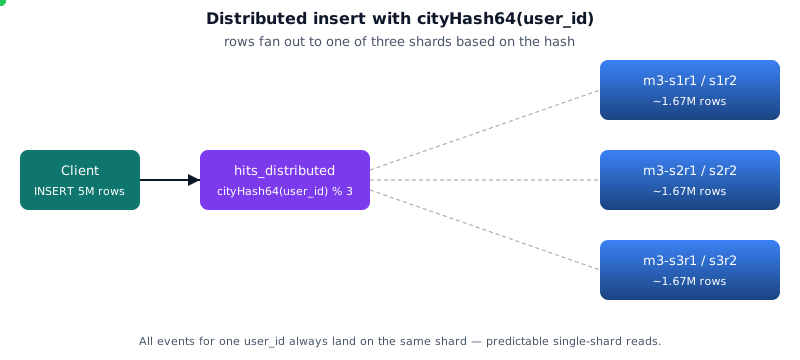
Sharding fanout
🗂️ Architecture diagrams
Rendered from the README's Mermaid sources. Click any to open the source SVG full-size.
Curated from the official ClickHouse documentation and engineering blog (and Altinity's docs/blog) — the same diagrams the broader CH community uses to explain these concepts. Click any image to read the source.
ClickHouse Docs
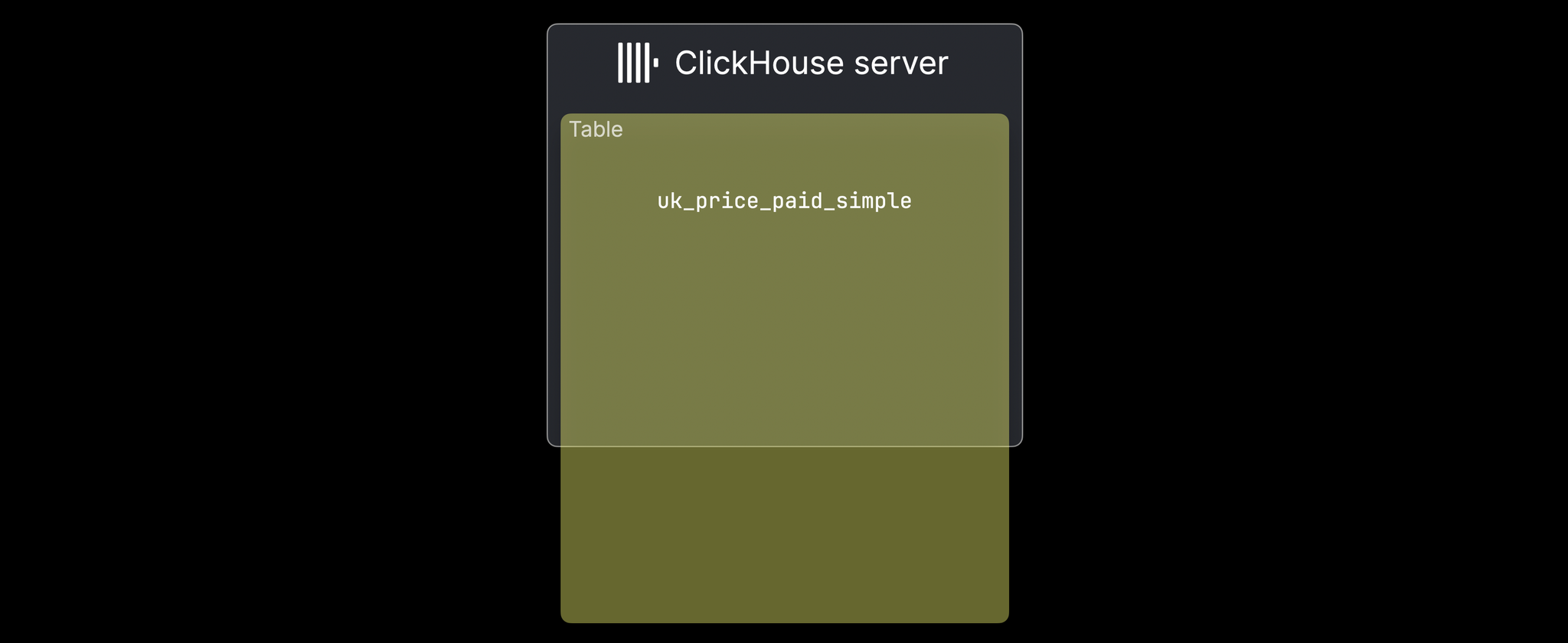
A single MergeTree table that has outgrown one server
ClickHouse Docs
Table data split into shards across multiple servers
ClickHouse Docs
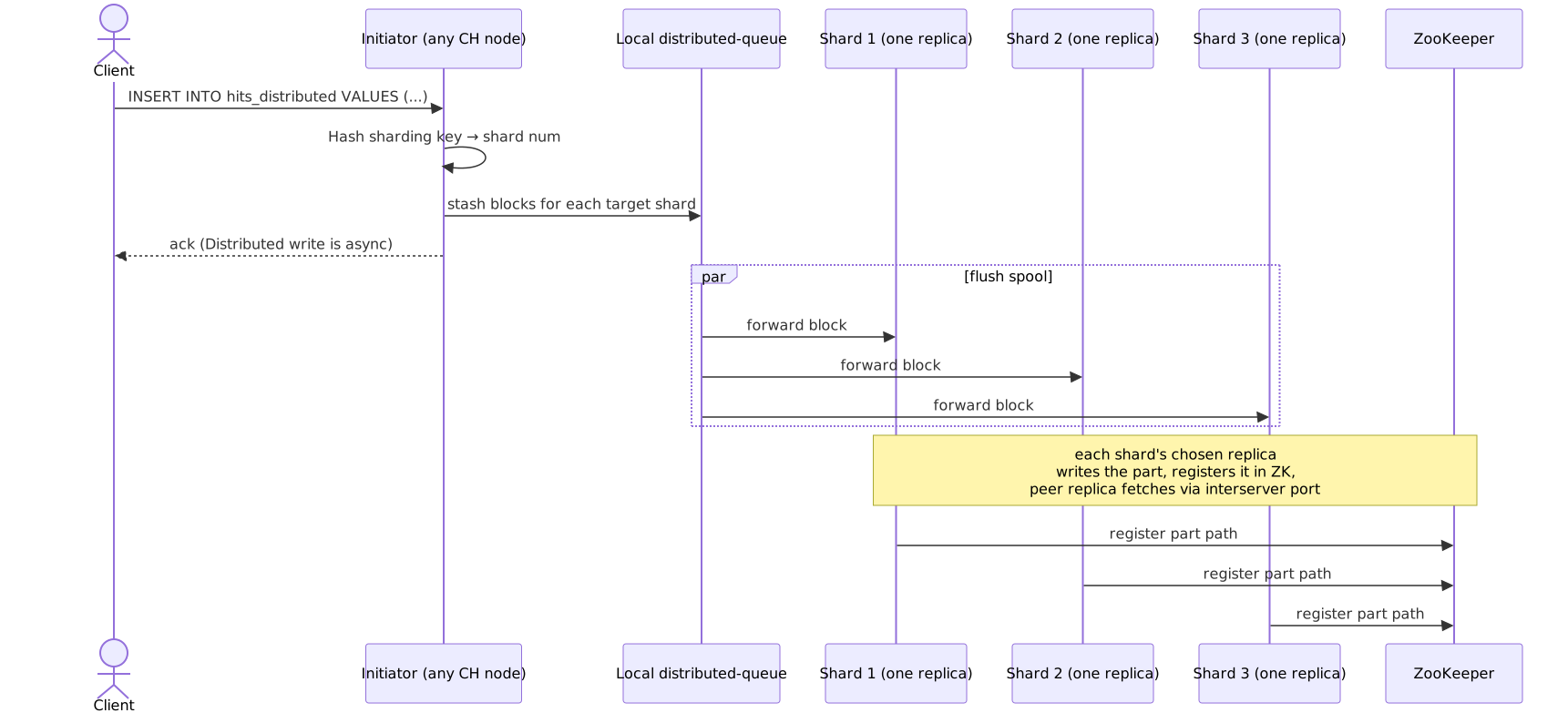
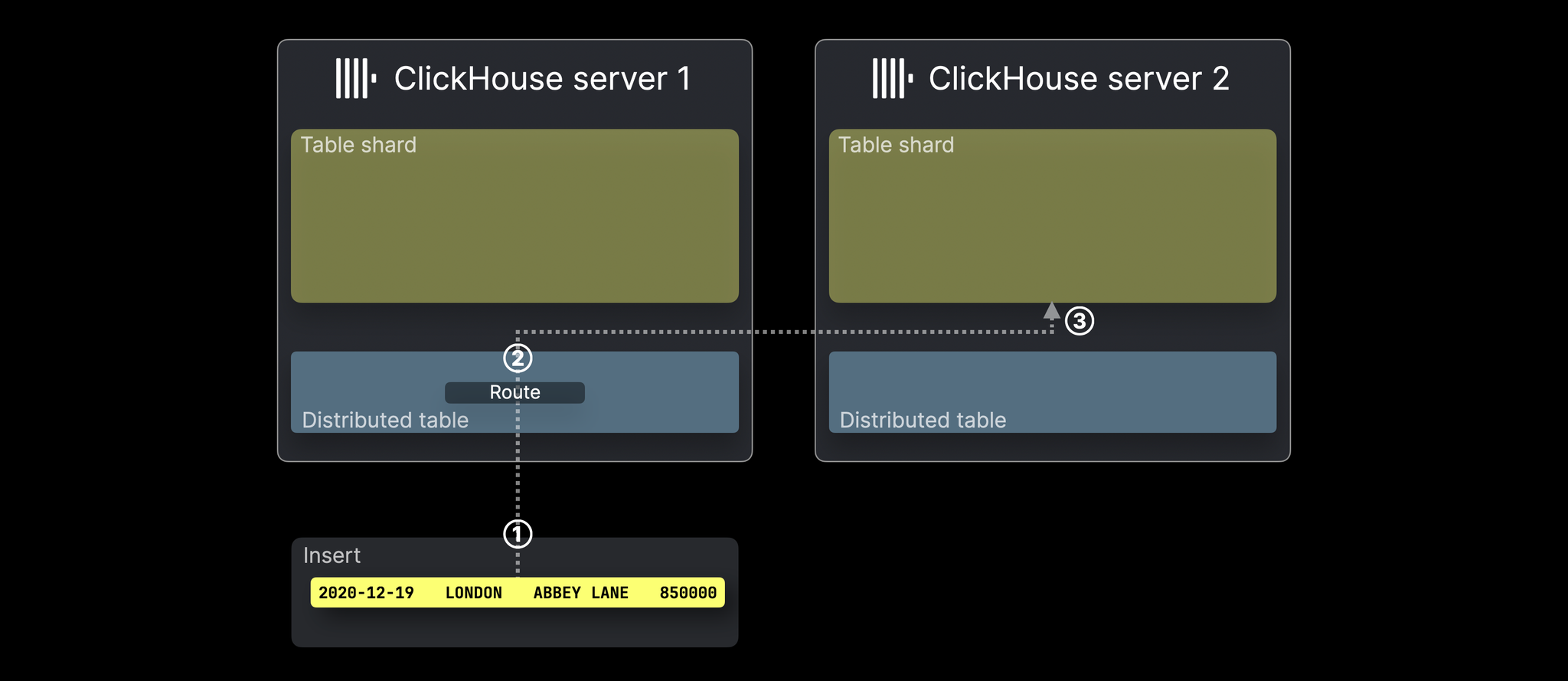
INSERT into a Distributed table: rows routed to target shards
ClickHouse Docs
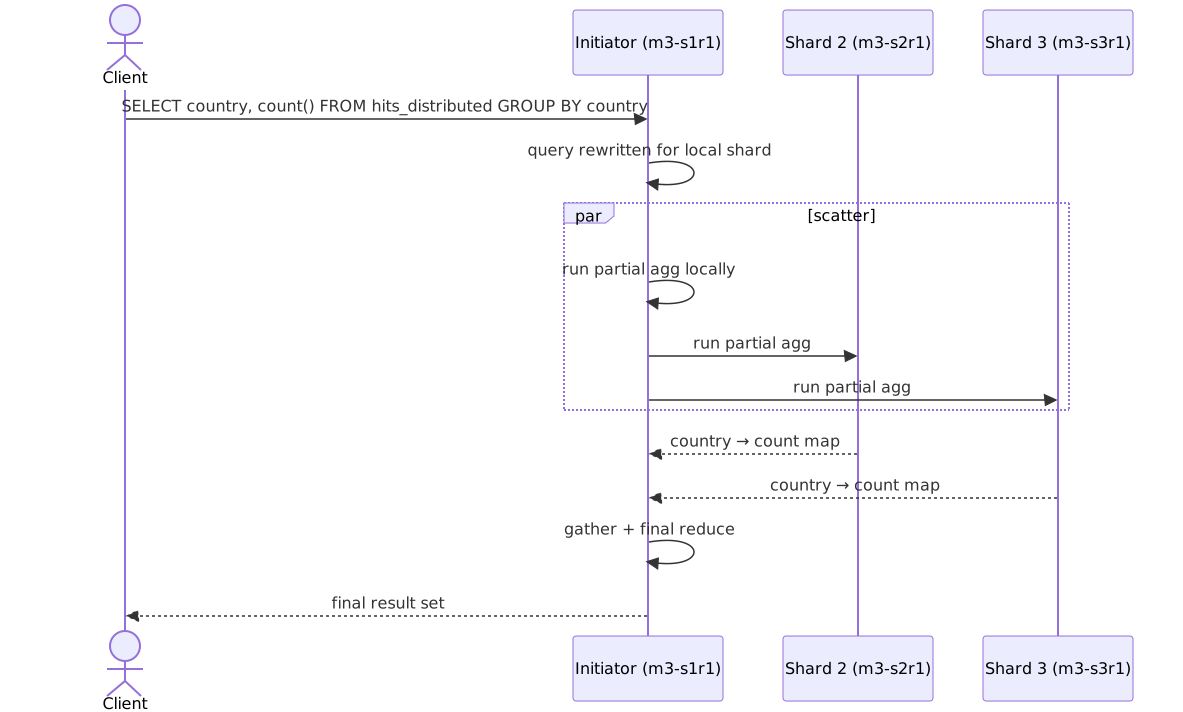
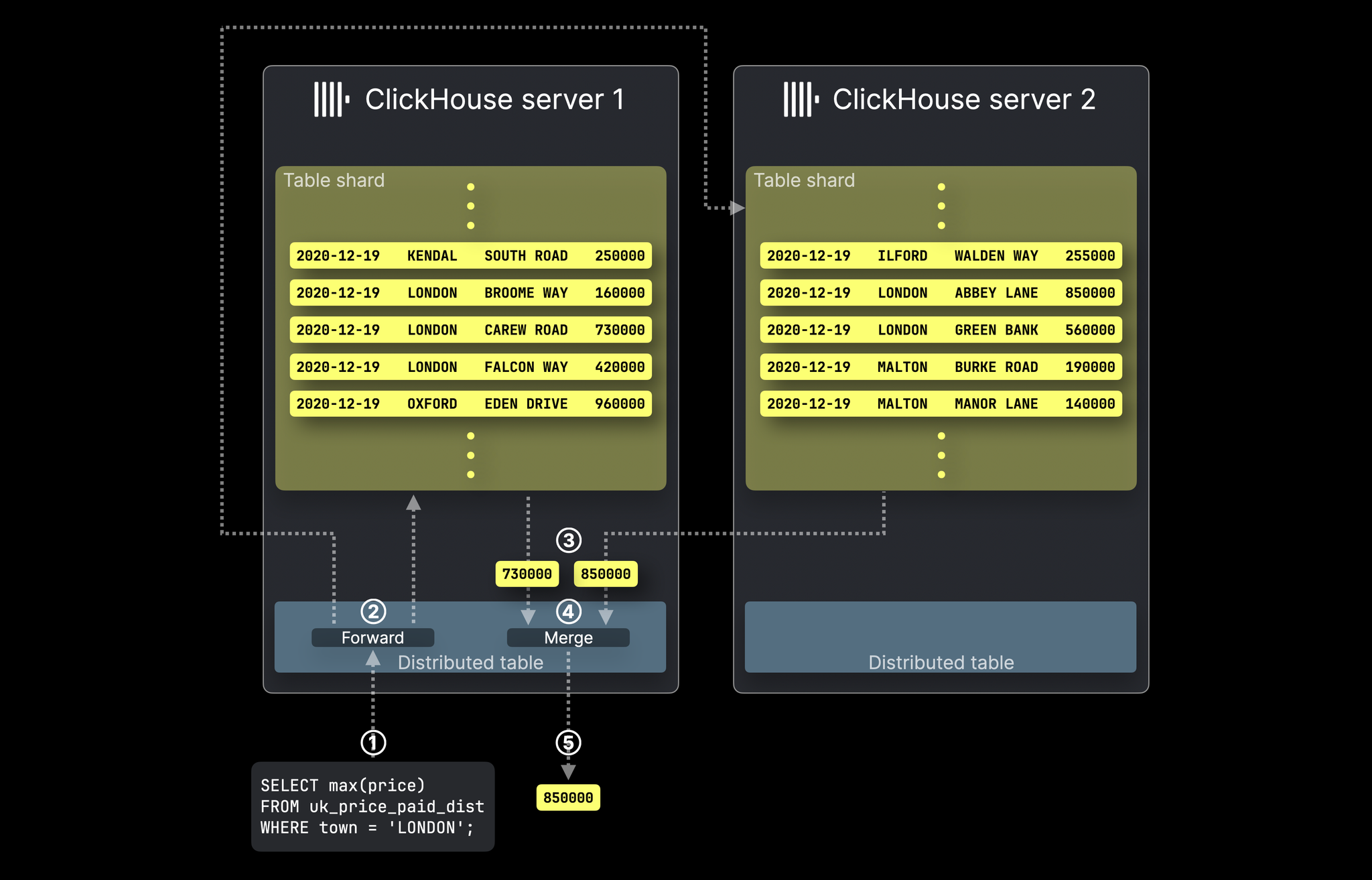
SELECT fan-out: query forwarded to all shards, results merged
ClickHouse Docs
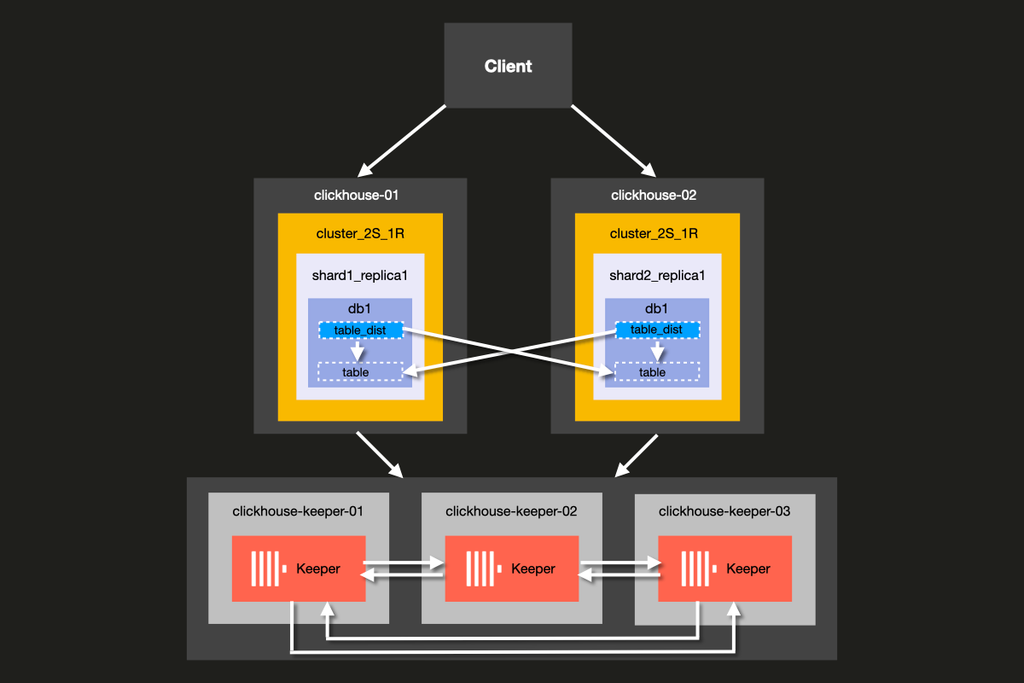
Horizontal scaling via sharding (architecture overview)
📚 Full module reference
Module 3 — Sharding & Distributed Tables
Audience: anyone scaling ClickHouse beyond one node. Prerequisites:
Modules 1–2. Time: ~75 min reading + 30 min hands-on.
By the end you will be able to:
Read a <remote_servers> config and translate it into capacity.
Pick a sharding key that gives even distribution and useful locality.
Distinguish internal_replication = true vs false and know when to
use each.
Trace an INSERT through the Distributed engine to the right shard.
Trace a SELECT through scatter→gather over a Distributed table.
Use weighted shards to handle heterogeneous fleets.
1. Why shard?
💬 Discuss with AI — click to view prompt
Paste into ChatGPT, Claude, Gemini, or any LLM chat.
I'm studying ClickHouse and working through the module "ClickHouse Sharding & Distributed Tables". I want to deeply understand the section: "Why shard?".

Here is a brief excerpt from the material I'm reading:

"""
A single ClickHouse node fits a remarkable amount of data — many teams run a single-node setup well into the **multi-TB** range. You shard when: | Reason                                | Symptom                                                         | | Data exceeds disk capacity            | `du -sh /var/lib/clickhouse` approaches the disk limit.          | | Query CPU saturated on one box        | `system.metrics.Query` always at the thread limit.               | | Background merges can't keep up       | `Too many parts` errors despite batched inserts.                 | | Network ingress >...
"""

Please explain this concept in depth. Cover:

1. **Core mechanics** — how does it actually work under the hood? What data structures, algorithms, or engine internals are involved? Where is the implementation in the ClickHouse source tree (file/folder names) if you know?

2. **When to use vs avoid** — what concrete workloads does this help, and when would it hurt or be wrong? Give specific scale/latency trade-offs.

3. **Comparable features in other systems** — how does this compare with similar features in PostgreSQL, MySQL, BigQuery, Snowflake, Redshift, or DuckDB? Build my intuition by analogy.

4. **Common pitfalls and gotchas** — what trips engineers up in production? Subtle bugs, performance traps, surprising semantics?

5. **Worked example** — show me a small but realistic SQL or config example that demonstrates the concept end-to-end. Include the expected output where useful.

6. **Where to read more** — a short list of authoritative pointers (CH docs, blog posts, talks, source-code files).

Assume I have solid SQL fundamentals but I'm new to ClickHouse internals. Be technical but pragmatic; avoid marketing language.
A single ClickHouse node fits a remarkable amount of data — many teams
run a single-node setup well into the multi-TB range. You shard when:
Reason
Symptom
Data exceeds disk capacity
du -sh /var/lib/clickhouse approaches the disk limit.
Query CPU saturated on one box
system.metrics.Query always at the thread limit.
Background merges can't keep up
Too many parts errors despite batched inserts.
Network ingress > one NIC
INSERT throughput pegged at the NIC's line rate.
If none of these are true: don't shard yet. A shard adds complexity to
DDL, queries, and operations.
2. The cluster shape used by every cluster module in this repo
💬 Discuss with AI — click to view prompt
Paste into ChatGPT, Claude, Gemini, or any LLM chat.
I'm studying ClickHouse and working through the module "ClickHouse Sharding & Distributed Tables". I want to deeply understand the section: "The cluster shape used by every cluster module in this repo".

Here is a brief excerpt from the material I'm reading:

"""
**3 shards × 2 replicas = 6 ClickHouse processes + 3 ZooKeeper.** Every shard's two replicas hold identical data. Different shards hold *different* data, partitioned by the **sharding key**.
"""

Please explain this concept in depth. Cover:

1. **Core mechanics** — how does it actually work under the hood? What data structures, algorithms, or engine internals are involved? Where is the implementation in the ClickHouse source tree (file/folder names) if you know?

2. **When to use vs avoid** — what concrete workloads does this help, and when would it hurt or be wrong? Give specific scale/latency trade-offs.

3. **Comparable features in other systems** — how does this compare with similar features in PostgreSQL, MySQL, BigQuery, Snowflake, Redshift, or DuckDB? Build my intuition by analogy.

4. **Common pitfalls and gotchas** — what trips engineers up in production? Subtle bugs, performance traps, surprising semantics?

5. **Worked example** — show me a small but realistic SQL or config example that demonstrates the concept end-to-end. Include the expected output where useful.

6. **Where to read more** — a short list of authoritative pointers (CH docs, blog posts, talks, source-code files).

Assume I have solid SQL fundamentals but I'm new to ClickHouse internals. Be technical but pragmatic; avoid marketing language.
3 shards × 2 replicas = 6 ClickHouse processes + 3 ZooKeeper. Every
shard's two replicas hold identical data. Different shards hold different
data, partitioned by the sharding key.
3. The two-table pattern
💬 Discuss with AI — click to view prompt
Paste into ChatGPT, Claude, Gemini, or any LLM chat.
I'm studying ClickHouse and working through the module "ClickHouse Sharding & Distributed Tables". I want to deeply understand the section: "The two-table pattern".

Here is a brief excerpt from the material I'm reading:

"""
A sharded table is **two tables**, both created on every node: | Table                   | Engine                  | Where                       | Purpose                                            | | `hits_local`            | `ReplicatedMergeTree`   | physical, on each replica   | Actually stores the rows.                          | | `hits_distributed`      | `Distributed`           | logical, on each replica    | Fans inserts/reads across shards.                  | **`{shard}` and `{replica}` are macros**, expanded per-node from `configs/macros/macros-sNrM.xml` (Module 4 dives into this).
"""

Please explain this concept in depth. Cover:

1. **Core mechanics** — how does it actually work under the hood? What data structures, algorithms, or engine internals are involved? Where is the implementation in the ClickHouse source tree (file/folder names) if you know?

2. **When to use vs avoid** — what concrete workloads does this help, and when would it hurt or be wrong? Give specific scale/latency trade-offs.

3. **Comparable features in other systems** — how does this compare with similar features in PostgreSQL, MySQL, BigQuery, Snowflake, Redshift, or DuckDB? Build my intuition by analogy.

4. **Common pitfalls and gotchas** — what trips engineers up in production? Subtle bugs, performance traps, surprising semantics?

5. **Worked example** — show me a small but realistic SQL or config example that demonstrates the concept end-to-end. Include the expected output where useful.

6. **Where to read more** — a short list of authoritative pointers (CH docs, blog posts, talks, source-code files).

Assume I have solid SQL fundamentals but I'm new to ClickHouse internals. Be technical but pragmatic; avoid marketing language.
A sharded table is two tables, both created on every node:
Table
Engine
Where
Purpose
hits_local
ReplicatedMergeTree
physical, on each replica
Actually stores the rows.
hits_distributed
Distributed
logical, on each replica
Fans inserts/reads across shards.
-- Created ONCE with ON CLUSTER, materialised on every node.
CREATE TABLE hits_local ON CLUSTER clickhouse_cluster (
    event_time DateTime,
    user_id    UInt64,
    country    LowCardinality(String),
    bytes      UInt32
)
ENGINE = ReplicatedMergeTree(
    '/clickhouse/tables/{shard}/hits_local',  -- ZK path: per-shard
    '{replica}'                                -- replica id within the shard
)
PARTITION BY toYYYYMM(event_time)
ORDER BY (user_id, event_time);

CREATE TABLE hits_distributed ON CLUSTER clickhouse_cluster
AS hits_local
ENGINE = Distributed(
    'clickhouse_cluster',     -- cluster name from <remote_servers>
    default,                  -- target database
    hits_local,               -- target table
    cityHash64(user_id)       -- sharding key
);
{shard} and {replica} are macros, expanded per-node from
configs/macros/macros-sNrM.xml (Module 4 dives into this).
4. The cluster config — <remote_servers>
💬 Discuss with AI — click to view prompt
Paste into ChatGPT, Claude, Gemini, or any LLM chat.
I'm studying ClickHouse and working through the module "ClickHouse Sharding & Distributed Tables". I want to deeply understand the section: "The cluster config — <remote_servers>".

Here is a brief excerpt from the material I'm reading:

"""
(no excerpt — section heading was "The cluster config — <remote_servers>")
"""

Please explain this concept in depth. Cover:

1. **Core mechanics** — how does it actually work under the hood? What data structures, algorithms, or engine internals are involved? Where is the implementation in the ClickHouse source tree (file/folder names) if you know?

2. **When to use vs avoid** — what concrete workloads does this help, and when would it hurt or be wrong? Give specific scale/latency trade-offs.

3. **Comparable features in other systems** — how does this compare with similar features in PostgreSQL, MySQL, BigQuery, Snowflake, Redshift, or DuckDB? Build my intuition by analogy.

4. **Common pitfalls and gotchas** — what trips engineers up in production? Subtle bugs, performance traps, surprising semantics?

5. **Worked example** — show me a small but realistic SQL or config example that demonstrates the concept end-to-end. Include the expected output where useful.

6. **Where to read more** — a short list of authoritative pointers (CH docs, blog posts, talks, source-code files).

Assume I have solid SQL fundamentals but I'm new to ClickHouse internals. Be technical but pragmatic; avoid marketing language.
This is the source of truth for "what's a shard, what's a replica":
Defines a shard. Order matters — first <shard> is shard 1.
<replica>
One CH process within the shard. All replicas of a shard hold identical data.
<weight> (optional)
Default 1. Higher weight = bigger share of new inserts. See §8.
<internal_replication>
Critical knob. See §6.
<user> / <password>
Inter-server auth (if you set CH passwords).
Read it with SQL:
SELECT cluster, shard_num, replica_num, host_name, port
FROM system.clusters WHERE cluster = 'clickhouse_cluster'
ORDER BY shard_num, replica_num;
5. INSERT lifecycle — what happens when you insert into a Distributed table
💬 Discuss with AI — click to view prompt
Paste into ChatGPT, Claude, Gemini, or any LLM chat.
I'm studying ClickHouse and working through the module "ClickHouse Sharding & Distributed Tables". I want to deeply understand the section: "INSERT lifecycle — what happens when you insert into a Distributed table".

Here is a brief excerpt from the material I'm reading:

"""
Key facts: - **Distributed INSERT is asynchronous by default.** The client gets an ack once the row is on the initiator's local spool, *before* it's been forwarded to each shard. Use `SYSTEM FLUSH DISTRIBUTED` to wait for all forwards to land. - **The initiator sends to *one* replica per shard** when `internal_replication = true`. That replica then replicates to its peer via ZK + interserver port (Module 4). - **The spool lives on disk** under `data/<db>/<distributed_table>/<shard>/`. If the initiator crashes, the spool survives.
"""

Please explain this concept in depth. Cover:

1. **Core mechanics** — how does it actually work under the hood? What data structures, algorithms, or engine internals are involved? Where is the implementation in the ClickHouse source tree (file/folder names) if you know?

2. **When to use vs avoid** — what concrete workloads does this help, and when would it hurt or be wrong? Give specific scale/latency trade-offs.

3. **Comparable features in other systems** — how does this compare with similar features in PostgreSQL, MySQL, BigQuery, Snowflake, Redshift, or DuckDB? Build my intuition by analogy.

4. **Common pitfalls and gotchas** — what trips engineers up in production? Subtle bugs, performance traps, surprising semantics?

5. **Worked example** — show me a small but realistic SQL or config example that demonstrates the concept end-to-end. Include the expected output where useful.

6. **Where to read more** — a short list of authoritative pointers (CH docs, blog posts, talks, source-code files).

Assume I have solid SQL fundamentals but I'm new to ClickHouse internals. Be technical but pragmatic; avoid marketing language.
Key facts:
Distributed INSERT is asynchronous by default. The client gets an
ack once the row is on the initiator's local spool, before it's been
forwarded to each shard. Use SYSTEM FLUSH DISTRIBUTED to wait for
all forwards to land.
The initiator sends to one replica per shard when
internal_replication = true. That replica then replicates to its peer
via ZK + interserver port (Module 4).
The spool lives on disk under data/<db>/<distributed_table>/<shard>/.
If the initiator crashes, the spool survives.
6. internal_replication — the most-confused knob in CH
💬 Discuss with AI — click to view prompt
Paste into ChatGPT, Claude, Gemini, or any LLM chat.
I'm studying ClickHouse and working through the module "ClickHouse Sharding & Distributed Tables". I want to deeply understand the section: "internal_replication — the most-confused knob in CH".

Here is a brief excerpt from the material I'm reading:

"""
(no excerpt — section heading was "internal_replication — the most-confused knob in CH")
"""

Please explain this concept in depth. Cover:

1. **Core mechanics** — how does it actually work under the hood? What data structures, algorithms, or engine internals are involved? Where is the implementation in the ClickHouse source tree (file/folder names) if you know?

2. **When to use vs avoid** — what concrete workloads does this help, and when would it hurt or be wrong? Give specific scale/latency trade-offs.

3. **Comparable features in other systems** — how does this compare with similar features in PostgreSQL, MySQL, BigQuery, Snowflake, Redshift, or DuckDB? Build my intuition by analogy.

4. **Common pitfalls and gotchas** — what trips engineers up in production? Subtle bugs, performance traps, surprising semantics?

5. **Worked example** — show me a small but realistic SQL or config example that demonstrates the concept end-to-end. Include the expected output where useful.

6. **Where to read more** — a short list of authoritative pointers (CH docs, blog posts, talks, source-code files).

Assume I have solid SQL fundamentals but I'm new to ClickHouse internals. Be technical but pragmatic; avoid marketing language.
Two modes, mutually exclusive at the cluster-config level:
Mode A — <internal_replication>true</internal_replication> (the right answer 99% of the time)
The Distributed engine sends to one replica per shard. ReplicatedMergeTree
takes care of replication via ZK.
INSERT → Distributed → pick one replica per shard
                       ↓
                       write to s1r1
                       ↓
                       s1r1 logs part in ZK
                       ↓
                       s1r2 fetches part from s1r1 via :9009
Pro
Con
One write per shard, not N.
Requires Replicated*MergeTree.
Inherits ZK consistency guarantees.
Requires ZK to be healthy.
Mode B — <internal_replication>false</internal_replication> (legacy)
The Distributed engine sends to every replica per shard. The local
table can be plain MergeTree.
INSERT → Distributed → write to s1r1 AND s1r2 in parallel
Pro
Con
No ZK dependency for replication.
Network bandwidth = N×.
Simpler local table engine.
No deduplication; replicas can drift on partial fails.
Use internal_replication=true with ReplicatedMergeTree everywhere.
The non-replicated path is mostly historical and fragile.
7. SELECT lifecycle — scatter / gather
💬 Discuss with AI — click to view prompt
Paste into ChatGPT, Claude, Gemini, or any LLM chat.
I'm studying ClickHouse and working through the module "ClickHouse Sharding & Distributed Tables". I want to deeply understand the section: "SELECT lifecycle — scatter / gather".

Here is a brief excerpt from the material I'm reading:

"""
- The initiator picks **one replica per shard** for the read (load-balanced via `<load_balancing>` setting, default `random`). - Each shard runs a **partial aggregation** locally and sends the intermediate result up. The initiator merges. - For pre-filtered queries (`WHERE user_id = 42` with the demo's sharding key), the planner narrows to **a single shard** — visible in `EXPLAIN`.
"""

Please explain this concept in depth. Cover:

1. **Core mechanics** — how does it actually work under the hood? What data structures, algorithms, or engine internals are involved? Where is the implementation in the ClickHouse source tree (file/folder names) if you know?

2. **When to use vs avoid** — what concrete workloads does this help, and when would it hurt or be wrong? Give specific scale/latency trade-offs.

3. **Comparable features in other systems** — how does this compare with similar features in PostgreSQL, MySQL, BigQuery, Snowflake, Redshift, or DuckDB? Build my intuition by analogy.

4. **Common pitfalls and gotchas** — what trips engineers up in production? Subtle bugs, performance traps, surprising semantics?

5. **Worked example** — show me a small but realistic SQL or config example that demonstrates the concept end-to-end. Include the expected output where useful.

6. **Where to read more** — a short list of authoritative pointers (CH docs, blog posts, talks, source-code files).

Assume I have solid SQL fundamentals but I'm new to ClickHouse internals. Be technical but pragmatic; avoid marketing language.
The initiator picks one replica per shard for the read (load-balanced
via <load_balancing> setting, default random).
Each shard runs a partial aggregation locally and sends the
intermediate result up. The initiator merges.
For pre-filtered queries (WHERE user_id = 42 with the demo's sharding
key), the planner narrows to a single shard — visible in EXPLAIN.
8. Choosing a sharding key
💬 Discuss with AI — click to view prompt
Paste into ChatGPT, Claude, Gemini, or any LLM chat.
I'm studying ClickHouse and working through the module "ClickHouse Sharding & Distributed Tables". I want to deeply understand the section: "Choosing a sharding key".

Here is a brief excerpt from the material I'm reading:

"""
The sharding key is an arbitrary expression. The Distributed engine computes `key % total_weight` to pick a shard. | Key                              | Distribution         | Locality                                | Verdict for typical analytics       | | `cityHash64(user_id)`            | even                 | all events for one user → one shard      | **Default choice.**                 | | `xxHash64(user_id)`              | even                 | same as above; lower collision rate      | Fine alternative.                    | | `intDiv(user_id, 100000)`        | even (if user_ids dense)...
"""

Please explain this concept in depth. Cover:

1. **Core mechanics** — how does it actually work under the hood? What data structures, algorithms, or engine internals are involved? Where is the implementation in the ClickHouse source tree (file/folder names) if you know?

2. **When to use vs avoid** — what concrete workloads does this help, and when would it hurt or be wrong? Give specific scale/latency trade-offs.

3. **Comparable features in other systems** — how does this compare with similar features in PostgreSQL, MySQL, BigQuery, Snowflake, Redshift, or DuckDB? Build my intuition by analogy.

4. **Common pitfalls and gotchas** — what trips engineers up in production? Subtle bugs, performance traps, surprising semantics?

5. **Worked example** — show me a small but realistic SQL or config example that demonstrates the concept end-to-end. Include the expected output where useful.

6. **Where to read more** — a short list of authoritative pointers (CH docs, blog posts, talks, source-code files).

Assume I have solid SQL fundamentals but I'm new to ClickHouse internals. Be technical but pragmatic; avoid marketing language.
The sharding key is an arbitrary expression. The Distributed engine
computes key % total_weight to pick a shard.
Rule of thumb: the sharding key should be a stable, high-cardinality
identifier that your queries already filter on (user_id, account_id,
device_id). Time alone is a bad sharding key. Country alone is a bad
sharding key.
9. Weighted shards — heterogeneous capacity
💬 Discuss with AI — click to view prompt
Paste into ChatGPT, Claude, Gemini, or any LLM chat.
I'm studying ClickHouse and working through the module "ClickHouse Sharding & Distributed Tables". I want to deeply understand the section: "Weighted shards — heterogeneous capacity".

Here is a brief excerpt from the material I'm reading:

"""
When one node is bigger than the others, set `<weight>` proportionally. The Distributed engine sums the weights and routes by `hash % total`. Above: `4/6 ≈ 67%` of inserts go to shard 3. The demo's `extras.sql` defines a `weighted_cluster` over the same hosts and shows the resulting per-shard balance.
"""

Please explain this concept in depth. Cover:

1. **Core mechanics** — how does it actually work under the hood? What data structures, algorithms, or engine internals are involved? Where is the implementation in the ClickHouse source tree (file/folder names) if you know?

2. **When to use vs avoid** — what concrete workloads does this help, and when would it hurt or be wrong? Give specific scale/latency trade-offs.

3. **Comparable features in other systems** — how does this compare with similar features in PostgreSQL, MySQL, BigQuery, Snowflake, Redshift, or DuckDB? Build my intuition by analogy.

4. **Common pitfalls and gotchas** — what trips engineers up in production? Subtle bugs, performance traps, surprising semantics?

5. **Worked example** — show me a small but realistic SQL or config example that demonstrates the concept end-to-end. Include the expected output where useful.

6. **Where to read more** — a short list of authoritative pointers (CH docs, blog posts, talks, source-code files).

Assume I have solid SQL fundamentals but I'm new to ClickHouse internals. Be technical but pragmatic; avoid marketing language.
When one node is bigger than the others, set <weight> proportionally.
The Distributed engine sums the weights and routes by hash % total.
Above: 4/6 ≈ 67% of inserts go to shard 3.
The demo's extras.sql defines a weighted_cluster over the same hosts
and shows the resulting per-shard balance.
10. Other table functions for ad-hoc cluster queries
💬 Discuss with AI — click to view prompt
Paste into ChatGPT, Claude, Gemini, or any LLM chat.
I'm studying ClickHouse and working through the module "ClickHouse Sharding & Distributed Tables". I want to deeply understand the section: "Other table functions for ad-hoc cluster queries".

Here is a brief excerpt from the material I'm reading:

"""
| Function                            | Hits                                  | Use for                                  | | `cluster('cluster_name', db, tbl)`  | one replica per shard                 | one-shot fan-out without a Distributed table | | `clusterAllReplicas('...', db, tbl)`| **every replica of every shard**       | replica-equivalence checks, *never aggregations* | | `remote('host:port', db, tbl)`      | one specific node                     | cross-cluster spot queries               | | `remoteSecure(...)`                 | same, over TLS                        | as above, in pr...
"""

Please explain this concept in depth. Cover:

1. **Core mechanics** — how does it actually work under the hood? What data structures, algorithms, or engine internals are involved? Where is the implementation in the ClickHouse source tree (file/folder names) if you know?

2. **When to use vs avoid** — what concrete workloads does this help, and when would it hurt or be wrong? Give specific scale/latency trade-offs.

3. **Comparable features in other systems** — how does this compare with similar features in PostgreSQL, MySQL, BigQuery, Snowflake, Redshift, or DuckDB? Build my intuition by analogy.

4. **Common pitfalls and gotchas** — what trips engineers up in production? Subtle bugs, performance traps, surprising semantics?

5. **Worked example** — show me a small but realistic SQL or config example that demonstrates the concept end-to-end. Include the expected output where useful.

6. **Where to read more** — a short list of authoritative pointers (CH docs, blog posts, talks, source-code files).

Assume I have solid SQL fundamentals but I'm new to ClickHouse internals. Be technical but pragmatic; avoid marketing language.
Function
Hits
Use for
cluster('cluster_name', db, tbl)
one replica per shard
one-shot fan-out without a Distributed table
clusterAllReplicas('...', db, tbl)
every replica of every shard
replica-equivalence checks, never aggregations
remote('host:port', db, tbl)
one specific node
cross-cluster spot queries
remoteSecure(...)
same, over TLS
as above, in production
Don't aggregate over clusterAllReplicas — you'll double-count.
11. The hands-on demo
💬 Discuss with AI — click to view prompt
Paste into ChatGPT, Claude, Gemini, or any LLM chat.
I'm studying ClickHouse and working through the module "ClickHouse Sharding & Distributed Tables". I want to deeply understand the section: "The hands-on demo".

Here is a brief excerpt from the material I'm reading:

"""
### What you get ### Container map | Role        | Container | Host HTTP | Host TCP | | Shard 1 R1  | `m3-s1r1` | 8123      | 9000     | | Shard 1 R2  | `m3-s1r2` | 8124      | 9001     | | Shard 2 R1  | `m3-s2r1` | 8125      | 9002     | | Shard 2 R2  | `m3-s2r2` | 8126      | 9003     | | Shard 3 R1  | `m3-s3r1` | 8127      | 9004     | | Shard 3 R2  | `m3-s3r2` | 8128      | 9005     | | ZK 1/2/3    | `m3-zk1/2/3` | (internal) | | ### Execution flow — what runs, in order | #  | Step                                | What happens...
"""

Please explain this concept in depth. Cover:

1. **Core mechanics** — how does it actually work under the hood? What data structures, algorithms, or engine internals are involved? Where is the implementation in the ClickHouse source tree (file/folder names) if you know?

2. **When to use vs avoid** — what concrete workloads does this help, and when would it hurt or be wrong? Give specific scale/latency trade-offs.

3. **Comparable features in other systems** — how does this compare with similar features in PostgreSQL, MySQL, BigQuery, Snowflake, Redshift, or DuckDB? Build my intuition by analogy.

4. **Common pitfalls and gotchas** — what trips engineers up in production? Subtle bugs, performance traps, surprising semantics?

5. **Worked example** — show me a small but realistic SQL or config example that demonstrates the concept end-to-end. Include the expected output where useful.

6. **Where to read more** — a short list of authoritative pointers (CH docs, blog posts, talks, source-code files).

Assume I have solid SQL fundamentals but I'm new to ClickHouse internals. Be technical but pragmatic; avoid marketing language.
If m3-s1r1 doesn't respond to /ping, up.sh runs first. Tears down peer demo modules, brings up the cluster, waits for every CH node to answer /ping.
1
setup.sql (via m3-s1r1)
Three ON CLUSTER statements: drop any existing tables, then CREATE TABLE hits_local … ReplicatedMergeTree('/clickhouse/tables/{shard}/hits_local', '{replica}') on every node, then a Distributed('clickhouse_cluster', default, hits_local, cityHash64(user_id)) wrapper. The {shard} and {replica} macros are expanded per-node.
2
data.sql (via m3-s1r1)
One INSERT INTO hits_distributed SELECT FROM numbers(5_000_000). The Distributed table fans rows to the right hits_local based on cityHash64(user_id) % 3.
3
SYSTEM FLUSH DISTRIBUTED × 6
Distributed inserts spool briefly on each node. Flushed on every replica so the next counts are exact.
4
queries.sql
Six queries: cluster topology, total rows, per-shard breakdown, replica equivalence, country aggregation, EXPLAIN, single-shard point lookup.
5
extras.sql
Sets up weighted_cluster (weights 1,1,4) → 600k row insert → per-shard balance (~66% on shard 3). Then three more Distributed tables with alternative sharding keys (rand(), intDiv(), xxHash64()) and EXPLAIN for each.
What to look for
Step
Outcome
system.clusters
3 shards × 2 replicas, all errors_count = 0.
Per-shard count
~1.67M rows each (5M / 3 with cityHash64).
Replica equivalence (s1)
r1 and r2 have identical byte counts.
EXPLAIN … WHERE user_id = 42
Plan shows query goes to one shard.
Weighted cluster balance
~100k / 100k / 400k (shard 3 has 4× weight).
12. Operational SQL cheatsheet
💬 Discuss with AI — click to view prompt
Paste into ChatGPT, Claude, Gemini, or any LLM chat.
I'm studying ClickHouse and working through the module "ClickHouse Sharding & Distributed Tables". I want to deeply understand the section: "Operational SQL cheatsheet".

Here is a brief excerpt from the material I'm reading:

"""
(no excerpt — section heading was "Operational SQL cheatsheet")
"""

Please explain this concept in depth. Cover:

1. **Core mechanics** — how does it actually work under the hood? What data structures, algorithms, or engine internals are involved? Where is the implementation in the ClickHouse source tree (file/folder names) if you know?

2. **When to use vs avoid** — what concrete workloads does this help, and when would it hurt or be wrong? Give specific scale/latency trade-offs.

3. **Comparable features in other systems** — how does this compare with similar features in PostgreSQL, MySQL, BigQuery, Snowflake, Redshift, or DuckDB? Build my intuition by analogy.

4. **Common pitfalls and gotchas** — what trips engineers up in production? Subtle bugs, performance traps, surprising semantics?

5. **Worked example** — show me a small but realistic SQL or config example that demonstrates the concept end-to-end. Include the expected output where useful.

6. **Where to read more** — a short list of authoritative pointers (CH docs, blog posts, talks, source-code files).

Assume I have solid SQL fundamentals but I'm new to ClickHouse internals. Be technical but pragmatic; avoid marketing language.
-- "Is the cluster healthy?"
SELECT cluster, shard_num, replica_num, host_name, errors_count, slowdowns_count
FROM system.clusters WHERE cluster = 'clickhouse_cluster';

-- "How many rows on each shard, right now?"
SELECT shardNum() AS shard, count() AS rows
FROM clusterAllReplicas('clickhouse_cluster', default, hits_local)
GROUP BY shard ORDER BY shard;

-- "What's pending in the distributed spool?"
SELECT database, table, is_blocked, error_count, data_files, data_compressed_bytes
FROM system.distribution_queue;

-- "What did this query actually do?"
EXPLAIN SELECT count() FROM hits_distributed WHERE user_id = 42;
13. Common pitfalls
💬 Discuss with AI — click to view prompt
Paste into ChatGPT, Claude, Gemini, or any LLM chat.
I'm studying ClickHouse and working through the module "ClickHouse Sharding & Distributed Tables". I want to deeply understand the section: "Common pitfalls".

Here is a brief excerpt from the material I'm reading:

"""
| Symptom                                                                 | Cause                                                                  | Fix                                                                                              | | One shard has 4× the rows of others                                     | High-skew sharding key (e.g. `country`).                               | Re-shard with a high-cardinality key or use a composite expression.                              | | `INSERT INTO hits_distributed` returns immediately, but `SELECT count()` is short | Spool not yet flus...
"""

Please explain this concept in depth. Cover:

1. **Core mechanics** — how does it actually work under the hood? What data structures, algorithms, or engine internals are involved? Where is the implementation in the ClickHouse source tree (file/folder names) if you know?

2. **When to use vs avoid** — what concrete workloads does this help, and when would it hurt or be wrong? Give specific scale/latency trade-offs.

3. **Comparable features in other systems** — how does this compare with similar features in PostgreSQL, MySQL, BigQuery, Snowflake, Redshift, or DuckDB? Build my intuition by analogy.

4. **Common pitfalls and gotchas** — what trips engineers up in production? Subtle bugs, performance traps, surprising semantics?

5. **Worked example** — show me a small but realistic SQL or config example that demonstrates the concept end-to-end. Include the expected output where useful.

6. **Where to read more** — a short list of authoritative pointers (CH docs, blog posts, talks, source-code files).

Assume I have solid SQL fundamentals but I'm new to ClickHouse internals. Be technical but pragmatic; avoid marketing language.
Symptom
Cause
Fix
One shard has 4× the rows of others
High-skew sharding key (e.g. country).
Re-shard with a high-cardinality key or use a composite expression.
INSERT INTO hits_distributed returns immediately, but SELECT count() is short
Spool not yet flushed.
SYSTEM FLUSH DISTRIBUTED <table> on every node.
Replicas on the same shard disagree on row count
internal_replication = false + a partial-failure write.
Switch to internal_replication = true and ReplicatedMergeTree.
EXPLAIN shows scatter even though WHERE filters by sharding key
The planner couldn't statically prove the filter narrows to one shard.
Filter must be on the exact column expression of the sharding key.
ON CLUSTER DDL hangs
distributed_ddl_task_timeout exceeded; one node unhealthy.
Check system.distributed_ddl_queue.exception_text; fix the unhealthy node.
Changing <remote_servers> doesn't take effect
XML reloads on file change; if it didn't, you may have a parse error.
SELECT * FROM system.clusters to confirm; check server log for parse errors.
14. Talking points for the live session
💬 Discuss with AI — click to view prompt
Paste into ChatGPT, Claude, Gemini, or any LLM chat.
I'm studying ClickHouse and working through the module "ClickHouse Sharding & Distributed Tables". I want to deeply understand the section: "Talking points for the live session".

Here is a brief excerpt from the material I'm reading:

"""
1. **Sharding ≠ partitioning.** Walk through the layered mental model: *cluster → shard → replica → partition → part → granule.* 2. **Sharding key = locality + uniformity.** Show why `country` is bad (skew) and `cityHash64(user_id)` is good (even, but stable). 3. **`internal_replication` is the knob most teams get wrong.** Show the two flow diagrams and recommend `true` + Replicated. 4. **`SYSTEM FLUSH DISTRIBUTED`** isn't optional in tests — it's the reason your CI's flaky. 5. **Weighted shards** for heterogeneous fleets. Demo the 1/1/4 cluster and `system.clusters.weight`. 6. **Resharding is...
"""

Please explain this concept in depth. Cover:

1. **Core mechanics** — how does it actually work under the hood? What data structures, algorithms, or engine internals are involved? Where is the implementation in the ClickHouse source tree (file/folder names) if you know?

2. **When to use vs avoid** — what concrete workloads does this help, and when would it hurt or be wrong? Give specific scale/latency trade-offs.

3. **Comparable features in other systems** — how does this compare with similar features in PostgreSQL, MySQL, BigQuery, Snowflake, Redshift, or DuckDB? Build my intuition by analogy.

4. **Common pitfalls and gotchas** — what trips engineers up in production? Subtle bugs, performance traps, surprising semantics?

5. **Worked example** — show me a small but realistic SQL or config example that demonstrates the concept end-to-end. Include the expected output where useful.

6. **Where to read more** — a short list of authoritative pointers (CH docs, blog posts, talks, source-code files).

Assume I have solid SQL fundamentals but I'm new to ClickHouse internals. Be technical but pragmatic; avoid marketing language.
Sharding ≠ partitioning. Walk through the layered mental model:
cluster → shard → replica → partition → part → granule.
Sharding key = locality + uniformity. Show why country is bad
(skew) and cityHash64(user_id) is good (even, but stable).
internal_replication is the knob most teams get wrong. Show
the two flow diagrams and recommend true + Replicated.
SYSTEM FLUSH DISTRIBUTED isn't optional in tests — it's the
reason your CI's flaky.
Weighted shards for heterogeneous fleets. Demo the 1/1/4 cluster
and system.clusters.weight.
Resharding is a project, not a setting. Use clickhouse-copier
or write to a parallel cluster with the new key, then cut over.
15. Going deeper
💬 Discuss with AI — click to view prompt
Paste into ChatGPT, Claude, Gemini, or any LLM chat.
I'm studying ClickHouse and working through the module "ClickHouse Sharding & Distributed Tables". I want to deeply understand the section: "Going deeper".

Here is a brief excerpt from the material I'm reading:

"""
- **Module 4** — what ZK actually does for replication, with kill-replica drills. - **Module 5** — `ON CLUSTER` DDL, distributed query plans, `cluster()` table function. - **Module 8** — disaster recovery on this same cluster.
"""

Please explain this concept in depth. Cover:

1. **Core mechanics** — how does it actually work under the hood? What data structures, algorithms, or engine internals are involved? Where is the implementation in the ClickHouse source tree (file/folder names) if you know?

2. **When to use vs avoid** — what concrete workloads does this help, and when would it hurt or be wrong? Give specific scale/latency trade-offs.

3. **Comparable features in other systems** — how does this compare with similar features in PostgreSQL, MySQL, BigQuery, Snowflake, Redshift, or DuckDB? Build my intuition by analogy.

4. **Common pitfalls and gotchas** — what trips engineers up in production? Subtle bugs, performance traps, surprising semantics?

5. **Worked example** — show me a small but realistic SQL or config example that demonstrates the concept end-to-end. Include the expected output where useful.

6. **Where to read more** — a short list of authoritative pointers (CH docs, blog posts, talks, source-code files).

Assume I have solid SQL fundamentals but I'm new to ClickHouse internals. Be technical but pragmatic; avoid marketing language.
Module 4 — what ZK actually does for replication, with kill-replica drills.