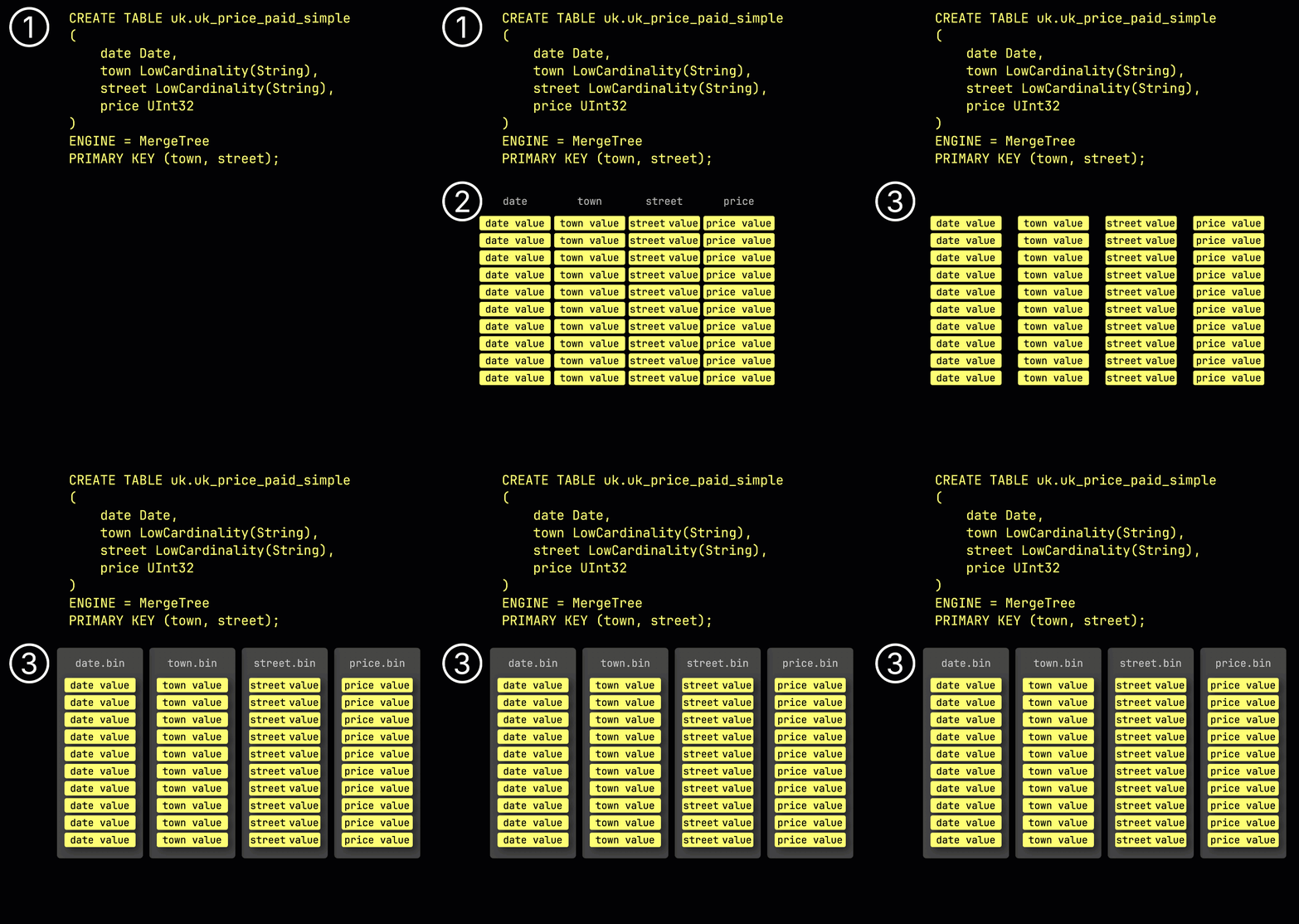
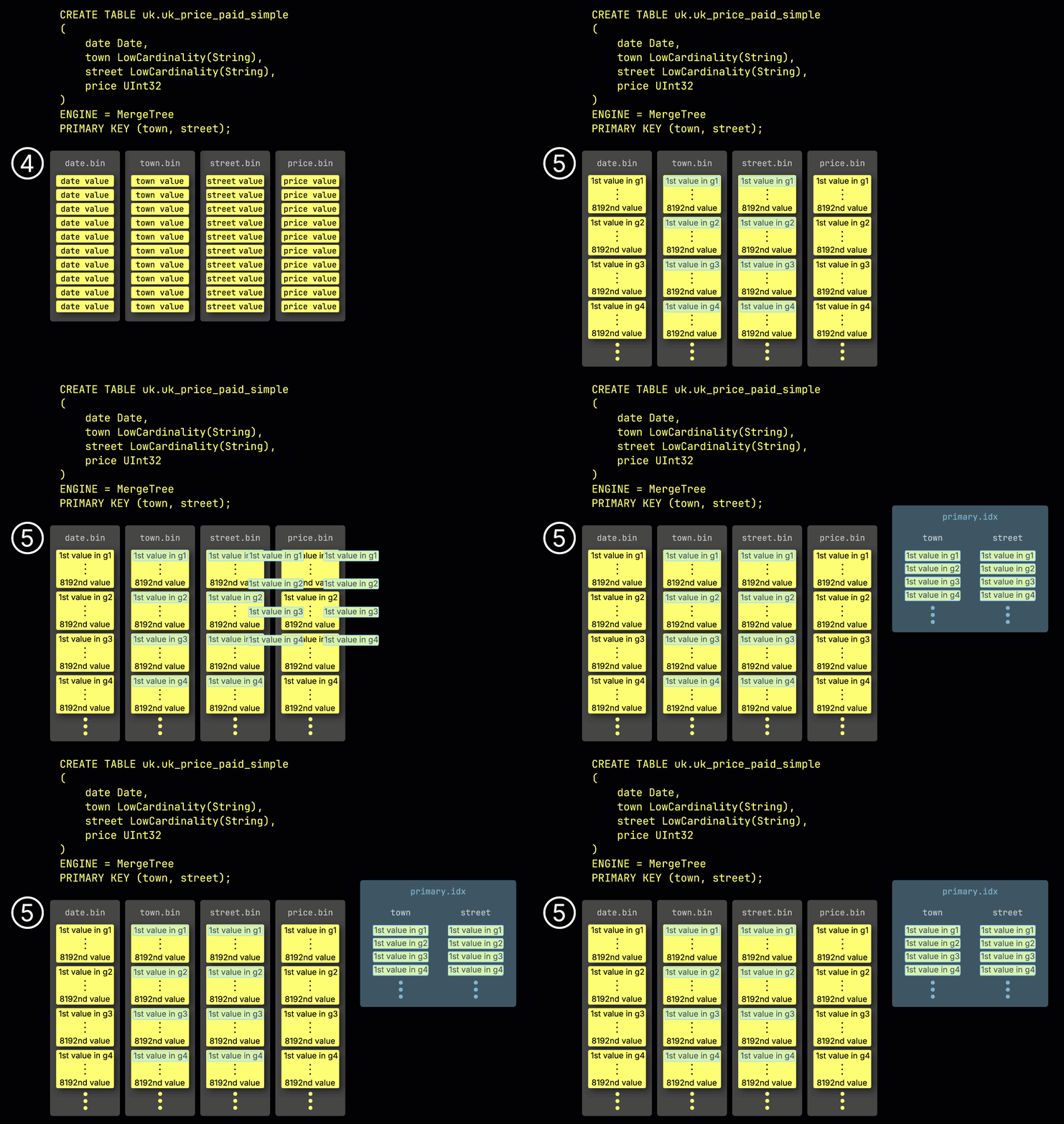
Table Engines are the core architecture components that determine how ClickHouse stores, processes, and retrieves data. Choosing the right engine is critical for performance and query optimization.
Data Modeling encompasses primary keys, sorting keys, partitioning strategies, data types, and codecs - all working together to create an optimal schema for your analytical workloads.
Why Table Engines Matter
⚡
Performance
Right engine + schema = 10-100x faster queries
💾
Storage Efficiency
Compression, codecs, and data types optimize disk usage
🎧
Specialized Use Cases
Different engines for updates, aggregations, and deduplication
🎯
Query Optimization
Primary keys, sorting, and partitioning guide query execution
The MergeTree Family
Engine
Purpose
Best For
MergeTree
Base engine for most use cases
General-purpose analytics, time-series, events
ReplacingMergeTree
Handles updates by replacing old versions
User profiles, state snapshots, dimension tables
SummingMergeTree
Pre-aggregates numeric columns during merges
Counters, metrics, pre-aggregated data
AggregatingMergeTree
Stores aggregation function states
Complex aggregations, materialized views
CollapsingMergeTree
Cancels out old rows with new ones
Status changes, events with cancellation
VersionedCollapsingMergeTree
Enhanced collapsing with version support
Complex state management, version tracking
MergeTree Engine Internals
Partition: 202601
Part 1
Rows: 10,000
Primary Index: Sparse
Data Blocks: Compressed
Part 2
Rows: 15,000
Primary Index: Sparse
Data Blocks: Compressed
Partition: 202602
Part 1
Rows: 8,000
Primary Index: Sparse
Data Blocks: Compressed
Part 2
Rows: 12,000
Primary Index: Sparse
Data Blocks: Compressed
Inside Each Part:
Primary Index
Sparse index for quick lookups
Column Files
Separate .bin file per column
Data Blocks
Compressed with codecs
Key Concepts
Primary Key vs Sorting Key
Primary Key: Used for filtering (WHERE clauses). Defines which columns are used for pruning partitions and blocks.
Sorting Key: Determines physical order of data. Can be different from primary key.
Rule of Thumb: Primary key is usually the first 1-3 columns of sorting key.
Partitioning Strategy
Partition: Logical grouping of data (by date, month, region, etc.)
Benefits: Faster deletes, parallel processing, manageable data movement
Common: Partition by date/month for time-series data
Data Types Impact
Choosing right types affects compression and speed:
UInt8/16/32/64: Best compression for integers
Decimal: For financial data (fixed precision)
LowCardinality: 10-100x compression for enums
String: Avoid if possible, use enums instead
Codecs for Compression
Specialized compression algorithms:
DoubleDelta: Timestamps, monotonic sequences
Gorilla: Floating-point numbers, metrics
Delta: Integer deltas (increments)
ZSTD: General-purpose, configurable
🚀 Quick Start
1. Create Your First Optimized Table
-- Connect to ClickHouse
clickhouse-client
USE analytics;

-- Create an optimized events table
CREATE TABLE events (
    event_date Date,
    event_time DateTime,
    user_id UInt64,
    event_type LowCardinality(String),
    country LowCardinality(String),
    revenue Decimal(10, 2)
) ENGINE = MergeTree()
PARTITION BY toYYYYMM(event_date)
ORDER BY (event_date, user_id, event_time);

-- Insert sample data
INSERT INTO events VALUES
    ('2026-01-22', '2026-01-22 10:00:00', 101, 'purchase', 'US', 99.99),
    ('2026-01-22', '2026-01-22 10:05:00', 102, 'click', 'UK', 0.00),
    ('2026-01-22', '2026-01-22 10:10:00', 103, 'purchase', 'CA', 149.50);

-- Verify the data
SELECT * FROM events;
SELECT COUNT(*) FROM events;
2. Understanding ReplacingMergeTree
-- For data that can be updated/replaced
CREATE TABLE users (
    user_id UInt64,
    name String,
    email String,
    status LowCardinality(String),
    updated_at DateTime,
    version UInt32  -- Version field required for tracking updates
) ENGINE = ReplacingMergeTree(version)  -- version field tells engine which is newest
PARTITION BY toYYYYMM(updated_at)
ORDER BY (user_id, updated_at);

-- Insert initial version
INSERT INTO users VALUES
    (1, 'Alice', 'alice@example.com', 'active', '2026-01-22 10:00:00', 1);

-- "Update" - insert new version with higher version number
INSERT INTO users VALUES
    (1, 'Alice Smith', 'alice@example.com', 'active', '2026-01-22 11:00:00', 2);

-- Query - will automatically use latest version during merge
SELECT * FROM users FINAL WHERE user_id = 1;

-- Note: Without FINAL, you might see duplicate versions
SELECT * FROM users WHERE user_id = 1;
3. Understanding SummingMergeTree
-- For pre-aggregated metrics and counters
CREATE TABLE metrics_daily (
    metric_date Date,
    metric_name LowCardinality(String),
    host LowCardinality(String),
    cpu_count UInt32,
    memory_gb UInt64,
    request_count UInt64,
    error_count UInt64,
    total_latency_ms UInt64
) ENGINE = SummingMergeTree()
PARTITION BY toYYYYMM(metric_date)
ORDER BY (metric_name, host, metric_date);

-- Insert daily summaries
INSERT INTO metrics_daily VALUES
    ('2026-01-22', 'app.metrics', 'server1', 8, 16, 10000, 50, 50000),
    ('2026-01-22', 'app.metrics', 'server1', 0, 0, 5000, 10, 25000);  -- Same day, will sum

-- Query - numeric columns are automatically summed during merge
SELECT
    metric_date,
    host,
    SUM(request_count),
    SUM(error_count)
FROM metrics_daily
GROUP BY metric_date, host;
💻 Commands Reference
Engine-Specific Commands
MergeTree (Basic)
CREATE TABLE logs (
    timestamp DateTime,
    level LowCardinality(String),
    message String
) ENGINE = MergeTree()
PARTITION BY toYYYYMM(timestamp)
ORDER BY (level, timestamp);

-- No special operations, standard INSERT/SELECT
ReplacingMergeTree (Updates)
CREATE TABLE dimension (
    id UInt64,
    name String,
    version UInt32
) ENGINE = ReplacingMergeTree(version)
ORDER BY id;

-- Required: version field, insert with increasing versions
INSERT INTO dimension VALUES (1, 'Value A', 1);
INSERT INTO dimension VALUES (1, 'Value B', 2);

-- Use FINAL to get latest
SELECT * FROM dimension FINAL;

-- Drop duplicate versions
OPTIMIZE TABLE dimension FINAL;
SummingMergeTree (Aggregations)
CREATE TABLE rollups (
    date Date,
    category String,
    count UInt64,
    sum UInt64,
    avg_value Float64  -- Will NOT be summed
) ENGINE = SummingMergeTree()
PARTITION BY toYYYYMM(date)
ORDER BY (date, category);

-- Numeric columns auto-sum, others stay as-is
INSERT INTO rollups VALUES
    ('2026-01-22', 'cat1', 10, 100, 5.5);
INSERT INTO rollups VALUES
    ('2026-01-22', 'cat1', 5, 50, 3.3);

-- Will show summed count and sum
SELECT date, category, sum(count), sum(sum)
FROM rollups
GROUP BY date, category;
Partitioning and TTL Commands
-- Table with TTL for auto-deletion
CREATE TABLE analytics (
    event_date Date,
    event_time DateTime,
    data String
) ENGINE = MergeTree()
PARTITION BY toYYYYMM(event_date)
ORDER BY event_date
TTL event_date + INTERVAL 30 DAY;  -- Auto-delete after 30 days

-- Check active partitions
SELECT partition, name
FROM system.parts
WHERE table = 'analytics'
  AND database = 'default'
  AND active;

-- Drop specific partition
ALTER TABLE analytics DROP PARTITION '202601';

-- Detach partition (soft delete, can be reattached)
ALTER TABLE analytics DETACH PARTITION '202601';

-- Reattach partition
ALTER TABLE analytics ATTACH PARTITION '202601';

-- Force merge/TTL cleanup
OPTIMIZE TABLE analytics FINAL;
Primary Key and Sorting Key Commands
-- Explicit primary key (different from sort key)
CREATE TABLE data (
    year UInt16,
    month UInt8,
    day UInt8,
    user_id UInt64,
    value Float64
) ENGINE = MergeTree()
PARTITION BY (year, month)
PRIMARY KEY (year, month, day)  -- For filtering/pruning
ORDER BY (year, month, day, user_id);  -- Physical sort

-- Query optimization using primary key
SELECT * FROM data
WHERE year = 2026 AND month = 1;  -- Uses primary key

-- Check table schema
DESCRIBE TABLE data;

-- Check primary key structure
SHOW CREATE TABLE data;
Data Types and Codecs
-- Table with optimized data types and codecs
CREATE TABLE metrics (
    timestamp DateTime CODEC(DoubleDelta, ZSTD),
    metric_name LowCardinality(String),
    value Float64 CODEC(Gorilla, ZSTD),
    counter UInt64 CODEC(Delta, ZSTD),
    status LowCardinality(String),
    message String CODEC(ZSTD(3))
) ENGINE = MergeTree()
PARTITION BY toYYYYMM(timestamp)
ORDER BY (metric_name, timestamp);

-- Check actual compression stats
SELECT
    table,
    column,
    formatReadableSize(sum(data_compressed_bytes)) as compressed,
    formatReadableSize(sum(data_uncompressed_bytes)) as uncompressed,
    round(sum(data_uncompressed_bytes) / sum(data_compressed_bytes), 2) as ratio
FROM system.parts_columns
WHERE table = 'metrics'
  AND database = 'default'
GROUP BY table, column
ORDER BY ratio DESC;
✨ Best Practices
1. Choosing the Right Engine
Use MergeTree When:
Append-only workloads
Time-series or event data
No updates needed
Standard analytics queries
Use ReplacingMergeTree When:
Dimension tables with updates
User profiles or settings
State snapshots
Deduplication needed
Use SummingMergeTree When:
Pre-aggregated data
Counters and metrics
Daily/hourly rollups
Numeric columns to sum
Use AggregatingMergeTree When:
Complex aggregation states
Materialized views
Advanced analytics
State-based aggregations
2. Optimal Partitioning Strategy
❌ Too Many Partitions
-- Daily partitions = 365 per year
CREATE TABLE events (
    timestamp DateTime,
    data String
) ENGINE = MergeTree()
PARTITION BY toDate(timestamp)  -- Creates 365+ partitions!
ORDER BY timestamp;
Problem: 365+ partitions/year, metadata overhead
✅ Optimal Partitions
-- Monthly partitions = 12 per year
CREATE TABLE events (
    timestamp DateTime,
    data String
) ENGINE = MergeTree()
PARTITION BY toYYYYMM(timestamp)
ORDER BY timestamp;
Benefit: Only 12 partitions/year, easy data cleanup
3. Primary Key Design
❌ High Cardinality First
-- UUID first = poor compression
CREATE TABLE events (
    event_id UUID,
    user_id UInt64,
    country String,
    timestamp DateTime
) ENGINE = MergeTree()
ORDER BY (event_id, timestamp);
Problem: Poor compression, inefficient pruning
✅ Low Cardinality First
-- Low cardinality first = better compression
CREATE TABLE events (
    event_id UUID,
    user_id UInt64,
    country String,
    timestamp DateTime
) ENGINE = MergeTree()
ORDER BY (country, timestamp, user_id, event_id);
UInt8/16/32/64: Use smallest type that fits your range
LowCardinality(String): 10-100x compression for enums (< 10k values)
Decimal(P, S): Financial data - use instead of Float
Date/DateTime: Always use date types, not strings
Enum: Better than String for fixed values
Avoid String: String columns are not compressed well
5. TTL Policies for Data Lifecycle
TTL for Rows (Auto-delete)
CREATE TABLE logs (
    timestamp DateTime,
    message String
) ENGINE = MergeTree()
PARTITION BY toYYYYMM(timestamp)
ORDER BY timestamp
TTL timestamp + INTERVAL 90 DAY;
Automatically deletes rows after 90 days
TTL for Column (Move to S3)
CREATE TABLE metrics (
    timestamp DateTime,
    value Float64
) ENGINE = MergeTree()
PARTITION BY toYYYYMM(timestamp)
ORDER BY timestamp
TTL timestamp + INTERVAL 7 DAY TO DISK 'hot_ssd',
    timestamp + INTERVAL 30 DAY TO DISK 'cold_ssd';
Moves old data to cheaper storage
🎯 When to Use Each Engine
Decision Matrix
Scenario
Recommended Engine
Example Use Case
Append-only events, metrics, logs
MergeTree
Website events, server metrics, application logs
Dimension tables, user profiles, config
ReplacingMergeTree
User settings, product catalog, pricing
Pre-aggregated metrics, counters, rollups
SummingMergeTree
Daily stats, hourly rollups, aggregated counters
Complex aggregation state, cardinality tracking
AggregatingMergeTree
HyperLogLog for unique counts, complex statistics
State transitions, event cancellation
CollapsingMergeTree
Order status changes, billing events
Real-World Example: E-commerce Analytics
Raw Events Table: MergeTree - store all clicks, views, purchases
Product Dimensions: ReplacingMergeTree - product info changes over time
Daily Rollups: SummingMergeTree - pre-aggregate daily stats by category
CREATE TABLE users_dimension (
    user_id UInt64,
    email String,
    name String,
    country LowCardinality(String),
    subscription_level LowCardinality(String),
    updated_at DateTime,
    version UInt32
) ENGINE = ReplacingMergeTree(version)
PARTITION BY toYYYYMM(updated_at)
PRIMARY KEY (user_id)
ORDER BY (user_id, updated_at);

-- Insert new user
INSERT INTO users_dimension VALUES
    (1, 'alice@ex.com', 'Alice', 'US', 'premium', now(), 1);

-- Update = new row with higher version
INSERT INTO users_dimension VALUES
    (1, 'alice@ex.com', 'Alice Smith', 'US', 'premium', now(), 2);

-- Query with FINAL to get latest
SELECT * FROM users_dimension FINAL WHERE user_id = 1;
-- Source events table
CREATE TABLE raw_events (
    event_date Date,
    event_time DateTime,
    user_id UInt64,
    event_type String,
    revenue Decimal(10, 2)
) ENGINE = MergeTree()
PARTITION BY toYYYYMM(event_date)
ORDER BY (event_date, user_id);

-- Pre-aggregated view
CREATE MATERIALIZED VIEW events_daily_mv
ENGINE = SummingMergeTree()
PARTITION BY toYYYYMM(day)
ORDER BY (day, event_type, user_id)
AS SELECT
    toDate(event_time) as day,
    event_type,
    user_id,
    COUNT(*) as event_count,
    SUM(revenue) as total_revenue
FROM raw_events
GROUP BY day, event_type, user_id;

-- Queries on MV are instant
SELECT
    day,
    event_type,
    sum(event_count),
    sum(total_revenue)
FROM events_daily_mv
WHERE day >= today() - 7
GROUP BY day, event_type;
2. Multi-Level Partitioning
-- Partition by multiple columns
CREATE TABLE analytics_detailed (
    event_year UInt16,
    event_month UInt8,
    event_day UInt8,
    event_time DateTime,
    user_id UInt64,
    metric_value Float64
) ENGINE = MergeTree()
PARTITION BY (event_year, event_month)
PRIMARY KEY (event_year, event_month, event_day)
ORDER BY (event_year, event_month, event_day, event_time);

-- Easy deletion of specific month/year
ALTER TABLE analytics_detailed DROP PARTITION (2026, 1);
3. Schema Evolution with ALTER
-- Original table
CREATE TABLE products (
    product_id UInt64,
    name String,
    price Decimal(10, 2)
) ENGINE = MergeTree()
ORDER BY product_id;

-- Add new column
ALTER TABLE products ADD COLUMN category String DEFAULT 'general';

-- Modify column type (careful!)
ALTER TABLE products MODIFY COLUMN name String CODEC(ZSTD);

-- Add column with TTL
ALTER TABLE products ADD COLUMN created_at DateTime DEFAULT now()
TTL created_at + INTERVAL 3 YEAR;

-- Drop column
ALTER TABLE products DROP COLUMN created_at;
4. Using Sampling for Approximate Results
-- Add sampling key to table
CREATE TABLE analytics (
    event_time DateTime,
    user_id UInt64,
    event_type String,
    value Float64
) ENGINE = MergeTree()
ORDER BY event_time
SAMPLE BY intHash32(user_id);

-- Fast approximate queries (10x faster)
SELECT
    event_type,
    COUNT(*) * 10 as estimated_count,
    AVG(value) as avg_value
FROM analytics
SAMPLE 0.1
WHERE event_time >= today() - 30
GROUP BY event_type;

-- Accurate queries (slower but complete)
SELECT
    event_type,
    COUNT(*) as exact_count,
    AVG(value) as avg_value
FROM analytics
WHERE event_time >= today() - 30
GROUP BY event_type;
5. Primary Key vs Sorting Key Deep Dive
-- Different primary and sort keys
CREATE TABLE events (
    year UInt16,
    month UInt8,
    day UInt8,
    user_id UInt64,
    event_id UUID,
    value Float64
) ENGINE = MergeTree()
PARTITION BY (year, month)
PRIMARY KEY (year, month, day)  -- Used for pruning
ORDER BY (year, month, day, user_id, event_id);  -- Physical order

-- This query will use primary key (fast)
SELECT * FROM events
WHERE year = 2026 AND month = 1 AND day = 22;

-- This query will scan all blocks (slower, but still optimized)
SELECT * FROM events
WHERE user_id = 12345;

-- Best practice: Primary key should match your most common filters
-- Sorting key can be longer for better compression
📚 Resources & References
📘 View in Notion
Access this module in your Notion workspace for note-taking and tracking your progress.
A self-contained ClickHouse stack you can run locally. Every step is reproducible; the README below walks through each concept with diagrams and measured outcomes.
cd code-examples/demos/module-2-table-engines
./up.sh        # bring stack up, wait for health
./run.sh       # run the demo (idempotent — re-runnable)
./down.sh      # tear down + drop volumes
📺 Live demo capture
Recorded with vhs: the actual terminal output from ./run.sh running on this very stack.
Animated GIF, ~479 KB. Right-click → open in new tab to view full-size.
🗂️ Architecture diagrams
Rendered from the README's Mermaid sources. Click any to open the source SVG full-size.
A insert into source table b mv triggerQ1 is the table append only br analytica
📚 ClickHouse reference visuals
Curated from the official ClickHouse documentation and engineering blog (and Altinity's docs/blog) — the same diagrams the broader CH community uses to explain these concepts. Click any image to read the source.
ClickHouse Docs
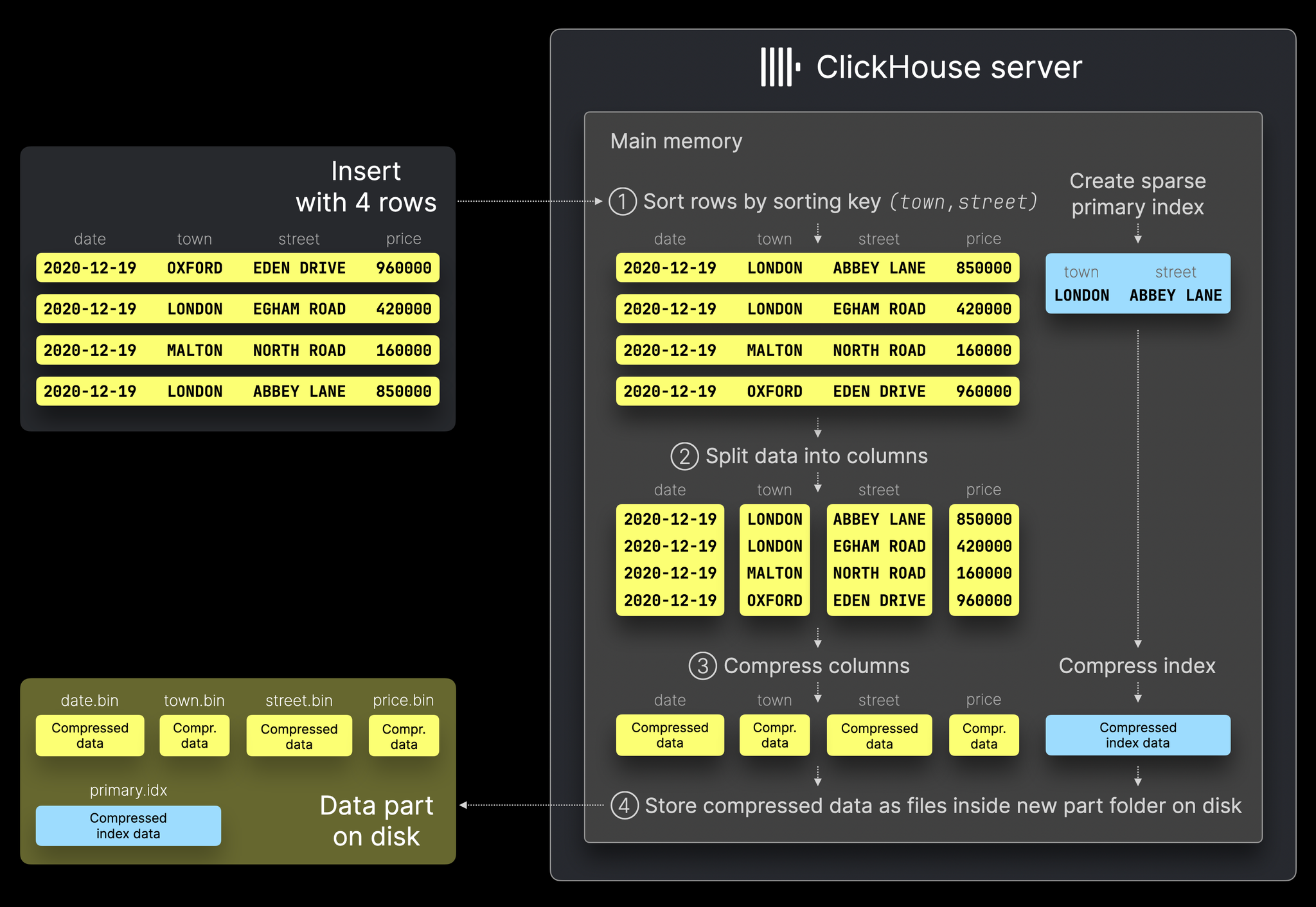
Anatomy of a MergeTree data part on disk (granules, marks, columns)
ClickHouse Docs
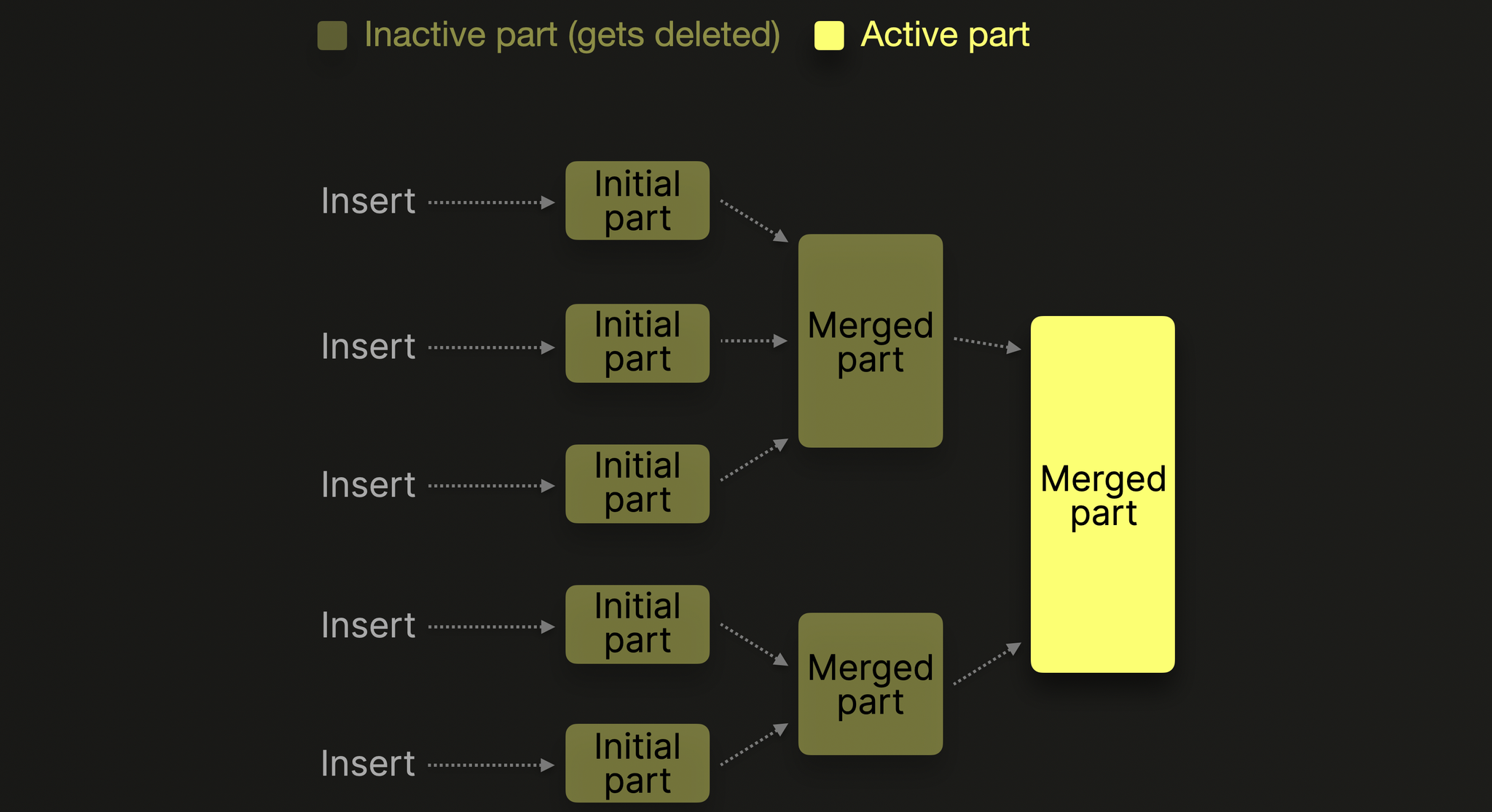
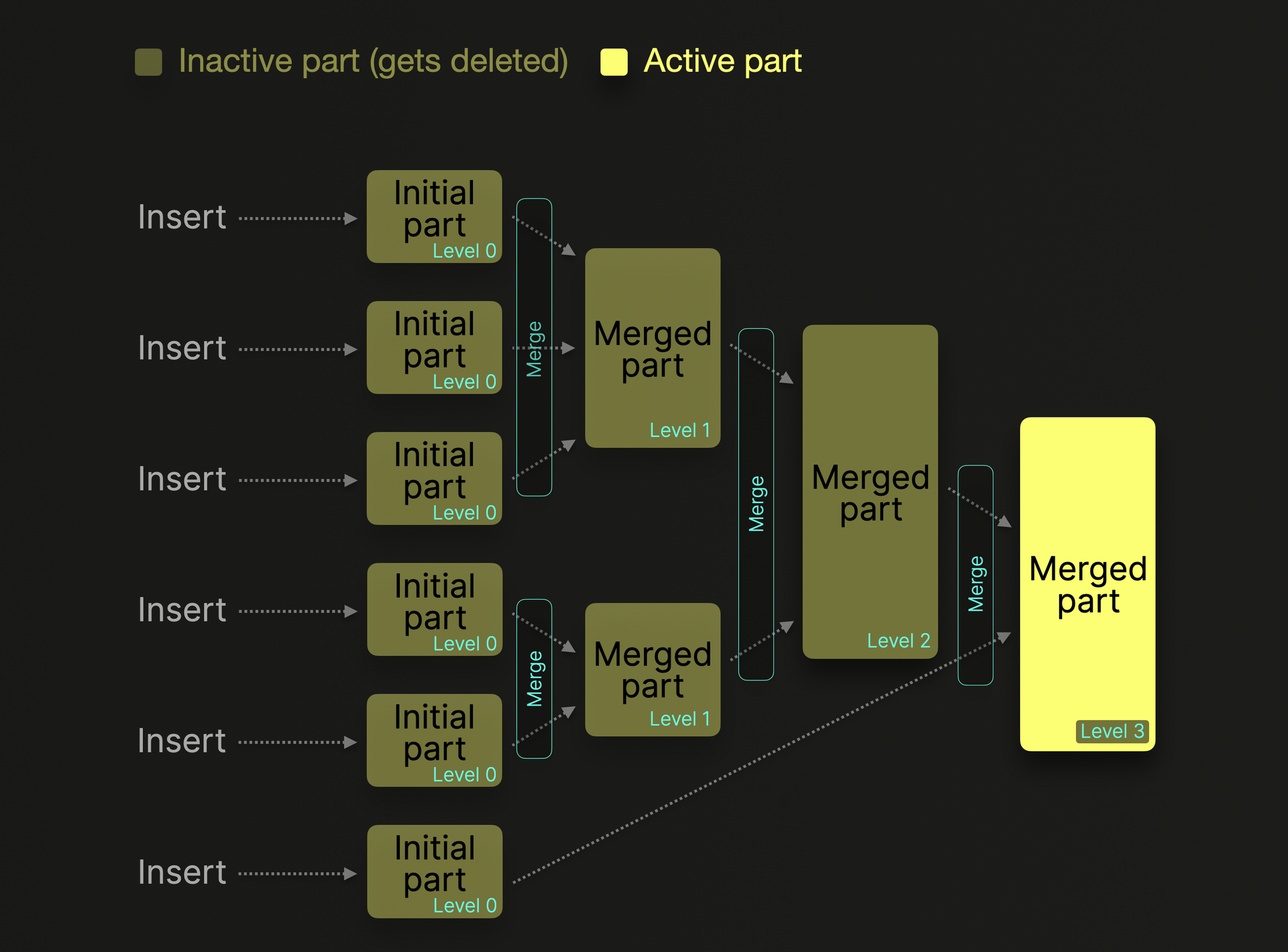
Background merges combine smaller parts into larger sorted parts
ClickHouse Docs
Inserts produce immutable parts that get merged in the background
ClickHouse Docs
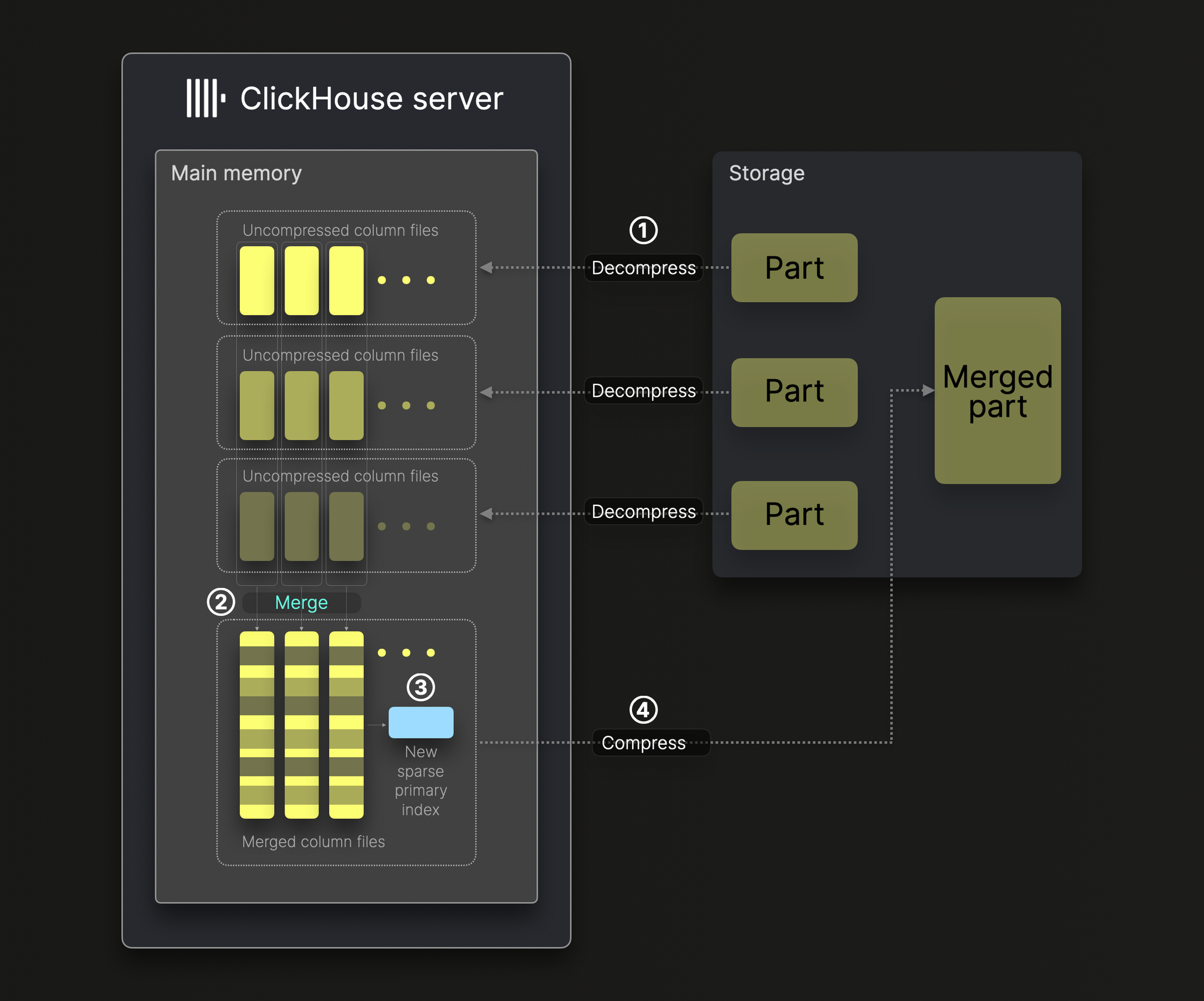
Merge process: decompress, k-way merge, re-index, recompress
ClickHouse Docs
Sparse primary index: one mark per granule pointing into column files
ClickHouse Docs
Granule pruning via the sparse primary index during query execution
📚 Full module reference
Module 2 — Table Engines & Data Modelling
Audience: anyone designing a ClickHouse schema. Prerequisites:
Module 1 (parts, merges, MergeTree). Time: ~60 min reading + 30 min hands-on.
By the end you will be able to:
Pick the right *MergeTree variant for any append/SCD/aggregation pattern.
Read sign-collapse and version-collapse semantics.
Design Materialized View pipelines that pre-aggregate at insert time.
Use Nested, Array, Map to model 1-to-many without joins.
Recognise when not to use a fancy engine.
1. The engine landscape at a glance
💬 Discuss with AI — click to view prompt
Paste into ChatGPT, Claude, Gemini, or any LLM chat.
I'm studying ClickHouse and working through the module "ClickHouse Table Engines". I want to deeply understand the section: "The engine landscape at a glance".

Here is a brief excerpt from the material I'm reading:

"""
| Family       | Use when                                                                                    | Don't use when                            | | **Log**      | Tiny ad-hoc tables. No indexes, no parts. Atomic blocks but no resumable reads.             | Anything you care about losing.           | | **MergeTree**| 99% of analytical tables. Default choice.                                                   | High-write, mutable, single-row workloads.| | **Replicated\***| MergeTree variants on a cluster. Module 4 deep-dives.                                    | Single-node demos....
"""

Please explain this concept in depth. Cover:

1. **Core mechanics** — how does it actually work under the hood? What data structures, algorithms, or engine internals are involved? Where is the implementation in the ClickHouse source tree (file/folder names) if you know?

2. **When to use vs avoid** — what concrete workloads does this help, and when would it hurt or be wrong? Give specific scale/latency trade-offs.

3. **Comparable features in other systems** — how does this compare with similar features in PostgreSQL, MySQL, BigQuery, Snowflake, Redshift, or DuckDB? Build my intuition by analogy.

4. **Common pitfalls and gotchas** — what trips engineers up in production? Subtle bugs, performance traps, surprising semantics?

5. **Worked example** — show me a small but realistic SQL or config example that demonstrates the concept end-to-end. Include the expected output where useful.

6. **Where to read more** — a short list of authoritative pointers (CH docs, blog posts, talks, source-code files).

Assume I have solid SQL fundamentals but I'm new to ClickHouse internals. Be technical but pragmatic; avoid marketing language.
Tiny ad-hoc tables. No indexes, no parts. Atomic blocks but no resumable reads.
Anything you care about losing.
MergeTree
99% of analytical tables. Default choice.
High-write, mutable, single-row workloads.
Replicated*
MergeTree variants on a cluster. Module 4 deep-dives.
Single-node demos.
Memory
Caches, ephemeral state, tests. Lost on restart.
Anything that must survive a crash.
Buffer
Last-resort smoothing layer in front of MergeTree if you cannot batch upstream.
If you can batch upstream — just batch.
Distributed / Kafka / MySQL / S3
Federation engines. They don't store data — they read or fan-out.
When you actually want a local table.
2. Plain MergeTree — the baseline
💬 Discuss with AI — click to view prompt
Paste into ChatGPT, Claude, Gemini, or any LLM chat.
I'm studying ClickHouse and working through the module "ClickHouse Table Engines". I want to deeply understand the section: "Plain MergeTree — the baseline".

Here is a brief excerpt from the material I'm reading:

"""
(no excerpt — section heading was "Plain MergeTree — the baseline")
"""

Please explain this concept in depth. Cover:

1. **Core mechanics** — how does it actually work under the hood? What data structures, algorithms, or engine internals are involved? Where is the implementation in the ClickHouse source tree (file/folder names) if you know?

2. **When to use vs avoid** — what concrete workloads does this help, and when would it hurt or be wrong? Give specific scale/latency trade-offs.

3. **Comparable features in other systems** — how does this compare with similar features in PostgreSQL, MySQL, BigQuery, Snowflake, Redshift, or DuckDB? Build my intuition by analogy.

4. **Common pitfalls and gotchas** — what trips engineers up in production? Subtle bugs, performance traps, surprising semantics?

5. **Worked example** — show me a small but realistic SQL or config example that demonstrates the concept end-to-end. Include the expected output where useful.

6. **Where to read more** — a short list of authoritative pointers (CH docs, blog posts, talks, source-code files).

Assume I have solid SQL fundamentals but I'm new to ClickHouse internals. Be technical but pragmatic; avoid marketing language.
You already know it from Module 1. Recap:
Append-only at the part level.
Parts merge in the background; rows within a part are sorted by ORDER BY.
No deduplication, no aggregation, no rollup. Just sort+compress+merge.
Use this until you have a specific reason to pick something else.
Paste into ChatGPT, Claude, Gemini, or any LLM chat.
I'm studying ClickHouse and working through the module "ClickHouse Table Engines". I want to deeply understand the section: "ReplacingMergeTree — slowly-changing dimensions".

Here is a brief excerpt from the material I'm reading:

"""
Same as MergeTree, but during merges, **rows with the same sort key are collapsed into one**, keeping the row with the highest *version*. ### Mental model ### Three ways to read | Method                                                                | Latency          | Notes                                                                                       | | `SELECT * FROM t`                                                     | Fast (no merge)  | **Returns dupes** until merge runs. Almost never what you want.                            | | `SELECT * FROM t FINAL`...
"""

Please explain this concept in depth. Cover:

1. **Core mechanics** — how does it actually work under the hood? What data structures, algorithms, or engine internals are involved? Where is the implementation in the ClickHouse source tree (file/folder names) if you know?

2. **When to use vs avoid** — what concrete workloads does this help, and when would it hurt or be wrong? Give specific scale/latency trade-offs.

3. **Comparable features in other systems** — how does this compare with similar features in PostgreSQL, MySQL, BigQuery, Snowflake, Redshift, or DuckDB? Build my intuition by analogy.

4. **Common pitfalls and gotchas** — what trips engineers up in production? Subtle bugs, performance traps, surprising semantics?

5. **Worked example** — show me a small but realistic SQL or config example that demonstrates the concept end-to-end. Include the expected output where useful.

6. **Where to read more** — a short list of authoritative pointers (CH docs, blog posts, talks, source-code files).

Assume I have solid SQL fundamentals but I'm new to ClickHouse internals. Be technical but pragmatic; avoid marketing language.
Same as MergeTree, but during merges, rows with the same sort key are
collapsed into one, keeping the row with the highest version.
CREATE TABLE users_replacing (
    user_id UInt64,
    name    String,
    email   String,
    version UInt64
)
ENGINE = ReplacingMergeTree(version)
ORDER BY user_id;
Mental model
INSERT batch 1:                  INSERT batch 2:
┌──────┬───────┬──────────┬───┐  ┌──────┬───────┬──────────┬───┐
│ id=1 │ alice │ a@old    │ v1│  │ id=1 │ alice │ a@new    │ v2│
│ id=2 │ bob   │ b@old    │ v1│  │ id=3 │ carol │ c@new    │ v3│
└──────┴───────┴──────────┴───┘  └──────┴───────┴──────────┴───┘

After merge (same id collapses, highest version wins):

  ┌──────┬───────┬──────────┬───┐
  │ id=1 │ alice │ a@new    │ v2│
  │ id=2 │ bob   │ b@old    │ v1│
  │ id=3 │ carol │ c@new    │ v3│
  └──────┴───────┴──────────┴───┘
Three ways to read
Method
Latency
Notes
SELECT * FROM t
Fast (no merge)
Returns dupes until merge runs. Almost never what you want.
SELECT * FROM t FINAL
Slow (merges at read time)
Correct, but reads the whole partition. Avoid in hot paths.
SELECT user_id, argMax(name, version), argMax(email, version), max(version) AS v FROM t GROUP BY user_id
Fast
The production pattern. Works regardless of merge state.
Key takeaway: ReplacingMergeTree gives eventual dedup. If your
query absolutely must see at most one row per key, do the dedup in the
query (argMax), not via FINAL.
4. SummingMergeTree — pre-aggregated counters
💬 Discuss with AI — click to view prompt
Paste into ChatGPT, Claude, Gemini, or any LLM chat.
I'm studying ClickHouse and working through the module "ClickHouse Table Engines". I want to deeply understand the section: "SummingMergeTree — pre-aggregated counters".

Here is a brief excerpt from the material I'm reading:

"""
Like MergeTree, but during merges, **rows with the same sort key get their numeric columns summed**. Non-numeric columns from the row with the *lowest* part get kept (treat them as the dimensions). ### Mental model > **Read pattern:** still wrap in `sum(value)` / `sum(count)` even after > SummingMergeTree, because the merge is incomplete until the next merge > pass. The engine guarantees correct results *if you sum at read time*.
"""

Please explain this concept in depth. Cover:

1. **Core mechanics** — how does it actually work under the hood? What data structures, algorithms, or engine internals are involved? Where is the implementation in the ClickHouse source tree (file/folder names) if you know?

2. **When to use vs avoid** — what concrete workloads does this help, and when would it hurt or be wrong? Give specific scale/latency trade-offs.

3. **Comparable features in other systems** — how does this compare with similar features in PostgreSQL, MySQL, BigQuery, Snowflake, Redshift, or DuckDB? Build my intuition by analogy.

4. **Common pitfalls and gotchas** — what trips engineers up in production? Subtle bugs, performance traps, surprising semantics?

5. **Worked example** — show me a small but realistic SQL or config example that demonstrates the concept end-to-end. Include the expected output where useful.

6. **Where to read more** — a short list of authoritative pointers (CH docs, blog posts, talks, source-code files).

Assume I have solid SQL fundamentals but I'm new to ClickHouse internals. Be technical but pragmatic; avoid marketing language.
Like MergeTree, but during merges, rows with the same sort key get their
numeric columns summed. Non-numeric columns from the row with the
lowest part get kept (treat them as the dimensions).
CREATE TABLE metrics_summing (
    metric_date Date,
    metric      LowCardinality(String),
    region      LowCardinality(String),
    value       UInt64,           -- summed
    count       UInt64 DEFAULT 1  -- summed
)
ENGINE = SummingMergeTree((value, count))
ORDER BY (metric_date, metric, region);
Read pattern: still wrap in sum(value) / sum(count) even after
SummingMergeTree, because the merge is incomplete until the next merge
pass. The engine guarantees correct results if you sum at read time.
Paste into ChatGPT, Claude, Gemini, or any LLM chat.
I'm studying ClickHouse and working through the module "ClickHouse Table Engines". I want to deeply understand the section: "AggregatingMergeTree — non-additive aggregations".

Here is a brief excerpt from the material I'm reading:

"""
For aggregations that aren't simple sums (`uniq`, `quantile`, `avg`, `max`), `Sum` won't work. Aggregating stores **partial aggregation states** (`AggregateFunction(...)`) and finalises them at read time with `*Merge`. > **Why not just store final values?** Because then you can't roll > *across* buckets. `uniq` over (Mon ∪ Tue) ≠ `uniq(Mon) + uniq(Tue)`. > Storing the state lets the engine merge correctly.
"""

Please explain this concept in depth. Cover:

1. **Core mechanics** — how does it actually work under the hood? What data structures, algorithms, or engine internals are involved? Where is the implementation in the ClickHouse source tree (file/folder names) if you know?

2. **When to use vs avoid** — what concrete workloads does this help, and when would it hurt or be wrong? Give specific scale/latency trade-offs.

3. **Comparable features in other systems** — how does this compare with similar features in PostgreSQL, MySQL, BigQuery, Snowflake, Redshift, or DuckDB? Build my intuition by analogy.

4. **Common pitfalls and gotchas** — what trips engineers up in production? Subtle bugs, performance traps, surprising semantics?

5. **Worked example** — show me a small but realistic SQL or config example that demonstrates the concept end-to-end. Include the expected output where useful.

6. **Where to read more** — a short list of authoritative pointers (CH docs, blog posts, talks, source-code files).

Assume I have solid SQL fundamentals but I'm new to ClickHouse internals. Be technical but pragmatic; avoid marketing language.
For aggregations that aren't simple sums (uniq, quantile, avg,
max), Sum won't work. Aggregating stores partial aggregation states
(AggregateFunction(...)) and finalises them at read time with *Merge.
CREATE TABLE events_agg (
    bucket_date       Date,
    country           LowCardinality(String),
    uniq_users_state  AggregateFunction(uniq, UInt32),
    revenue_state     AggregateFunction(sum, Float64),
    p99_state         AggregateFunction(quantileTDigest(0.99), Float64)
)
ENGINE = AggregatingMergeTree
ORDER BY (bucket_date, country);

-- Insert STATES (not raw values) — usually fed by a Materialized View:
INSERT INTO events_agg
SELECT
    bucket_date, country,
    uniqState(user_id),
    sumState(revenue),
    quantileTDigestState(0.99)(latency)
FROM raw_events
GROUP BY bucket_date, country;

-- Read: finalize with *Merge.
SELECT bucket_date, country,
       uniqMerge(uniq_users_state) AS uniq_users,
       sumMerge(revenue_state)     AS revenue,
       quantileTDigestMerge(0.99)(p99_state) AS p99
FROM events_agg
GROUP BY bucket_date, country;
Why not just store final values? Because then you can't roll
across buckets. uniq over (Mon ∪ Tue) ≠ uniq(Mon) + uniq(Tue).
Storing the state lets the engine merge correctly.
6. CollapsingMergeTree — current-state mutations
💬 Discuss with AI — click to view prompt
Paste into ChatGPT, Claude, Gemini, or any LLM chat.
I'm studying ClickHouse and working through the module "ClickHouse Table Engines". I want to deeply understand the section: "CollapsingMergeTree — current-state mutations".

Here is a brief excerpt from the material I'm reading:

"""
Designed for "delete or update by writing two rows": one with `sign = +1` inserts, one with `sign = -1` cancels. ### How collapse works ### Two reading patterns > **Gotcha:** if `sign = -1` arrives without the matching `sign = +1` > earlier, you get a *negative* row. The +1/-1 pair must be ordered with > -1 *after* the +1 it cancels.
"""

Please explain this concept in depth. Cover:

1. **Core mechanics** — how does it actually work under the hood? What data structures, algorithms, or engine internals are involved? Where is the implementation in the ClickHouse source tree (file/folder names) if you know?

2. **When to use vs avoid** — what concrete workloads does this help, and when would it hurt or be wrong? Give specific scale/latency trade-offs.

3. **Comparable features in other systems** — how does this compare with similar features in PostgreSQL, MySQL, BigQuery, Snowflake, Redshift, or DuckDB? Build my intuition by analogy.

4. **Common pitfalls and gotchas** — what trips engineers up in production? Subtle bugs, performance traps, surprising semantics?

5. **Worked example** — show me a small but realistic SQL or config example that demonstrates the concept end-to-end. Include the expected output where useful.

6. **Where to read more** — a short list of authoritative pointers (CH docs, blog posts, talks, source-code files).

Assume I have solid SQL fundamentals but I'm new to ClickHouse internals. Be technical but pragmatic; avoid marketing language.
Designed for "delete or update by writing two rows": one with sign = +1
inserts, one with sign = -1 cancels.
CREATE TABLE orders_collapsing (
    order_id UInt64,
    status   LowCardinality(String),
    total    Float64,
    sign     Int8
)
ENGINE = CollapsingMergeTree(sign)
ORDER BY order_id;

INSERT INTO orders_collapsing VALUES (101, 'pending', 10.0, +1);
-- Order 101 paid: cancel old row, write new row in one INSERT
INSERT INTO orders_collapsing VALUES
    (101, 'pending', 10.0, -1),
    (101, 'paid',    10.0, +1);
-- Pattern A: trust the merge (eventual consistency)
SELECT * FROM orders_collapsing FINAL;

-- Pattern B: do it in the query (works pre-merge too)
SELECT order_id,
       argMax(status, sign) AS status,
       sum(total * sign)    AS total
FROM orders_collapsing
GROUP BY order_id;
Gotcha: if sign = -1 arrives without the matching sign = +1
earlier, you get a negative row. The +1/-1 pair must be ordered with
-1 after the +1 it cancels.
Paste into ChatGPT, Claude, Gemini, or any LLM chat.
I'm studying ClickHouse and working through the module "ClickHouse Table Engines". I want to deeply understand the section: "VersionedCollapsingMergeTree — out-of-order tolerant".

Here is a brief excerpt from the material I'm reading:

"""
CollapsingMergeTree breaks if events arrive out of order. **VersionedCollapsing** adds a `version` column; the engine resolves on `(sort_key, version)`. The cancel rows can arrive *before* the inserts they cancel; the engine sorts them out at merge time using `version`. > **Use this** in any pipeline where event ordering isn't guaranteed > (Kafka, multi-region producers, retry queues).
"""

Please explain this concept in depth. Cover:

1. **Core mechanics** — how does it actually work under the hood? What data structures, algorithms, or engine internals are involved? Where is the implementation in the ClickHouse source tree (file/folder names) if you know?

2. **When to use vs avoid** — what concrete workloads does this help, and when would it hurt or be wrong? Give specific scale/latency trade-offs.

3. **Comparable features in other systems** — how does this compare with similar features in PostgreSQL, MySQL, BigQuery, Snowflake, Redshift, or DuckDB? Build my intuition by analogy.

4. **Common pitfalls and gotchas** — what trips engineers up in production? Subtle bugs, performance traps, surprising semantics?

5. **Worked example** — show me a small but realistic SQL or config example that demonstrates the concept end-to-end. Include the expected output where useful.

6. **Where to read more** — a short list of authoritative pointers (CH docs, blog posts, talks, source-code files).

Assume I have solid SQL fundamentals but I'm new to ClickHouse internals. Be technical but pragmatic; avoid marketing language.
CollapsingMergeTree breaks if events arrive out of order. VersionedCollapsing
adds a version column; the engine resolves on (sort_key, version).
CREATE TABLE orders_versioned (
    order_id UInt64,
    status   LowCardinality(String),
    total    Float64,
    version  UInt64,    -- monotonic per order_id
    sign     Int8
)
ENGINE = VersionedCollapsingMergeTree(sign, version)
ORDER BY order_id;
The cancel rows can arrive before the inserts they cancel; the engine
sorts them out at merge time using version.
Use this in any pipeline where event ordering isn't guaranteed
(Kafka, multi-region producers, retry queues).
8. Log-family engines — when minimalism wins
💬 Discuss with AI — click to view prompt
Paste into ChatGPT, Claude, Gemini, or any LLM chat.
I'm studying ClickHouse and working through the module "ClickHouse Table Engines". I want to deeply understand the section: "Log-family engines — when minimalism wins".

Here is a brief excerpt from the material I'm reading:

"""
| Engine    | Atomic INSERT | Indexes | Compressed | Concurrent reads | Use it for                      | | `Log`     | yes (block)   | no      | yes        | yes              | small append-only logs (audit)  | | `TinyLog` | no            | no      | yes        | one at a time    | scratch tables (≤ 1M rows)      | | `StripeLog` | no          | no      | yes        | yes              | medium tables; deprecated path  | There's no `OPTIMIZE`, no merges, no skip-indexes. The engine is just "appendable file". **Don't use Log-family for anything important.**
"""

Please explain this concept in depth. Cover:

1. **Core mechanics** — how does it actually work under the hood? What data structures, algorithms, or engine internals are involved? Where is the implementation in the ClickHouse source tree (file/folder names) if you know?

2. **When to use vs avoid** — what concrete workloads does this help, and when would it hurt or be wrong? Give specific scale/latency trade-offs.

3. **Comparable features in other systems** — how does this compare with similar features in PostgreSQL, MySQL, BigQuery, Snowflake, Redshift, or DuckDB? Build my intuition by analogy.

4. **Common pitfalls and gotchas** — what trips engineers up in production? Subtle bugs, performance traps, surprising semantics?

5. **Worked example** — show me a small but realistic SQL or config example that demonstrates the concept end-to-end. Include the expected output where useful.

6. **Where to read more** — a short list of authoritative pointers (CH docs, blog posts, talks, source-code files).

Assume I have solid SQL fundamentals but I'm new to ClickHouse internals. Be technical but pragmatic; avoid marketing language.
Engine
Atomic INSERT
Indexes
Compressed
Concurrent reads
Use it for
Log
yes (block)
no
yes
yes
small append-only logs (audit)
TinyLog
no
no
yes
one at a time
scratch tables (≤ 1M rows)
StripeLog
no
no
yes
yes
medium tables; deprecated path
There's no OPTIMIZE, no merges, no skip-indexes. The engine is just
"appendable file". Don't use Log-family for anything important.
9. Memory engine — RAM-only
💬 Discuss with AI — click to view prompt
Paste into ChatGPT, Claude, Gemini, or any LLM chat.
I'm studying ClickHouse and working through the module "ClickHouse Table Engines". I want to deeply understand the section: "Memory engine — RAM-only".

Here is a brief excerpt from the material I'm reading:

"""
- Stored in process memory only. **Lost on restart.** - Reads are fast; useful for caches, joins' right-hand side, or staging. - No size cap by default — easy to OOM the server.
"""

Please explain this concept in depth. Cover:

1. **Core mechanics** — how does it actually work under the hood? What data structures, algorithms, or engine internals are involved? Where is the implementation in the ClickHouse source tree (file/folder names) if you know?

2. **When to use vs avoid** — what concrete workloads does this help, and when would it hurt or be wrong? Give specific scale/latency trade-offs.

3. **Comparable features in other systems** — how does this compare with similar features in PostgreSQL, MySQL, BigQuery, Snowflake, Redshift, or DuckDB? Build my intuition by analogy.

4. **Common pitfalls and gotchas** — what trips engineers up in production? Subtle bugs, performance traps, surprising semantics?

5. **Worked example** — show me a small but realistic SQL or config example that demonstrates the concept end-to-end. Include the expected output where useful.

6. **Where to read more** — a short list of authoritative pointers (CH docs, blog posts, talks, source-code files).

Assume I have solid SQL fundamentals but I'm new to ClickHouse internals. Be technical but pragmatic; avoid marketing language.
CREATE TABLE tmp_uploads (id UUID, payload String) ENGINE = Memory;
Stored in process memory only. Lost on restart.
Reads are fast; useful for caches, joins' right-hand side, or staging.
No size cap by default — easy to OOM the server.
10. Buffer engine — last-resort write smoothing
💬 Discuss with AI — click to view prompt
Paste into ChatGPT, Claude, Gemini, or any LLM chat.
I'm studying ClickHouse and working through the module "ClickHouse Table Engines". I want to deeply understand the section: "Buffer engine — last-resort write smoothing".

Here is a brief excerpt from the material I'm reading:

"""
A `Buffer` table sits in front of a real MergeTree and accumulates rows in RAM until thresholds trigger a flush. > **Strong recommendation:** prefer batching upstream. A Buffer table is > a band-aid that *loses data on crash* — its rows haven't been written > to MergeTree yet. Use it only when the producer literally cannot batch. `OPTIMIZE TABLE facts_buffer;` flushes manually. Reading from the Buffer table reads its in-memory layers + the destination table.
"""

Please explain this concept in depth. Cover:

1. **Core mechanics** — how does it actually work under the hood? What data structures, algorithms, or engine internals are involved? Where is the implementation in the ClickHouse source tree (file/folder names) if you know?

2. **When to use vs avoid** — what concrete workloads does this help, and when would it hurt or be wrong? Give specific scale/latency trade-offs.

3. **Comparable features in other systems** — how does this compare with similar features in PostgreSQL, MySQL, BigQuery, Snowflake, Redshift, or DuckDB? Build my intuition by analogy.

4. **Common pitfalls and gotchas** — what trips engineers up in production? Subtle bugs, performance traps, surprising semantics?

5. **Worked example** — show me a small but realistic SQL or config example that demonstrates the concept end-to-end. Include the expected output where useful.

6. **Where to read more** — a short list of authoritative pointers (CH docs, blog posts, talks, source-code files).

Assume I have solid SQL fundamentals but I'm new to ClickHouse internals. Be technical but pragmatic; avoid marketing language.
A Buffer table sits in front of a real MergeTree and accumulates rows in
RAM until thresholds trigger a flush.
CREATE TABLE facts_dest (...) ENGINE = MergeTree ORDER BY (...);

CREATE TABLE facts_buffer AS facts_dest
ENGINE = Buffer(default, facts_dest,
    16,            -- num_layers
    10, 60,        -- min/max time (seconds)
    10000, 1_000_000,    -- min/max rows
    10_000_000, 100_000_000); -- min/max bytes
Strong recommendation: prefer batching upstream. A Buffer table is
a band-aid that loses data on crash — its rows haven't been written
to MergeTree yet. Use it only when the producer literally cannot batch.
OPTIMIZE TABLE facts_buffer; flushes manually. Reading from the Buffer
table reads its in-memory layers + the destination table.
11. Materialized Views — the "computed table" pattern
💬 Discuss with AI — click to view prompt
Paste into ChatGPT, Claude, Gemini, or any LLM chat.
I'm studying ClickHouse and working through the module "ClickHouse Table Engines". I want to deeply understand the section: "Materialized Views — the "computed table" pattern".

Here is a brief excerpt from the material I'm reading:

"""
In ClickHouse a Materialized View is **not a virtual view**. It's a real table fed by a trigger that runs at INSERT time on a *source table*. | Property                          | Implication                                                                | | Triggers on **INSERT**, not UPDATE | Mutations don't propagate. Drop+recreate the MV to re-aggregate.          | | One MV reads, multiple MVs allowed | A single source row can feed N MVs simultaneously.                        | | `TO <table>` is the modern form    | Decouples MV definition from the storage engine. Always prefer it....
"""

Please explain this concept in depth. Cover:

1. **Core mechanics** — how does it actually work under the hood? What data structures, algorithms, or engine internals are involved? Where is the implementation in the ClickHouse source tree (file/folder names) if you know?

2. **When to use vs avoid** — what concrete workloads does this help, and when would it hurt or be wrong? Give specific scale/latency trade-offs.

3. **Comparable features in other systems** — how does this compare with similar features in PostgreSQL, MySQL, BigQuery, Snowflake, Redshift, or DuckDB? Build my intuition by analogy.

4. **Common pitfalls and gotchas** — what trips engineers up in production? Subtle bugs, performance traps, surprising semantics?

5. **Worked example** — show me a small but realistic SQL or config example that demonstrates the concept end-to-end. Include the expected output where useful.

6. **Where to read more** — a short list of authoritative pointers (CH docs, blog posts, talks, source-code files).

Assume I have solid SQL fundamentals but I'm new to ClickHouse internals. Be technical but pragmatic; avoid marketing language.
In ClickHouse a Materialized View is not a virtual view. It's a real
table fed by a trigger that runs at INSERT time on a source table.
CREATE TABLE events_src (
    ts DateTime, user_id UInt64,
    event_type LowCardinality(String), revenue Float64
) ENGINE = MergeTree ORDER BY (event_type, ts);

CREATE TABLE events_per_minute (
    bucket DateTime, event_type LowCardinality(String),
    events UInt64, revenue Float64
) ENGINE = SummingMergeTree ORDER BY (bucket, event_type);

CREATE MATERIALIZED VIEW events_per_minute_mv TO events_per_minute AS
SELECT
    toStartOfMinute(ts) AS bucket, event_type,
    count() AS events, sum(revenue) AS revenue
FROM events_src
GROUP BY bucket, event_type;
Property
Implication
Triggers on INSERT, not UPDATE
Mutations don't propagate. Drop+recreate the MV to re-aggregate.
One MV reads, multiple MVs allowed
A single source row can feed N MVs simultaneously.
TO <table> is the modern form
Decouples MV definition from the storage engine. Always prefer it.
MV must GROUP BY for *MergeTree variants
Otherwise the engine can't collapse correctly.
Backfill pattern:INSERT INTO events_per_minute SELECT … FROM events_src GROUP BY …
after creating the MV — the MV won't see old rows on its own.
12. Nested type — 1-to-many without joins
💬 Discuss with AI — click to view prompt
Paste into ChatGPT, Claude, Gemini, or any LLM chat.
I'm studying ClickHouse and working through the module "ClickHouse Table Engines". I want to deeply understand the section: "Nested type — 1-to-many without joins".

Here is a brief excerpt from the material I'm reading:

"""
`Nested` stores a "table inside a row" as parallel arrays. Two equivalent reading styles: > **Prefer Nested over JOINs** for tightly-bound 1-to-many like > order-lines, page-impressions-per-session, or telemetry dimensions. > JOINs in CH cost more than in OLTP databases.
"""

Please explain this concept in depth. Cover:

1. **Core mechanics** — how does it actually work under the hood? What data structures, algorithms, or engine internals are involved? Where is the implementation in the ClickHouse source tree (file/folder names) if you know?

2. **When to use vs avoid** — what concrete workloads does this help, and when would it hurt or be wrong? Give specific scale/latency trade-offs.

3. **Comparable features in other systems** — how does this compare with similar features in PostgreSQL, MySQL, BigQuery, Snowflake, Redshift, or DuckDB? Build my intuition by analogy.

4. **Common pitfalls and gotchas** — what trips engineers up in production? Subtle bugs, performance traps, surprising semantics?

5. **Worked example** — show me a small but realistic SQL or config example that demonstrates the concept end-to-end. Include the expected output where useful.

6. **Where to read more** — a short list of authoritative pointers (CH docs, blog posts, talks, source-code files).

Assume I have solid SQL fundamentals but I'm new to ClickHouse internals. Be technical but pragmatic; avoid marketing language.
Nested stores a "table inside a row" as parallel arrays.
-- Dot-notation: get parallel arrays
SELECT invoice_id,
       line_items.sku, line_items.qty, line_items.price,
       arraySum(arrayMap((q, p) -> q * p, line_items.qty, line_items.price)) AS computed
FROM invoices;

-- ARRAY JOIN: explode to one row per item
SELECT invoice_id, sku, qty, price
FROM invoices
ARRAY JOIN line_items.sku AS sku, line_items.qty AS qty, line_items.price AS price;
Prefer Nested over JOINs for tightly-bound 1-to-many like
order-lines, page-impressions-per-session, or telemetry dimensions.
JOINs in CH cost more than in OLTP databases.
13. The hands-on demo
💬 Discuss with AI — click to view prompt
Paste into ChatGPT, Claude, Gemini, or any LLM chat.
I'm studying ClickHouse and working through the module "ClickHouse Table Engines". I want to deeply understand the section: "The hands-on demo".

Here is a brief excerpt from the material I'm reading:

"""
### What you get ### Execution flow — what runs, in order | #  | Step          | What happens                                                                                                                                                                                              | | 0  | self-bootstrap | If `m2-clickhouse` isn't healthy, run `up.sh` (which evicts other demo modules first to avoid port conflicts).                                                                                          | | 1  | `setup.sql`   | Creates database `m2` and seven tables, one per engine: `users_rep...
"""

Please explain this concept in depth. Cover:

1. **Core mechanics** — how does it actually work under the hood? What data structures, algorithms, or engine internals are involved? Where is the implementation in the ClickHouse source tree (file/folder names) if you know?

2. **When to use vs avoid** — what concrete workloads does this help, and when would it hurt or be wrong? Give specific scale/latency trade-offs.

3. **Comparable features in other systems** — how does this compare with similar features in PostgreSQL, MySQL, BigQuery, Snowflake, Redshift, or DuckDB? Build my intuition by analogy.

4. **Common pitfalls and gotchas** — what trips engineers up in production? Subtle bugs, performance traps, surprising semantics?

5. **Worked example** — show me a small but realistic SQL or config example that demonstrates the concept end-to-end. Include the expected output where useful.

6. **Where to read more** — a short list of authoritative pointers (CH docs, blog posts, talks, source-code files).

Assume I have solid SQL fundamentals but I'm new to ClickHouse internals. Be technical but pragmatic; avoid marketing language.
If m2-clickhouse isn't healthy, run up.sh (which evicts other demo modules first to avoid port conflicts).
1
setup.sql
Creates database m2 and seven tables, one per engine: users_replacing (Replacing), metrics_summing (Summing), events_agg (Aggregating with uniq/sum/quantileTDigest states), orders_collapsing (Collapsing), audit_log (Log), tmp_uploads (Memory), facts_dest + facts_buffer (MergeTree + Buffer in front).
2
data.sql
Loads each engine with shape-appropriate data: dupes for Replacing, partial counters for Summing, 200k aggregate STATES for Aggregating, +1/-1 sign rows for Collapsing, a few rows for Log/Memory/Buffer.
3
queries.sql
Walks each engine's reading pattern: dedup via argMax, OPTIMIZE FINAL reductions, *Merge finalizers for Aggregating, the +1/-1 collapse, and a Buffer flush via OPTIMIZE TABLE m2.facts_buffer to push rows down to facts_dest.
4
extras.sql
Three more engines/patterns: VersionedCollapsingMergeTree (out-of-order +/-1 resolved by version), a complete Materialized View pipeline (events_src → events_per_minute_mv → events_per_minute SummingMergeTree, with 200k synthetic events), and the Nested type (invoices.line_items.{sku, qty, price}) queried with both dot-notation and ARRAY JOIN.
14. Decision tree
💬 Discuss with AI — click to view prompt
Paste into ChatGPT, Claude, Gemini, or any LLM chat.
I'm studying ClickHouse and working through the module "ClickHouse Table Engines". I want to deeply understand the section: "Decision tree".

Here is a brief excerpt from the material I'm reading:

"""
(no excerpt — section heading was "Decision tree")
"""

Please explain this concept in depth. Cover:

1. **Core mechanics** — how does it actually work under the hood? What data structures, algorithms, or engine internals are involved? Where is the implementation in the ClickHouse source tree (file/folder names) if you know?

2. **When to use vs avoid** — what concrete workloads does this help, and when would it hurt or be wrong? Give specific scale/latency trade-offs.

3. **Comparable features in other systems** — how does this compare with similar features in PostgreSQL, MySQL, BigQuery, Snowflake, Redshift, or DuckDB? Build my intuition by analogy.

4. **Common pitfalls and gotchas** — what trips engineers up in production? Subtle bugs, performance traps, surprising semantics?

5. **Worked example** — show me a small but realistic SQL or config example that demonstrates the concept end-to-end. Include the expected output where useful.

6. **Where to read more** — a short list of authoritative pointers (CH docs, blog posts, talks, source-code files).

Assume I have solid SQL fundamentals but I'm new to ClickHouse internals. Be technical but pragmatic; avoid marketing language.
15. Common pitfalls
💬 Discuss with AI — click to view prompt
Paste into ChatGPT, Claude, Gemini, or any LLM chat.
I'm studying ClickHouse and working through the module "ClickHouse Table Engines". I want to deeply understand the section: "Common pitfalls".

Here is a brief excerpt from the material I'm reading:

"""
| Symptom                                                                            | Cause                                                                              | Fix                                                                                            | | `SELECT * FROM users_replacing` returns duplicates                                 | Merge hasn't run yet.                                                              | Use `argMax` query pattern; never rely on background merge for correctness.                    | | `SELECT *` from SummingMergeTree returns multiple rows per k...
"""

Please explain this concept in depth. Cover:

1. **Core mechanics** — how does it actually work under the hood? What data structures, algorithms, or engine internals are involved? Where is the implementation in the ClickHouse source tree (file/folder names) if you know?

2. **When to use vs avoid** — what concrete workloads does this help, and when would it hurt or be wrong? Give specific scale/latency trade-offs.

3. **Comparable features in other systems** — how does this compare with similar features in PostgreSQL, MySQL, BigQuery, Snowflake, Redshift, or DuckDB? Build my intuition by analogy.

4. **Common pitfalls and gotchas** — what trips engineers up in production? Subtle bugs, performance traps, surprising semantics?

5. **Worked example** — show me a small but realistic SQL or config example that demonstrates the concept end-to-end. Include the expected output where useful.

6. **Where to read more** — a short list of authoritative pointers (CH docs, blog posts, talks, source-code files).

Assume I have solid SQL fundamentals but I'm new to ClickHouse internals. Be technical but pragmatic; avoid marketing language.
Symptom
Cause
Fix
SELECT * FROM users_replacing returns duplicates
Merge hasn't run yet.
Use argMax query pattern; never rely on background merge for correctness.
SELECT * from SummingMergeTree returns multiple rows per key
Same — pre-merge state.
Always wrap with sum(...) at read time.
Negative rows in CollapsingMergeTree
sign=-1 arrived without matching sign=+1; or wrong sort key.
Verify your producer always emits +1 then -1; or switch to VersionedCollapsing.
AggregatingMergeTree rows look like garbage
Forgot to *Merge at read time, or stored values instead of *State.
Insert xxxState(...), read xxxMerge(...).
Buffer table silently drops rows on container restart
Buffer is in RAM. Crash = data loss.
Don't use Buffer; batch upstream.
Materialized View misses historical data
MV only triggers on INSERTs after creation.
Backfill: INSERT INTO target SELECT … FROM source GROUP BY ….
MV creates tons of tiny parts
Source has small frequent inserts.
Add a buffer or batch the source.
16. Talking points for the live session
💬 Discuss with AI — click to view prompt
Paste into ChatGPT, Claude, Gemini, or any LLM chat.
I'm studying ClickHouse and working through the module "ClickHouse Table Engines". I want to deeply understand the section: "Talking points for the live session".

Here is a brief excerpt from the material I'm reading:

"""
1. **MergeTree is the answer 80% of the time.** Show the decision tree and walk people through it. 2. **`FINAL` is a debugging convenience, not a production pattern.** Demonstrate by running `argMax` vs `FINAL` on the demo's `users_replacing` and showing query duration. 3. **Storing aggregation *state* unlocks rollups.** Show `uniqState` → `uniqMerge` over a week's data; `sum`-of-`uniq` would be wrong. 4. **Materialized Views are write-time triggers, not query-time views.** This is the single biggest ClickHouse misconception. 5. **Nested vs JOIN:** show the same query both ways, time them. Nes...
"""

Please explain this concept in depth. Cover:

1. **Core mechanics** — how does it actually work under the hood? What data structures, algorithms, or engine internals are involved? Where is the implementation in the ClickHouse source tree (file/folder names) if you know?

2. **When to use vs avoid** — what concrete workloads does this help, and when would it hurt or be wrong? Give specific scale/latency trade-offs.

3. **Comparable features in other systems** — how does this compare with similar features in PostgreSQL, MySQL, BigQuery, Snowflake, Redshift, or DuckDB? Build my intuition by analogy.

4. **Common pitfalls and gotchas** — what trips engineers up in production? Subtle bugs, performance traps, surprising semantics?

5. **Worked example** — show me a small but realistic SQL or config example that demonstrates the concept end-to-end. Include the expected output where useful.

6. **Where to read more** — a short list of authoritative pointers (CH docs, blog posts, talks, source-code files).

Assume I have solid SQL fundamentals but I'm new to ClickHouse internals. Be technical but pragmatic; avoid marketing language.
MergeTree is the answer 80% of the time. Show the decision tree
and walk people through it.
FINAL is a debugging convenience, not a production pattern.
Demonstrate by running argMax vs FINAL on the demo's
users_replacing and showing query duration.
Storing aggregation state unlocks rollups. Show
uniqState → uniqMerge over a week's data; sum-of-uniq would be wrong.
Materialized Views are write-time triggers, not query-time views.
This is the single biggest ClickHouse misconception.
Nested vs JOIN: show the same query both ways, time them.
Nested usually wins by 5–20×.
17. Container ports
💬 Discuss with AI — click to view prompt
Paste into ChatGPT, Claude, Gemini, or any LLM chat.
I'm studying ClickHouse and working through the module "ClickHouse Table Engines". I want to deeply understand the section: "Container ports".

Here is a brief excerpt from the material I'm reading:

"""
| Service        | Container port | Host port | | HTTP           | 8123           | 8123      | | Native (TCP)   | 9000           | 9000      |
"""

Please explain this concept in depth. Cover:

1. **Core mechanics** — how does it actually work under the hood? What data structures, algorithms, or engine internals are involved? Where is the implementation in the ClickHouse source tree (file/folder names) if you know?

2. **When to use vs avoid** — what concrete workloads does this help, and when would it hurt or be wrong? Give specific scale/latency trade-offs.

3. **Comparable features in other systems** — how does this compare with similar features in PostgreSQL, MySQL, BigQuery, Snowflake, Redshift, or DuckDB? Build my intuition by analogy.

4. **Common pitfalls and gotchas** — what trips engineers up in production? Subtle bugs, performance traps, surprising semantics?

5. **Worked example** — show me a small but realistic SQL or config example that demonstrates the concept end-to-end. Include the expected output where useful.

6. **Where to read more** — a short list of authoritative pointers (CH docs, blog posts, talks, source-code files).

Assume I have solid SQL fundamentals but I'm new to ClickHouse internals. Be technical but pragmatic; avoid marketing language.
Service
Container port
Host port
HTTP
8123
8123
Native (TCP)
9000
9000
📊 ClickHouse Knowledge Transfer
Module 2 of 10 | Duration: 6-8 weeks total
Created for comprehensive ClickHouse training | 2026